
If you’re running a BigCommerce store at any scale, whether dozens or thousands of SKUs, you already know that SEO in e-commerce isn’t just about keyword optimization and backlinks. Today’s competitive search landscape demands clarity of data , so search engines and AI systems understand what your content means, not just what it says. That’s where BigCommerce Schema Markup comes in.
Schema markup (structured data) is a code vocabulary recognized by search engines that labels your on-page content with machine-readable meaning. When you add it correctly, BigCommerce structured data helps your pages qualify for enhanced search features like rich snippets (with prices, ratings, FAQs, and more) and improves visibility in AI-driven search interfaces.
In this guide, you’ll learn:
- What BigCommerce Schema Markup is and why it matters
- How schema enhances SEO and AI visibility
- Primary schema types for e-commerce stores
- Real-world implementation insights
- Tools for validation and testing
- Issues to avoid
- FAQs targeting user intent
- Where deeper learning fits (future internal links)
What Is BigCommerce Schema Markup?
BigCommerce schema markup is structured data implemented in JSON-LD format that helps search engines understand product, review, FAQ, and business information on your store pages. It enables eligibility for rich results and improves AI-driven search visibility.
At its core, schema markup is structured data that adds meaning to your store pages. Instead of plain HTML, structured data tells search engines what a piece of content represents: a product, review, FAQ, price, business, or event.
BigCommerce installs basic structured data in many themes out of the box, but it’s often limited or incomplete. To unlock rich search features and improve visibility, you’ll need to implement schema intentionally.
The most reliable form of structured markup today is JSON-LD (JavaScript Object Notation for Linked Data), which Google prefers because it separates structured data cleanly from the visible content.
Why Schema Markup Matters for SEO & AI Visibility
Schema markup matters because it gives search engines structured, machine-readable context about your content, increasing eligibility for rich results and improving how your pages appear in SERPs. It enhances click-through rates, strengthens entity recognition, and helps AI systems accurately interpret and surface your products, FAQs, and brand information in summaries and answer-driven search experiences.
Below are the key points that explain how schema directly impacts SEO performance and AI visibility.
1. Improved Rich Snippets & Search Presentation
With BigCommerce structured data, search engines can display enhanced listings (called rich snippets), showing key product details like price, star ratings, availability, and review count directly on search results.
Enhanced snippets attract attention, build trust, and can improve click-through rates (CTR) by making your store stand out from standard blue links. Estimates suggest CTR increases of 15 – 30% or more when schema powers rich search features.
2. Better Understanding by AI Search Systems
Next-generation search interfaces and digital assistants increasingly consume structured data to generate knowledge panels, answer boxes, and conversational responses. When your pages have a clean BigCommerce JSON-LD implementation, AI systems can interpret your content more accurately and confidently.
This means your product details, FAQs, and business information are more likely to be pulled into AI summaries and rich search experiences.
3. Indirect SEO Value
Schema isn’t a direct ranking signal for Google, but it contributes to better user metrics (higher CTR, lower bounce), which do positively influence SEO performance over time
Schema vs. No Schema in Search Results
Structured data transforms how your store appears in search results. Instead of a standard blue link, schema enables enhanced listings with pricing, ratings, and additional context that improve visibility and click-through rates.
| Without Schema | With Proper Schema |
|---|---|
| Standard blue link with title & meta description | Rich result with price, rating stars, and availability |
| Limited product detail shown in SERPs | Key product data displayed directly in search |
| Lower click-through potential | Higher CTR due to enhanced visual prominence |
| Weak entity recognition | Strong structured entity signals for AI systems |
| Reduced eligibility for SERP features | Eligible for Product, FAQ, and Breadcrumb rich results |
BigCommerce Schema Types That Boost SEO
Not all schemas are created equal. Knowing which types matter for e-commerce is critical.
Product Schema
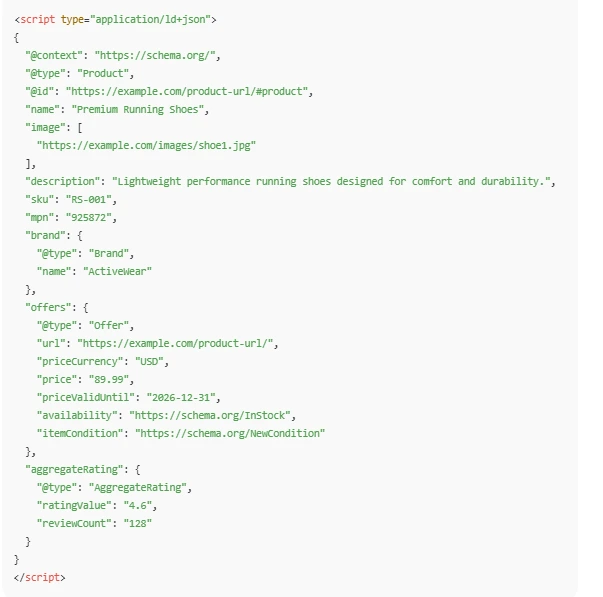
Product schema tells search engines details about your product: name, description, SKU, price, availability, and offers. Proper product markup makes your product pages eligible for rich snippets.
Example snippet for a product (simplified):
FAQ Schema (Question & Answer)
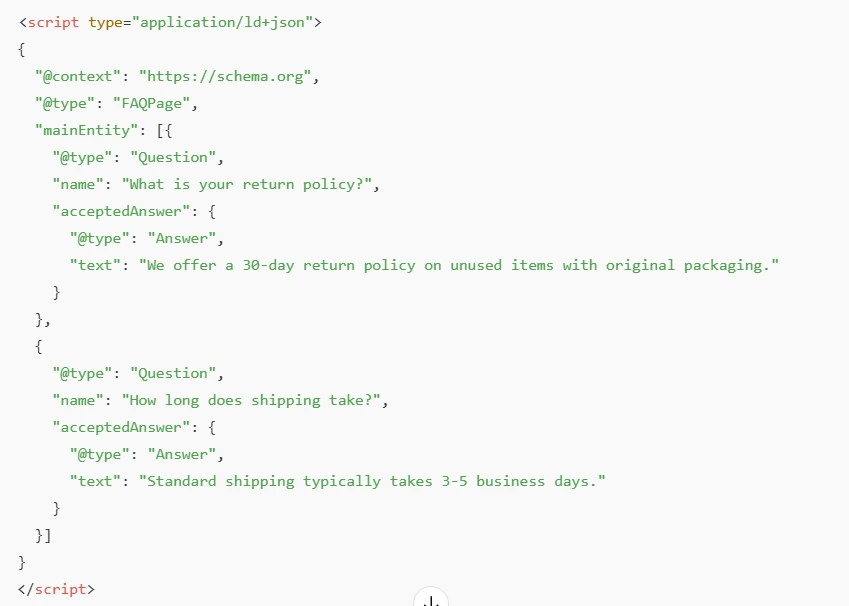
Structured FAQ markup can enhance your page with expandable questions directly in SERPs. This helps capture attention and answers common user questions before they click. Use this only if the FAQs are visible on the page .
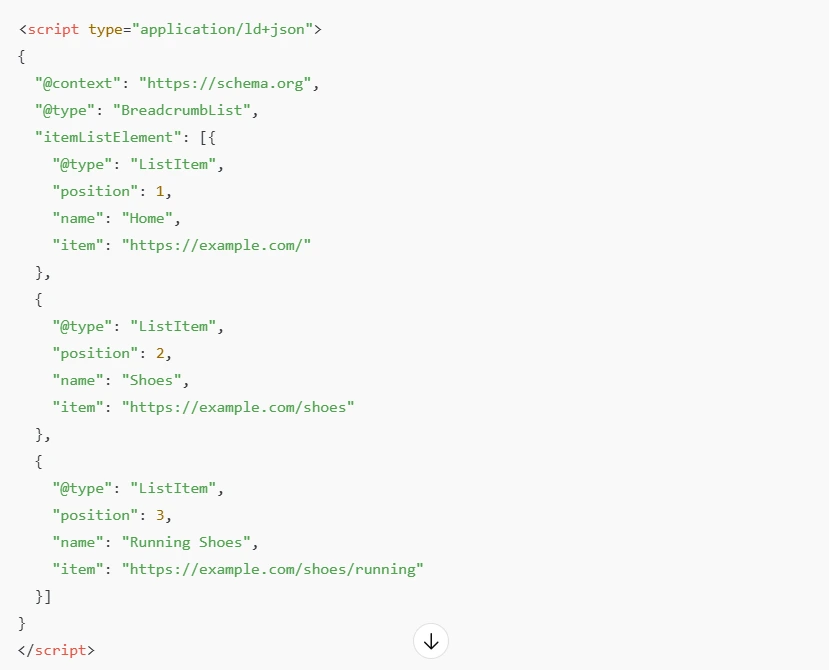
Breadcrumb Schema
This tells search engines how your site hierarchy is structured, offering enhanced navigation visuals in search results, especially for category and collection pages. This improves search result navigation display and hierarchy clarity.
Review/Rating Schema
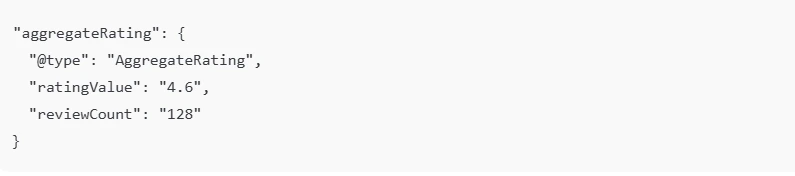
Including real user ratings and review counts in your structured data can help trigger rich review snippets under product listings. Review and rating schema Review and rating schema should be nested inside your Product schema, not separate.
Example snippet inside a Product object:
If adding a full Review object:
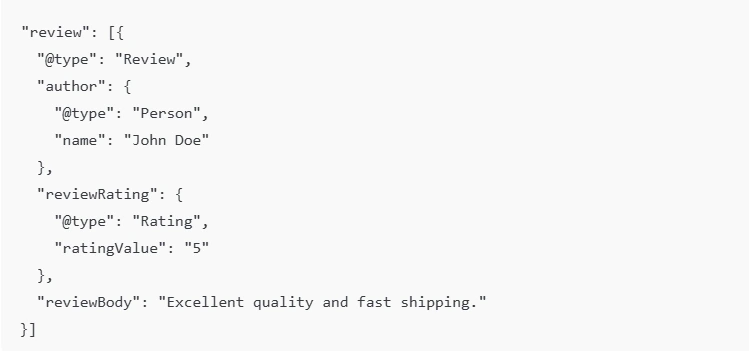
Important: Reviews must be genuine and visible on the page.
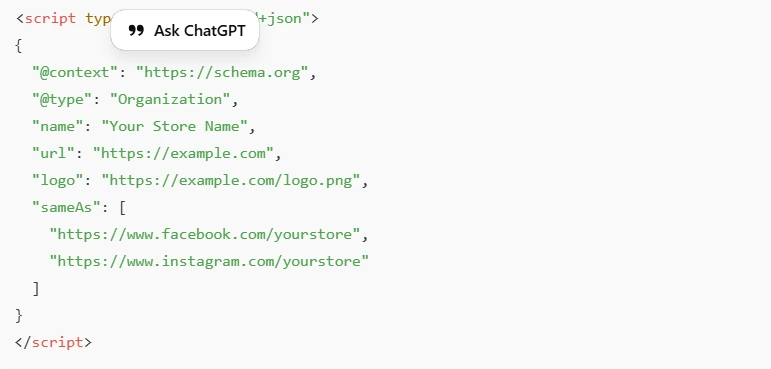
Organization Schema
If you have a physical store or local presence, structured data helps search engines verify and display your business information more prominently. Best added globally (header or Script Manager).
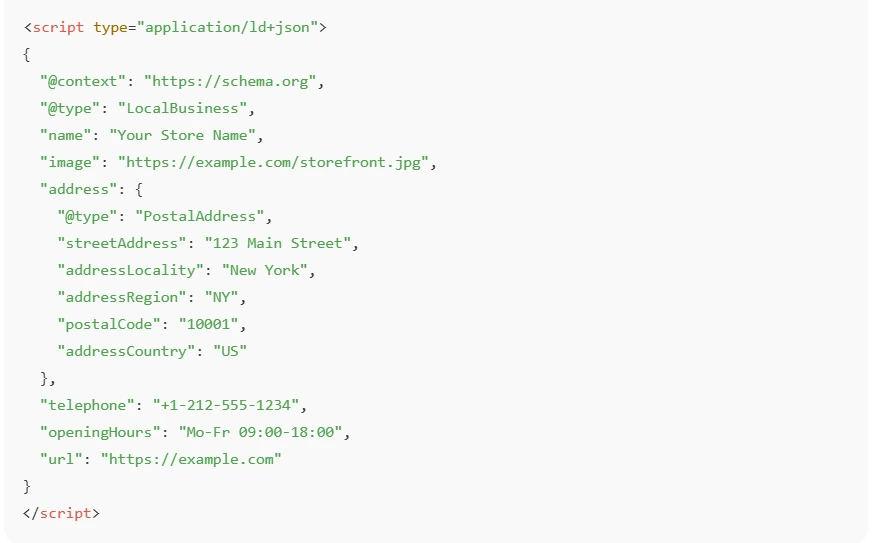
LocalBusiness Schema
Use this only if you operate a physical location.
BigCommerce Schema Markup: Step-by-Step Implementation
Implementing BigCommerce Schema Markup properly is where most stores either gain a competitive edge, or quietly miss an opportunity.
Many merchants assume the schema is “already handled” by the theme. In reality, default markup is often incomplete, static, or missing high-impact types like FAQ and enhanced Product schema.
Below is a practical, expert-level framework to implement BigCommerce structured data correctly, safely, and at scale.
Step 1: Audit Existing Structured Data (Before Choosing a Method)
Before deciding how to implement BigCommerce Schema Markup , first check what already exists.
Most BigCommerce themes include basic Product schema. If you add new markup without auditing, you risk:
- Duplicate Product objects
- Conflicting Offer data
- Invalid nesting
- Loss of rich result eligibility
Use:
- Google Rich Results Test
- Google Search Console
Only after auditing should you decide on your implementation method.
Step 2: Choose an Implementation method in BigCommerce
Method 1: Use Built-In Theme Structured Data
Most BigCommerce themes include basic Product schema.
Pros:
- No coding required
- Automatically pulls product data
Cons:
- Often incomplete
- May lack advanced fields (brand, GTIN, aggregateRating)
- No FAQ or custom schema
Before adding new markup, always audit existing schema using Google’s Rich Results Test.
Method 2: Manual JSON-LD Implementation (Recommended for Control)
Google recommends JSON-LD format because it separates structured data from HTML and is easier to maintain.
You can add JSON-LD in:
- Theme files (e.g., product.html)
- Global header/footer
- Script manager
Step 3: Add JSON-LD to Your BigCommerce Theme
In BigCommerce, you can add JSON-LD in:
- Theme Files (Stencil templates)
- Typically inside product.html
- Script Manager (for global schema like Organization)
- Page-specific template files
This ensures your BigCommerce JSON-LD implementation automatically updates when:
- Price changes
- Availability changes
- Variants change
- Currency switches
Hardcoding the schema is risky. Dynamic markup is essential for e-commerce accuracy.
Step 4: Implement High-Impact Schema Types
To maximize SEO and AI visibility, prioritize:
1. Product Schema for BigCommerce
This is mandatory for e-commerce visibility.
Include:
- name
- image
- description
- SKU
- brand
- offers
- aggregateRating (if applicable)
2. FAQ Schema BigCommerce
FAQ schema can be added on:
- Product pages
- Buying guides
- Category pages
3. Breadcrumb Schema
improves SERP navigation display and helps search engines understand your site hierarchy.
BigCommerce themes sometimes include it; verify before adding.
Step 5: Make Schema Dynamic (Critical for E-commerce)
Advanced stores need dynamic JSON-LD.
Static or hardcoded schema can violate Google’s structured data guidelines if it does not reflect live pricing, stock, or variant changes. For multi-currency stores, headless implementations, or large SKU catalogs, dynamic schema tied directly to BigCommerce variables is essential to maintain compliance and avoid structured data suppression.
Static schema fails when:
- Inventory runs out
- Flash sales change prices
- Variants display different pricing
- Multi-currency stores switch markets
Dynamic implementation ensures your structured data always matches visible content, a key Google requirement.
Step 6: Test & Validate Your Schema
Implementation isn’t complete until you validate it.
Use the Google Rich Results Test to check whether your BigCommerce Schema Markup is eligible for rich results. Test both live URLs and code snippets before publishing.
If you want to automate validation and reduce manual implementation errors, you can automate the validation with BigCommerce schema markup apps like Schema (JSON-LD) App to generate and manage dynamic JSON-LD without editing theme files directly.
After testing, monitor performance and errors inside Google Search Console under the Enhancements section. This helps you detect:
- Missing required fields
- Invalid properties
- Incorrect nesting
- Content mismatches
Fix critical errors immediately. Warnings can be reviewed, but errors will block eligibility.
Best practice: Always test in staging before pushing the schema live.
How Schema Works at a Technical Level
Structured data uses the vocabulary from Schema.org to define exactly what your content represents, such as a Product, FAQ, Brand, or Offer. Each schema type includes specific properties (like price, availability, or rating) that help search engines understand your page without guessing.
Google recommends JSON-LD because it keeps structured data separate from your HTML, making it easier to manage, update, and scale, especially for e-commerce stores.
When Google crawls your page, it reads the JSON-LD code, validates the required fields, and connects the data to its entity systems. If everything is correct, your page becomes eligible for rich results like product snippets, FAQ dropdowns, or enhanced search listings.
Common BigCommerce Schema Issues & Errors
Even technically correct BigCommerce Schema Markup can fail if it conflicts with your page content or duplicates existing markup. Search engines require structured data to be accurate, consistent, and properly formatted.
Here are the most common issues store owners encounter:
1. Duplicate Schema from Multiple Sources
BigCommerce themes often output default Product schema. If you add a BigCommerce Schema App or manually inject JSON-LD without disabling the original markup, you may create duplicate Product objects.
This can confuse search engines and lead to:
- Inconsistent Offer data
- Multiple aggregateRating entries
- Rich result ineligibility
Always audit your page source before adding new structured data.
2. Outdated or Mismatched Values
Google requires structured data to match visible content. If your JSON-LD says:
- Price: $49.99
- But your page shows:
- Price: $59.99
Google may ignore the markup entirely.
This often happens when schema is hardcoded instead of dynamically pulled from product variables. E-commerce stores must ensure pricing, availability, and variant data stay synchronized.
3. Incorrect Nesting of Schema Properties
Structured data follows a strict hierarchy.
For example:
- Offer must be nested inside Product
- aggregateRating must sit under Product
- acceptedAnswer must sit under Question in FAQ schema
Incorrect nesting is one of the most common reasons Product schema fails validation.
4. Missing Required Fields
Every schema type has required properties. Missing fields like offers, price or availability will prevent eligibility for product-rich results.
Fixing these issues strengthens your eligibility for BigCommerce rich snippets and ensures search engines interpret your structured data correctly.
Quick BigCommerce Schema Audit Checklist:
Before considering your schema complete, verify:
- No duplicate Product schema objects
- Offer nested correctly inside Product
- aggregateRating matches visible reviews
- Price and availability match on-page content
- JSON-LD validates in Google Rich Results Test
- No conflict between theme, app, and manual schema
- Required fields are present for eligibility
Measuring Impact & AI Readiness
Once your BigCommerce structured data is live and validated, the next step is measuring real-world impact.
Track performance using Google Search Console under the Enhancements and Performance reports.
Key indicators include:
- Rich result impressions (Product, FAQ, Breadcrumb)
- CTR improvements for transactional queries
- Increase in SERP feature appearances
- Brand entity visibility in AI-generated answers
While schema does not guarantee rankings, improved visibility and enhanced presentation often lead to stronger engagement signals.
For AI readiness, monitor whether:
- Your brand appears in AI summaries
- Product details are accurately reflected in search experiences
- FAQs are surfaced in conversational search queries
High-quality schema improves how your store is understood at the entity level — making it more suitable for AI-driven discovery as search evolves.
How Schema Improves AI-Generated Search Visibility
Modern search is increasingly entity-driven and AI-assisted. Platforms like Google AI Overviews and conversational search interfaces rely heavily on structured data to interpret product attributes, brand entities, pricing, and FAQs.
When your BigCommerce store implements clean, validated JSON-LD:
- Product attributes become machine-readable entities
- Brand and organization data strengthen knowledge graph associations
- FAQs become eligible for answer extraction
- Pricing and availability increase AI confidence in surfacing your product
Structured data does not just enhance search snippets, it improves how AI systems understand and represent your store across evolving search experiences.
Best Practices for BigCommerce Structured Data
To ensure long-term success with BigCommerce SEO schema , follow these expert best practices:
\1. Prioritize JSON-LD
JSON-LD keeps structured data separate from HTML, reducing errors and making maintenance easier. It’s also Google’s recommended format for structured data implementation.
2. Keep Schema Dynamic
Always pull values directly from BigCommerce product variables. This ensures:
- Pricing updates automatically
- Inventory status remains accurate
- Variant changes reflect correctly
- Multi-currency stores stay synchronized
Dynamic schema prevents content mismatches — one of the biggest causes of structured data rejection
3. Validate Regularly
After theme updates, product imports, or app installations, re-test your structured data. Even small template changes can break JSON-LD output.
4. Avoid Redundant Schema Sources
Do not combine:
- Theme schema
- App-generated schema
- Manual JSON-LD
Unless you intentionally disable duplicates. Clean, singular schema output is always safer than layered markup.
When implemented thoughtfully, validated consistently, and kept dynamic, BigCommerce Schema Markup becomes a scalable technical asset, not just a one-time SEO tweak.
Conclusion
BigCommerce schema markup is a foundational element of modern e-commerce SEO and AI visibility. When done right, using JSON-LD and strategic implementation, you unlock powerful search enhancements, increase click-through rates, and help AI systems understand your content.
As search evolves toward entity-based indexing and AI-assisted discovery, structured data shifts from optional enhancement to foundational infrastructure. BigCommerce stores that implement clean, dynamic, and validated schema today position themselves for stronger rich result eligibility, improved AI representation, and long-term search resilience.
FAQs
Does BigCommerce include schema markup by default?
Yes, most BigCommerce themes include basic structured data such as Product and Organization schema. However, this default markup is often limited and may require enhancements to fully qualify for rich results like FAQs, reviews, and advanced product snippets.
Will schema increase my Google rankings?
Schema does not act as a direct ranking factor in Google’s algorithm. However, it improves search appearance, click-through rates, and content clarity, which can indirectly support overall SEO performance.
What tools help test BigCommerce schema?
You can validate your structured data using Google Rich Results Test to check eligibility for rich results. Additionally, Google Search Console provides reports that highlight structured data errors and enhancements.
Is JSON-LD better than Microdata?
Yes, JSON-LD is the recommended format by Google because it keeps structured data separate from HTML markup. It is cleaner, easier to automate, and less prone to breaking during theme updates.
Can I implement schema without coding?
Yes, BigCommerce apps and SEO plugins can automatically generate structured data without manual coding. However, custom JSON-LD implementation offers greater control and flexibility for advanced schema types.
How long before the schema shows rich results?
There is no guaranteed timeframe, as Google decides when to display rich results. It may take days or weeks after crawling and indexing your updated structured data.
Why validate structured data after implementation?
Validation ensures search engines correctly interpret your markup and that there are no critical errors. Regular testing helps maintain eligibility for rich results and prevents visibility loss due to technical issues.