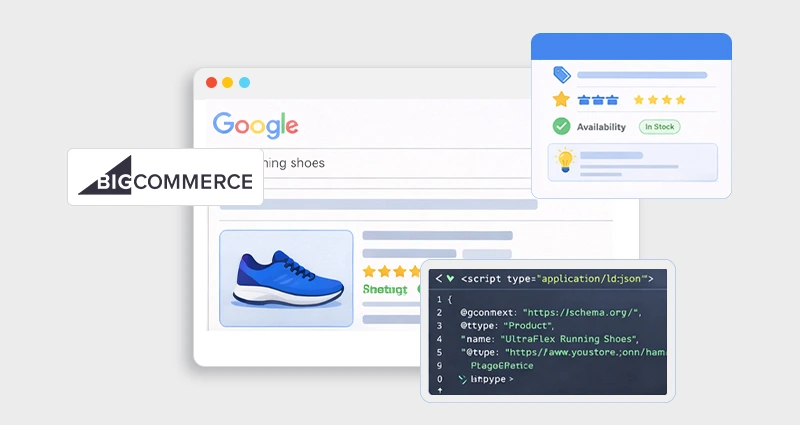

E-commerce SEO isn’t just about ranking anymore; it’s about visibility. If search engines can clearly understand your product data, your listings can qualify for rich results that drive higher clicks and better engagement.
For BigCommerce stores, relying only on the default schema isn’t always enough. Prices change, inventory shifts, and reviews update, and your structured data should reflect that automatically.
In this guide, you’ll learn how to implement Dynamic JSON-LD Schema in BigCommerce directly within your theme, using real variables and production-ready methods to keep your schema accurate and scalable.
Why Dynamic JSON-LD Schema in BigCommerce Matters
If you’re serious about e-commerce SEO, static schema isn’t enough.
Modern search engines, especially Google, prefer JSON-LD for structured data markup because it separates data from your HTML and is easier to process and maintain. According to Google, JSON-LD is the recommended format for implementing structured data.
BigCommerce already outputs some built-in schema, but here’s the problem: It’s often incomplete, rigid, or missing key properties required for rich results.
If you want full control over:
- Product rich snippets
- Availability updates
- Price changes
- Review aggregation
- Variant-level schema
- Custom fields
Then you need a Dynamic JSON-LD Schema in BigCommerce, implemented directly in your theme.
This guide will walk you through exactly how to add dynamic JSON-LD to BigCommerce properly, using real theme variables and production-safe techniques.
What Is Dynamic JSON-LD Schema?
Before implementing anything, it’s important to understand what “dynamic” actually means in the context of structured data.
The static schema is hardcoded JSON-LD. The values are manually written into the script, meaning if your product price changes, inventory updates, or reviews increase, the schema does not update automatically. Someone has to edit it.
Dynamic JSON-LD schema , on the other hand, pulls live product data directly from BigCommerce theme variables. Instead of hardcoding a price like “price”: “49.99”, you reference something like {{product.price}}. When the price updates in your store, the schema updates automatically.
In a real e-commerce environment, that difference is critical.
Dynamic schema markup in BigCommerce automatically reflects:
- Price changes (sales, discounts, currency switches)
- Inventory updates (InStock / OutOfStock)
- Review count and rating changes
- Variant-level pricing and availability
- SEO title and product description edits
This keeps your structured data aligned with visible page content, which is essential for compliance with structured data guidelines.
When implemented correctly, dynamic JSON-LD supports:
- Stronger BigCommerce rich snippets optimization
- Cleaner, centralized, structured data markup
- Greater eligibility for enhanced search features
- In short, dynamic schema scales with your catalog. Static schema breaks as your store grows.
How BigCommerce Handles Structured Data by Default
BigCommerce’s Stencil framework includes built-in product schema out of the box. This is helpful for beginners, but it’s not always sufficient for advanced SEO needs.
The default implementation typically includes basic Product and Offer properties. However, it often lacks:
Full recommended fields for rich results
Advanced variant handling
Custom product attributes
Flexible control over schema structure
Another issue developers frequently encounter is duplication. If you add custom JSON-LD without checking what the theme already outputs, you may end up with two Product schemas on the same page. That can confuse search engines and lead to structured data errors.
Before implementing BigCommerce schema markup JSON-LD manually, always audit your current setup:
- View page source and search for application/ld+json.
- Identify whether a Product schema already exists.
- Test the URL in Google’s Rich Results Test tool.
- Review the Enhancements report in Google Search Console.
If you prefer generating validated structured data before adding it to your theme, you can use a dedicated BigCommerce schema app to create properly formatted JSON-LD that aligns with Google’s requirements before deployment
Duplicate or conflicting schema markup is one of the most common causes of invalid structured data and rich result ineligibility.
Understanding what BigCommerce outputs by default allows you to extend or replace it strategically, instead of layering new schema on top of existing markup and creating problems.
Step-by-Step: How to Add Dynamic JSON-LD Schema in BigCommerce
Now let’s implement it the right way.
Step 1: Access Your Theme Files
Go to:
Storefront → My Themes → Edit Code.
We’ll modify:

Or inject into:

Depending on whether you want page-specific or global schema.
For BigCommerce JSON-LD schema for product pages , product-view.html is ideal.
Step 2: Add Dynamic Product JSON-LD
Below is a production-ready example using Stencil Handlebars variables.
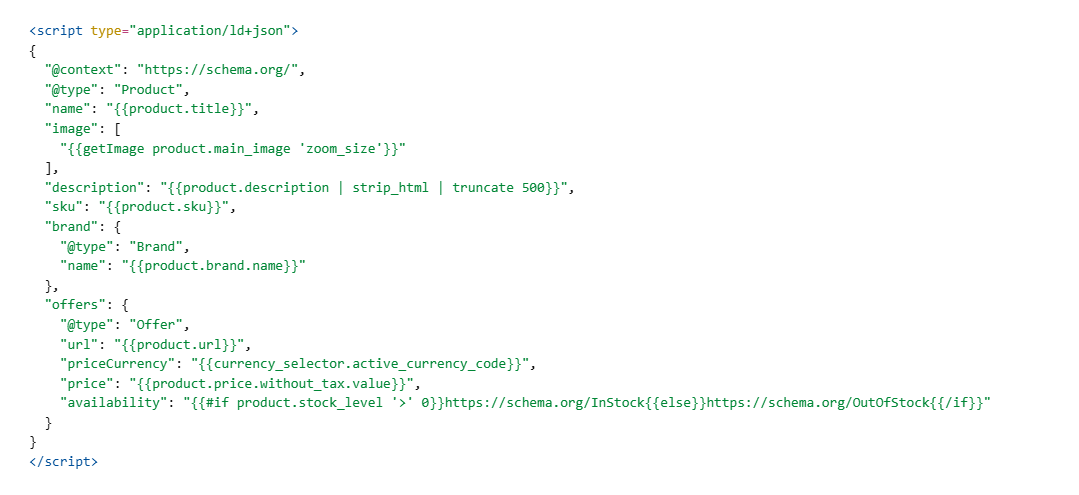
Why This Is Dynamic:
- {{product.price}} updates automatically.
- stock_level reflects real inventory.
- Image references use BigCommerce CDN.
- Currency adapts to store settings.
This is a proper BigCommerce structured data implementation.
Step 3: Add Review & Aggregate Rating (If Available)
If your store collects reviews:
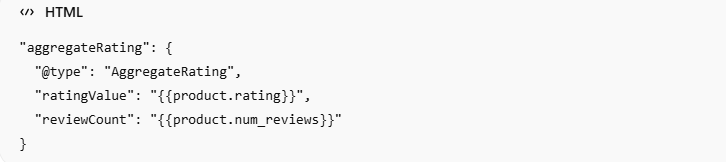
Only include this if real review data exists. Fake ratings violate Google’s policies.
Step 4: Handle Variants Properly
If your product has variants (size, color, etc.), dynamic schema markup in BigCommerce should reflect them.
For advanced setups, you can loop through variants.
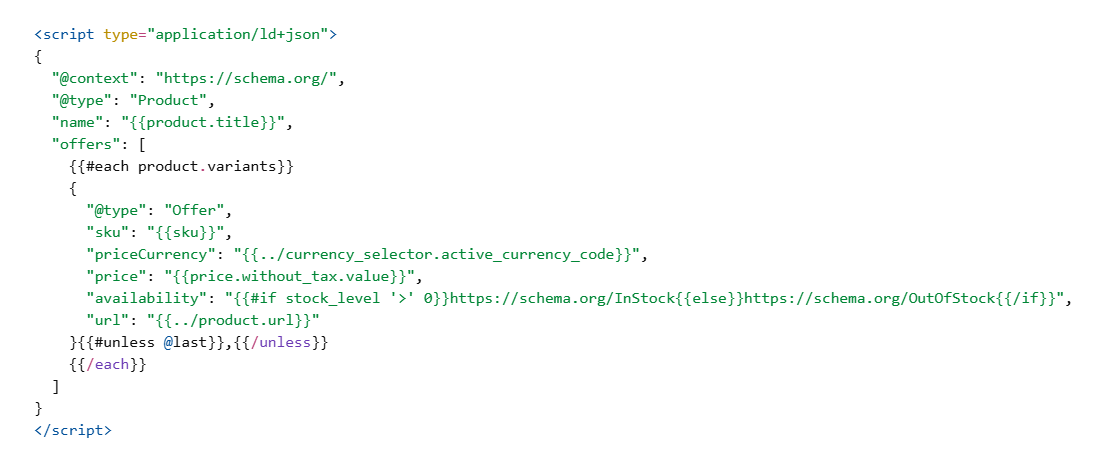
This ensures Google sees each purchasable option.
When to Use AggregateOffer Instead of Multiple Offers
If your product has many variants with different prices, using AggregateOffer may be cleaner than outputting dozens of individual Offer objects.
Example:
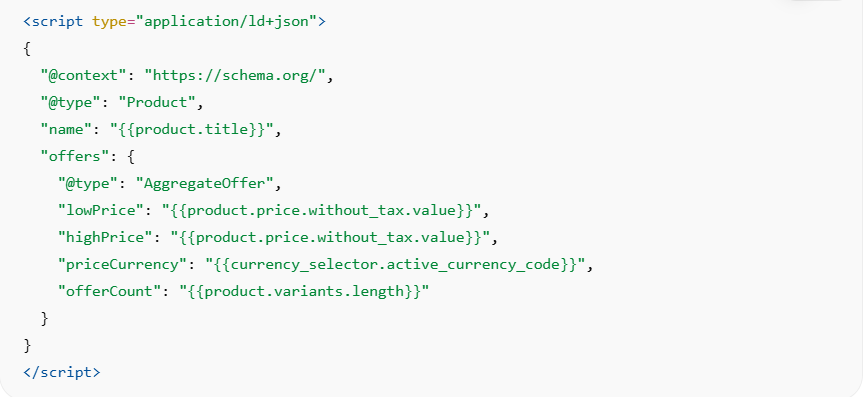
Use AggregateOffer when:
- Variants share the same product page
- Price ranges matter more than individual SKU visibility
- You want cleaner structured data output
This prevents schema bloat and keeps your markup lightweight.
Advanced: BigCommerce Headless Schema Implementation
If you’re running BigCommerce in a headless setup, using frameworks like Next.js, Gatsby, or a fully custom frontend, your structured data workflow changes significantly.
In a headless architecture, your frontend is decoupled from BigCommerce’s Stencil theme. That means you won’t rely on Handlebars variables. Instead, you’ll fetch product data through BigCommerce APIs (Storefront GraphQL or REST), transform that data into JSON-LD, and inject it into your rendered pages.
The critical rule here is this:
Search engines must see the JSON-LD in the initial HTML response.
That means:
Build your schema object inside your React component (or server function).
Inject it into the <Head> section of the page.
Ensure it is rendered via Server-Side Rendering (SSR) or Static Site Generation (SSG).
If your schema is generated only after client-side hydration (pure CSR), it may not always be reliably processed. While Google can execute JavaScript, relying entirely on client-side rendering introduces unnecessary risk.
A simplified example in a Next.js environment might look like this:
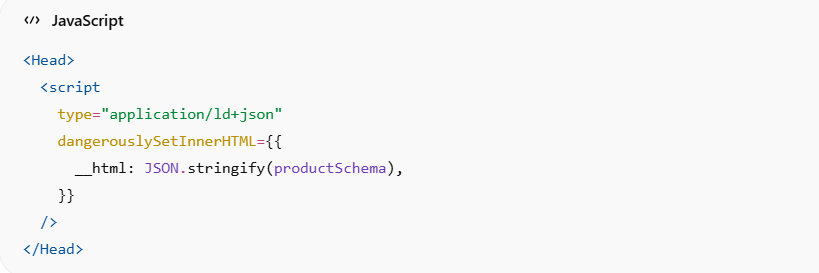
The key is that productSchema is built from API-fetched data and rendered before the page is fully delivered.
In a headless BigCommerce schema implementation, you gain flexibility, but you also assume responsibility for:
- Maintaining schema accuracy
- Handling variant-level offers correctly
- Preventing duplicate schema injection
- Keeping price and availability synced
Headless gives power. It also removes guardrails.
Testing & Validation
After you implement Dynamic JSON-LD Schema in BigCommerce, validation is not optional, it’s mandatory.
Here’s a practical workflow I recommend for production stores:
First, test the URL using Google’s Rich Results Test . This confirms eligibility for enhanced search features and highlights missing required properties.
Second, validate your properties against Schema.org to ensure your structure follows proper vocabulary standards.
Third, monitor the Enhancements report inside Google Search Console. This is where Google reports detected errors, warnings, and valid items across your site.
Finally, track performance metrics:
- Impressions for product-rich results
- Click-through rate changes
- Error reduction over time
It’s important to understand something clearly:
Schema markup does not guarantee rich snippets.
However, without a correct schema, you are not even eligible.
Structured data increases eligibility, performance depends on competition, authority, and compliance.
Where to Place JSON-LD Script in BigCommerce Theme
For standard stencil themes, placement matters more than most developers realize.
For optimal BigCommerce SEO schema markup performance:
- Place JSON-LD inside the <head> section whenever possible.
- Ensure it renders server-side during initial page load.
- Avoid injecting schema via AJAX or delayed scripts.
- Never hide schema inside conditionally blocked containers.
Technically, JSON-LD can appear anywhere in the HTML. However, placing it inside <head> keeps it organized, predictable, and easier to audit.
For a product-specific schema, product-view.html is typically the cleanest location. For the global schema (Organization, Website, Breadcrumb), base.html is more appropriate.
The most important principle is crawlability.
Your structured data should:
- Appear in the raw HTML source
- Load without user interaction
- Not depend on scroll, click, or dynamic triggers
If a search engine crawler cannot see it immediately, it cannot reliably process it.
Does Dynamic JSON-LD Affect Page Speed?
In most cases, Dynamic JSON-LD has minimal to no impact on page speed when implemented correctly. JSON-LD is simply a small script block containing structured data, it does not execute visual logic, manipulate the DOM, or block rendering like large JavaScript libraries can.
However, poor implementation can create unnecessary overhead. For example:
- Outputting dozens of variant-level Offer objects for products with many SKUs can significantly increase HTML size.
- Injecting duplicate schema scripts increases page weight and can cause validation conflicts.
- Including excessive, unused properties bloats markup without adding SEO value.
Because JSON-LD is not render-blocking, placing it inside the
typically has negligible performance impact compared to heavy JS bundles, tracking scripts, or third-party widgets.From an SEO perspective, clean structured data can actually improve crawl clarity. When search engines can quickly interpret product information from structured markup, it reduces ambiguity without negatively affecting Core Web Vitals.
The key is balance: keep your schema accurate, lean, and purposeful.
Common Implementation Mistakes
Over the years, these are the issues I’ve seen break structured data most frequently in BigCommerce stores.
Duplicate Product Schema
This happens when developers add custom JSON-LD without disabling or removing BigCommerce’s default product schema. The result? Two Product objects on the same page.
Search engines may ignore both or flag errors.
Always inspect the page source before adding a custom schema.
Incorrect Availability Format
Availability must use the full schema URL:
https://schema.org/InStock.
Using just “InStock” is invalid and may trigger errors in structured data reports.
Currency Mismatch
If your visible price displays in USD but your JSON-LD outputs EUR, that inconsistency can invalidate your markup.
Your “priceCurrency” must match the currency displayed to users. This becomes especially important for multi-currency stores.
Rendering via AJAX Only
If JSON-LD loads after the page renders, especially through AJAX calls, it may not be reliably processed.
While modern search engines can render JavaScript, delayed structured data introduces risk. Always prefer server-side output when possible.
Including Review Data Without Real Reviews
If your store does not collect reviews, do not fabricate aggregateRating. Search engines have strict policies around misleading structured data.
Only output rating schema when genuine review data exists.
Implementing Dynamic JSON-LD Schema in BigCommerce is not just about adding code, it’s about aligning structured data with real-time product truth. When accuracy, placement, and validation are handled properly, your schema becomes a durable SEO asset instead of a recurring technical issue.
Real-World Implementation Advice (From Production Stores)
From practical experience auditing ecommerce stores, here’s what consistently improves structured data stability:
- Always disable default schema before custom implementation.
- Keep one Product schema per page.
- Match schema values exactly with visible content.
- Avoid marking up hidden or non-indexable products.
- Revalidate schema after theme updates.
Structured data should reflect reality, not marketing intent.
Search engines increasingly validate schema against page content, and mismatches can reduce trust signals.
Comparing Static vs Dynamic Schema in BigCommerce
| Feature | Static JSON-LD | Dynamic JSON-LD |
|---|---|---|
| Updates with price | No | Yes |
| Updates with stock | No | Yes |
| Variant support | Limited | Full |
| Scalable | No | Yes |
| Recommended for ecommerce | No | Yes |
For successful e-commerce stores, Dynamic JSON-LD Schema in BigCommerce is one of the effective solutions for conversion and rankings.
Preparing Your BigCommerce Store for AI-Powered Search
Search platforms are evolving beyond traditional blue links. Structured data now plays a role in:
- AI-driven product recommendations
- Shopping graph inclusion
- Conversational search results
- Knowledge panel integrations
Dynamic JSON-LD ensures your product data is machine-readable, consistent, and ready for emerging search interfaces.
As search engines rely more heavily on structured signals, static schema implementations will fall behind.
Final Thoughts
Adding Dynamic JSON-LD Schema in BigCommerce isn’t just a technical enhancement; it’s foundational ecommerce SEO work.
When implemented properly:
- Your schema updates automatically
- Your rich snippet eligibility improves
- Your structured data remains scalable
- Your store stays compliant with search guidelines
If you’re building a serious e-commerce brand, static schema won’t keep up.
Dynamic implementation inside your BigCommerce theme ensures your structured data evolves alongside your catalog, exactly how modern SEO demands.
FAQs
1. How to add a dynamic JSON-LD schema in BigCommerce?
Edit your Stencil theme files and inject JSON-LD inside product templates using Handlebars variables like {{product.price}}, {{product.sku}}, and stock conditions to ensure real-time structured data updates.
2. Does BigCommerce support structured data markup by default?
Yes, but the built-in schema is basic and may not include full product properties required for rich snippets. Custom dynamic JSON-LD allows deeper control and better optimization.
3. Where should I add the JSON-LD script in the BigCommerce theme?
Add it inside product-view.html for product pages or base.html for the global schema. Ensure it renders server-side and is not blocked by conditional logic.
4. Can I add a dynamic product schema to the BigCommerce theme without apps?
Yes. Developers can directly implement JSON-LD in Stencil templates using built-in product variables. This gives full control and avoids third-party conflicts.
5. What schema type should e-commerce stores use?
For product pages, use Product with Offer and AggregateRating. You can review property requirements on Schema.org.
6. Does JSON-LD improve rankings?
Structured data does not directly increase rankings, but it improves eligibility for rich results, which can improve CTR and visibility.
7. How do I avoid duplicate schema markup?
Check the page source first. If BigCommerce already outputs product schema, disable it before adding custom structured data.
8. Is JSON-LD better than Microdata for BigCommerce?
Yes. JSON-LD is cleaner, easier to maintain, and officially recommended by Google.