
If you run a Wix website, chances are you already answer common customer questions on your pages. But search engines don’t automatically understand that these are structured FAQs. That’s where Wix FAQ schema markup comes in.
By adding Wix FAQ structured data, you give search engines a clear, machine-readable format for your questions and answers. This structured format helps search engines, AI assistants, and voice search platforms understand your content more accurately.
In this guide, you’ll learn how to add FAQ schema in Wix step-by-step and understand best practices to ensure your structured data is implemented correctly.
What Is Wix FAQ Schema?
Wix FAQ schema is a type of structured data that marks up question-and-answer content on a webpage using the FAQPage schema type from Schema.org.
When implemented correctly, this markup tells search engines:
- These are questions users ask
- These are the answers provided on the page
- The content should be interpreted as FAQ structured data
The most widely used format for implementing this is JSON-LD, which is recommended by Google and other search engines.
In simple terms, Wix FAQ schema markup converts your visible FAQ section into structured data that search engines can read easily. If you’re new to structured data, it’s important to understand Wix schema markup first before implementing advanced schema types on your store.
Example:
A normal FAQ on a page might look like:
Q: How do I add schema markup in Wix?
A: You can add JSON-LD schema using custom code in Wix.
With Wix structured data FAQ, the same content is also added behind the scenes in a structured format so search engines understand it instantly.
Does FAQ Schema Still Work in SEO?
Yes, FAQ schema still works in SEO, but its role has shifted from generating rich snippets to helping search engines and AI systems better understand structured question-and-answer content.
This is an important question because Google changed how FAQ rich snippets appear in search results.
In August 2023, Google limited the display of FAQ rich results mostly to authoritative government and health websites. As a result, many regular websites no longer see expandable FAQ dropdowns in Google search results. However, the FAQ schema is still valuable for several reasons:
1. It Helps Search Engines Understand Content:
Structured data organizes your page into clear question-answer pairs, making it easier for search engines to interpret the topic and intent of the page.
2. AI Search Platforms Use Structured FAQs:
AI-powered search systems and assistants often extract answers directly from structured FAQ content because it is easier to process.
3. Other Search Engines Still Use FAQ Rich Results:
Search engines like Bing, DuckDuckGo, and voice assistants may still display FAQ rich results.
4. It Improves Content Structure:
The FAQ schema provides a structured format that aligns with how users search, by asking questions.
In short,Wix FAQ schema markup is no longer just about rich snippets, it’s about improving content understanding across search engines and AI platforms.
Benefits of Adding FAQ Schema to Your Wix Website
Adding schema markup for Wix FAQ provides several practical SEO advantages that improve how search engines interpret your content and how users interact with your pages.
Better Content Understanding
With Wix FAQ schema markup, search engines can clearly identify the questions, answers, and their relationship on your page. This structured format helps search engines understand the context and meaning of your content more accurately.
Increased AI Visibility
Many modern AI-powered search systems and voice assistants rely on structured data to extract clear answers. Implementing Wix structured data FAQ makes it easier for AI tools to recognize and reference your content.
Improved User Experience
An FAQ section helps visitors quickly find answers to common questions without scrolling through long content. This improves readability, reduces confusion, and helps users get the information they need faster.
Potential Rich Snippets
Although FAQ rich snippets are more limited today, properly implemented Wix FAQ rich snippets can still appear in some search results or on other search engines that support FAQ structured data.
Requirements Before Adding FAQ Schema
Before implementing the Wix FAQPage schema, it’s important to ensure your page follows structured data guidelines so search engines can process the markup correctly.
The FAQ Must Be Visible on the Page
The questions and answers included in your Wix FAQ schema markup must also be visible to users on the page. Adding schema for hidden content can be considered misleading and may violate search engine guidelines.
Questions Should Be Genuine
Your FAQ questions should reflect real queries that users might ask about the topic. Avoid keyword stuffing or unnatural phrasing, and focus on providing helpful, informative answers.
Avoid Promotional Content
FAQ answers should provide clear and helpful explanations rather than marketing messages. Structured data is meant to answer user questions, so overly promotional or sales-focused responses should be avoided.
Keep FAQs Relevant
Each page should include FAQs that are directly related to the page’s topic. Avoid repeating the same questions across multiple pages, as unique FAQs improve relevance and help search engines better understand each page.
Here is a revised version of your section that smoothly introduces only the manual method while keeping it natural and informative:
How to Add FAQ Schema in Wix (Step-by-Step)
Adding Wix FAQ schema markup to your website involves implementing structured data that helps search engines recognize the question-and-answer content on your page. The most common and recommended approach is using JSON-LD structured data, which allows you to define FAQ content in a format search engines can easily understand.
In Wix, you can add Wix FAQ structured data by inserting JSON-LD schema through the Custom Code settings. This method gives you full control over your schema markup and allows you to apply it to specific pages where your FAQ content appears.
Below is a step-by-step guide on how to add FAQ schema in Wix manually using JSON-LD.
Add Wix JSON-LD FAQ Schema Manually
This method gives you full control over your Wix FAQ structured data and is the preferred approach for many SEO professionals because it allows you to customize schema markup precisely for each page.
Step 1: Create Your FAQ Section
Start by adding an FAQ section directly on the page where the questions appear. The FAQ content must be visible to users, because search engines require the structured data to match the content displayed on the page.
Example:
Question: What is Wix schema markup?
Answer: Wix schema markup is structured data that helps search engines understand website content and context more clearly.
Your FAQ section can be placed near the bottom of the page or within a dedicated FAQ block, but it should be easy for visitors to read and navigate.
Step 2: Generate JSON-LD FAQ Schema
Once the FAQ section is created, you need to convert the questions and answers into the Wix JSON-LD FAQ schema format.
Here is a simple example of FAQPage schema markup:
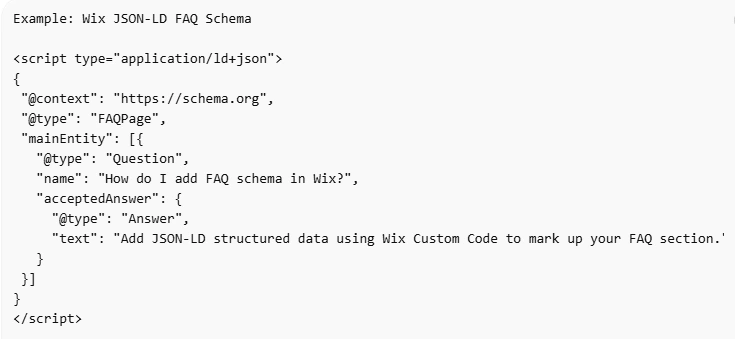
This code defines a Wix FAQPage schema with two questions and answers. Each question is marked as a Question entity, and the corresponding response is defined inside the acceptedAnswer property.
You can add multiple questions within the mainEntity array depending on how many FAQs appear on your page.
Step 3: Add the Code in Wix
After generating the Wix FAQ schema markup, the next step is adding the code to your site.
Follow these steps:
- Open your Wix Dashboard
- Go to Settings
- Select Custom Code
- Click Add Custom Code
- Paste your JSON-LD FAQ schema
- Choose the specific page where the FAQ exists
The script can usually be added to the head section, however, Wix also allows placement in the body depending on your setup.
Once the code is published, search engines will be able to crawl and process your Wix structured data FAQ markup during the next indexing cycle.
If you manage many pages, manually adding JSON-LD for every FAQ can become time-consuming. In that case, using a Wix Schema App can help automate FAQ schema generation and apply structured data across multiple pages.
How to Validate Wix FAQ Schema
After adding your Wix FAQ schema markup, it’s important to test the implementation to ensure search engines can read it correctly.
Use Google Rich Results Test
The Google Rich Results Test is one of the most reliable tools for validating FAQ schema markup in Wix.
Steps to Test Your Schema
- Copy the URL of the page containing the FAQ
- Open the Google Rich Results Test tool
- Paste the page URL
- Run the analysis
The tool will display important information such as:
- Detected structured data types
- Any errors in the schema
- Warnings that may affect eligibility for rich results
Fixing errors early ensures your Wix structured data is interpreted correctly by search engines.
Use Schema Validator
Another useful option is the Schema.org validator, which focuses specifically on checking the formatting of your JSON-LD schema.
This tool helps confirm that your Wix FAQPage schema structure follows the correct syntax and schema vocabulary.
Validation is an important step because even small formatting issues can prevent search engines from processing your structured data.
Best Practices for Wix FAQ Structured Data
Even though adding Wix FAQ schema markup is technically simple, following best practices can significantly improve its effectiveness:
Use 3–5 Important Questions
Most pages benefit from three to five well-chosen FAQs that address the most common user questions. Focus on real queries users ask rather than creating questions solely for keywords.
Keep Answers Clear and Informative
Answers should provide helpful explanations rather than short responses like “Contact support.” Detailed answers improve user experience and help search engines understand the topic better.
Match Schema With Page Content
The questions and answers in your Wix structured data FAQ schema must exactly match the visible content on the page. Any mismatch can reduce trust or cause validation issues.
Avoid Duplicate FAQs Across Pages
Using the same FAQ schema on multiple pages may dilute relevance. Instead, tailor each FAQ section to the topic of that specific page.
Keep FAQs Updated
If product information, services, or policies change, update both the page content and the FAQ schema markup Wix implementation to keep everything accurate.
Example: Wix FAQ Schema Structure
Below is a simplified overview of the FAQPage schema structure used in Wix JSON-LD markup.
Best Practices for Wix FAQ Structured Data
| Property | Purpose |
|---|---|
| @context | Defines schema vocabulary |
| @type | Identifies schema type (FAQPage) |
| mainEntity | List of questions |
| Question | Individual question |
| acceptedAnswer | The answer object |
This structure ensures that search engines can clearly interpret your Wix FAQ structured data and understand the relationship between questions and answers.
Common Mistakes When Adding Wix FAQ Schema
Even small implementation mistakes can prevent your Wix FAQ schema markup from working properly.
Adding Schema Without Visible FAQs
Search engines require that all schema content match the visible page content. If the FAQ does not appear on the page itself, the markup may be ignored or flagged as misleading.
Overloading Pages With Too Many FAQs
Adding a large number of FAQs can make pages look cluttered and may reduce the usefulness of the content for users. It is better to focus on the most important and high-value questions instead.
Copy-Pasting the Same Schema Across Pages
Every page should have unique FAQs relevant to its topic. Repeating an identical schema across multiple pages can weaken topical relevance.
Using FAQ Schema for Promotional Content
The FAQ schema should answer genuine user questions. Using it purely for promotional messaging can reduce credibility and violate structured data guidelines.
Conclusion
Adding Wix FAQ schema markup is one of the simplest ways to structure your content for search engines and AI systems.
While FAQ rich snippets are now limited in Google, the structured format still improves how search engines understand your content and how AI platforms extract answers. Implementing Wix structured data FAQ ensures your question-and-answer content is clearly organized, machine-readable, and ready for modern search experiences.
By creating useful FAQs, implementing Wix JSON-LD FAQ schema, and validating your markup, you can build a stronger technical SEO foundation for your Wix website.
FAQs
What is Wix FAQ schema markup?
Wix FAQ schema markup is structured data that identifies question-and-answer content on a webpage using the FAQPage schema type from Schema.org. It helps search engines understand that the content is an FAQ section and interpret the relationship between questions and answers more clearly.
How do I add a FAQ schema in Wix?
You can add FAQ schema in Wix by inserting JSON-LD structured data through Wix Custom Code settings. Another option is using a Wix Schema App, which automatically generates and applies the schema markup without manual coding.
Does Wix support structured data?
Yes, Wix supports structured data implementation through custom code and schema apps. You can add markup such as FAQPage schema, product schema, organization schema, and article schema to help search engines better understand your content.
Will the FAQ schema create rich snippets in Google?
Google limited FAQ rich results in 2023, and they now appear mostly for authoritative government and health websites. However, search engines still process FAQ schema to understand page content and structure.
How many FAQs should I include?
Most pages work best with 3–6 well-written FAQs that address the most common user questions. Focus on quality and relevance rather than adding too many questions.
What format should the Wix FAQ schema use?
The recommended format is JSON-LD, which is the preferred structured data format supported by major search engines because it is easy to implement and maintain.
Can I add the FAQ schema to any Wix page?
Yes, you can add FAQ schema markup to most Wix pages, including blog posts, service pages, and landing pages, as long as the FAQ content is visible on the page.
How long does it take for the schema to work?
Search engines usually take a few days to several weeks to crawl and process newly added schema markup, depending on how frequently the page is indexed.