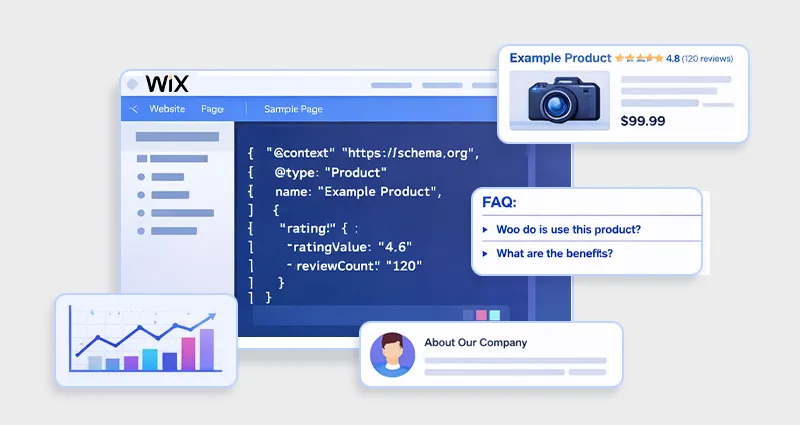

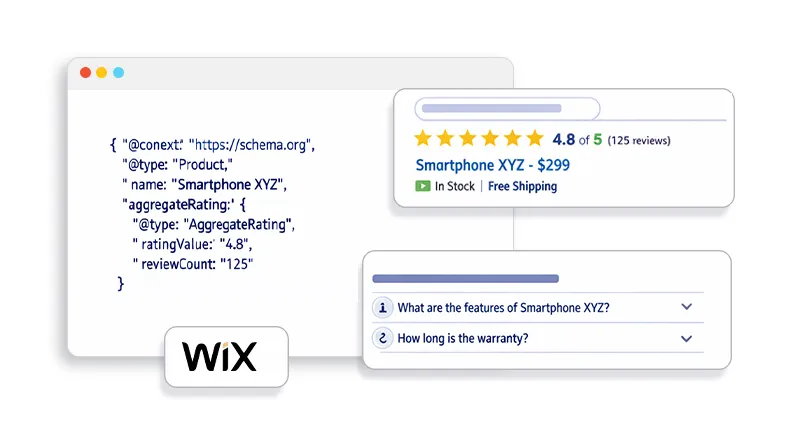
Search results today look very different from the simple list of blue links they once were. You’ll often see listings that include star ratings, product prices, FAQs, images, or other extra details that help users understand a page before they even click it. These enhanced listings, known as rich snippets or rich results, stand out visually and often attract significantly more attention than standard search results.
For website owners, this visibility can make a real difference. If you run a Wix site, learning how to generate Wix rich snippets can help your pages appear more informative and competitive in search results. The key is schema markup, a structured data format that helps search engines interpret your content more clearly. When implemented correctly, it allows search engines to display additional information about your pages, improving both visibility and user engagement.
What Are Wix Rich Snippets?
Wix rich snippets are enhanced search results that show additional information from your Wix pages, such as ratings, prices, FAQs, or images, directly in search listings. These extra details make your result more informative and visually prominent compared to standard search results.
Wix rich snippets are enhanced search results that display extra information, such as:
- Star ratings
- Product prices
- FAQs
- Breadcrumbs
- Event details
- Images
These features appear because search engines detect structured data markup on your page.
Structured data is a standardized format used to provide additional information about webpage content. This markup is commonly written using JSON-LD schema, which is the preferred format used by Google and supported by Wix.
When implemented correctly, search engines may transform your normal listing into a Wix rich result, which often leads to improved visibility and higher click-through rates.
Why Wix Rich Snippets Matter for SEO
Adding Wix SEO schema markup is not just about visual enhancements, it directly improves how search engines interpret your website. Here’s why it matters:
Here’s why it matters.
1. Better Search Engine Understanding
Schema markup helps search engines interpret the context of your content.
For example:
| Page Type | Schema Type | Result |
|---|---|---|
| Product page | Product schema | Price and ratings in SERPs |
| Blog post | Article schema | Enhanced article previews |
| FAQ section | FAQ schema | Expandable question answers |
| Local business | LocalBusiness schema | Business information |
Even when a schema does not generate a rich snippet, it still helps search engines better understand your content and improves overall SEO clarity.
2. Higher Click-Through Rates
Listings with extra information attract more attention.
For example:
- Ratings increase trust
- FAQs expand search visibility
- Product data encourages clicks
These enhancements often increase the click-through rate compared to plain search listings.
3. Improved Visibility in Modern Search
Structured data also helps search engines power features such as:
- Google rich results
- AI search summaries
- voice search results
- knowledge panels
This makes structured data for Wix websites a long-term SEO investment.
Understanding Wix Structured Data
Before implementing markup, it’s important to understand how Wix structured data works.
Some schema types are automatically generated by Wix.
For example:
- Wix Stores automatically includes Product structured data
- Business websites can include the Local Business schema
- Blog articles may include Article markup
These automated schemas pull information directly from page content and convert it into structured data that search engines can read.
However, for advanced SEO you may need to in Wix manually.
To fully understand how structured data works, it’s helpful to start by understanding Wix structured data and how search engines interpret it.
Types of Schema Markup That Generate Wix Rich Results
Not every schema type generates rich snippets. Only specific structured data types are eligible for Wix rich results in search engines. Using the right schema helps search engines understand your content and display enhanced search listings.
Product Schema
Product schema is widely used for e-commerce pages. It allows search engines to display product details such as price, availability, ratings, and images directly in search results. This helps users quickly evaluate products before clicking the page.
FAQ Schema
FAQ schema enables search engines to show expandable questions and answers beneath your search result. This can increase visibility in search results and help your page address common user queries directly.
Review Schema
Review schema allows search listings to display star ratings and review counts. These visual indicators build trust and often make listings more attractive to users searching for products or services.
Article Schema
Article schema helps search engines understand blog content by providing information such as the headline, author, publish date, and featured image. This can improve how blog posts appear in search results.
Local Business Schema
The Local Business schema provides structured information about a business, including name, address, contact details, and logo. This helps search engines display accurate business information in search and local listings.
How to Add Schema Markup in Wix (Step-by-Step)
Now, let’s look at how to add a schema in Wix manually.
Wix supports schema using JSON-LD structured data, which is the recommended format by search engines.
Step 1: Generate Your Schema Markup
You can create schema markup using:
- Schema.org templates
- Schema generators
- SEO tools
Example of Wix JSON-LD schemafor an article:
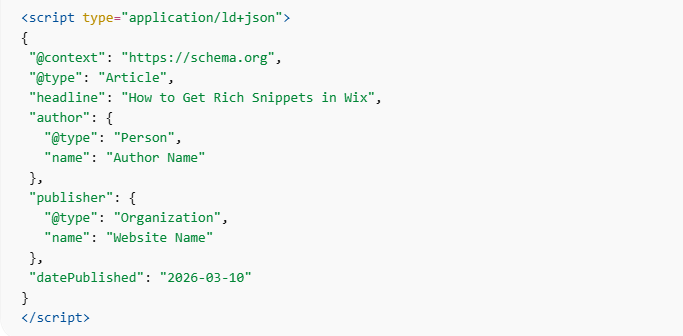
Step 2: Add Schema Markup in Wix
To add schema markup in Wix, follow these steps:
- Open your Wix dashboard
- Go to Page Settings
- Navigate to SEO Settings
- Open Advanced SEO
- Paste your JSON-LD schema code
- Save and publish
Wix requires schema markup to be added in JSON-LD format and recommends keeping the code under 7,000 characters.
Step 3: Test Your Structured Data
Before publishing, validate your schema.
Recommended tools include:
These tools confirm whether your markup is valid and eligible for rich results. For websites with many pages, managing structured data manually can become difficult. In such cases, using a Wix Schema App Wix Schema App can help automate schema generation and keep your markup consistent across the entire site.
Best Practices to Get Wix Rich Snippets
Adding schema markup in Wix increases your eligibility for rich results, but it does not guarantee that search engines will display them. Search engines evaluate several factors before deciding whether to show rich snippets.
Following these best practices can significantly improve your chances of generating Wix rich results.
Match Schema with Visible Content
One of the most important rules of structured data is that the markup must reflect the content visible on the page.
For example, if your schema includes:
- product price
- ratings
- FAQs
those elements must also appear clearly in the page content. If the structured data includes information that users cannot see, search engines may ignore the markup or consider it misleading.
Ensuring that schema accurately represents the page content is essential for maintaining trust and maximizing the chances of rich snippets appearing in search results.
Use the Right Schema Type
Choosing the correct schema type for each page helps search engines interpret your content more accurately.
For example:
- FAQ pages should use FAQ schema
- ecommerce product pages should use Product schema
- blog posts should use Article schema
Using the wrong schema type can confuse search engines and reduce the effectiveness of your Wix SEO schema markup.
Before implementing structured data, it is always best to identify the primary purpose of the page and choose the schema type that best describes that content.
Avoid Duplicate Schema
Another common issue occurs when multiple structured data scripts describe the same content on a page.
Duplicate schema can occur when:
- a Wix feature automatically generates schema
- additional schema is added manually
- additional schema is added manually
When search engines encounter conflicting structured data, they may ignore it entirely.
To avoid this problem, ensure that:
- only one primary schema describes the page
- duplicate or conflicting markup is removed
Maintaining clean and consistent schema markup improves the chances of generating Wix rich snippets.
Keep Schema Updated
Structured data should always reflect the most current information on your page.
For example, if you run an ecommerce store or frequently update content, schema properties may need to change over time.
Important properties to keep updated include:
- product prices
- review ratings
- availability status
- publish or update dates
Outdated schema information can reduce the accuracy of your structured data and may prevent rich results from appearing.
Regularly reviewing and updating schema ensures that search engines receive accurate information about your content.
Common Mistakes That Prevent Wix Rich Snippets
Even when schema markup is implemented, certain mistakes can prevent search engines from displaying Wix rich snippets. Understanding these common errors can help you avoid issues that limit the effectiveness of your structured data.
Incorrect JSON Formatting
Structured data written in JSON-LD format must follow strict syntax rules.
Common formatting errors include:
- missing commas
- incorrect quotation marks
- unclosed brackets
Even small formatting mistakes can break the entire schema script. When this happens, search engines cannot properly read the markup, making it ineligible for rich results.
Using validation tools before publishing is the best way to detect formatting issues.
Schema Not Matching Page Content
Search engines prioritize accuracy and transparency. If the schema markup includes information that does not appear on the page itself, the markup may be ignored.
For example, adding review schema without displaying actual reviews on the page can trigger validation warnings or prevent rich snippets from appearing.
To avoid this issue, always ensure that your structured data mirrors the visible content of the page.
Adding Unsupported Schema Types
Not all schema types lead to rich snippets.
While Schema.org Schema.org defines hundreds of structured data types, search engines only support certain ones for rich results. Implementing unsupported schema types may still help search engines understand your content, but they will not generate visible enhancements in search results.
Therefore, focusing on schema types known to trigger rich results, such as Product, FAQ, Review, and Article schema, is generally more effective.
Not Validating Schema
One of the most overlooked steps in implementing structured data is validation.
Before publishing any Wix JSON-LD schema, it should always be tested using validation tools. These tools check whether the markup is properly formatted and eligible for rich results.
Failing to validate schema can lead to unnoticed errors that prevent search engines from recognizing the structured data altogether.
By regularly testing your markup, you ensure that your Wix structured data remains accurate, functional, and optimized for rich search results.
Conclusion
Getting Wix rich snippets is one of the most effective ways to improve search visibility without changing your rankings.
By implementing Wix schema markup, you help search engines clearly understand your content, which can unlock enhanced listings such as product details, FAQs, and ratings.
Whether you manually add schema markup in Wix using JSON-LD or automate it with a Wix Schema App, structured data remains a critical component of modern SEO.
When combined with quality content and proper validation, Wix structured data Wix structured data can transform ordinary search listings into high-visibility results that attract more clicks and qualified traffic.
FAQs
What are Wix rich snippets?
Wix rich snippets are enhanced search results that display additional information such as ratings, FAQs, images, or product details. They appear when search engines detect structured data markup on a Wix website.
How do I get rich snippets in Wix?
To get Wix rich snippets, add schema markup using JSON-LD structured data through Wix SEO settings or a Wix Schema App. Then validate the markup using Google’s Rich Results Test.
Does Wix automatically add schema markup?
Yes. Some Wix features automatically generate schema markup, such as product pages in Wix Stores or business information added to site settings. However, advanced schema often requires manual implementation.
Which schema types generate rich results?
Common schema types that generate rich snippets include:
- Product
- FAQ
- Review
- Article
- LocalBusiness
- Event
How long does it take for rich snippets to appear?
Rich snippets may appear within days or weeks after Google recrawls and indexes your page. However, adding schema markup does not guarantee not guarantee that rich results will appear.
What format does Wix support for schema markup?
Wix supports JSON-LD structured data, which is the recommended format used by search engines like Google.
Can Wix schema markup improve rankings?
Schema markup does not directly improve rankings. However, it improves search engine understanding and can increase click-through rates through rich snippets
What is the easiest way to implement schema in Wix?
The easiest approach is using a Wix Schema App that automatically generates and manages structured data across your website.