
If you run a BigCommerce store , implementing schema markup , especially in JSON-LD format, isn’t optional anymore; it’s a technical SEO foundation. Schema enables search engines to understand your e-commerce content at a semantic level, resulting in rich snippets in search results, such as prices, reviews, star ratings, and availability, which can significantly increase click-through rates and organic visibility.
While many BigCommerce themes include basic structured data, they often don’t expose enough detail to maximize rich results for products, reviews, FAQs, local business info, and offers. That’s where implementing custom BigCommerce JSON-LD schema markup, tailored to your business and catalog, gives you an edge.
What Is BigCommerce Schema Markup?
Schema markup is a structured data vocabulary maintained by Schema.org It provides a standardized way to label content like products, reviews, FAQs, and business details so search engines can interpret them correctly.
Google officially recommends using JSON-LD format for structured data , which is why most modern e-commerce implementations rely on BigCommerce JSON-LD rather than microdata.
In practical terms, BigCommerce schema markup is a block of JSON code added to your product pages, category pages, blog posts, or homepage that communicates structured information such as:
- Product name
- SKU
- Brand
- Price
- Availability
- Rating
- Review count
This is the foundation of the Product schema BigCommerce implementation.
Core Schema Types Every BigCommerce Store Should Use
| Schema Type | Purpose |
|---|---|
| Product | Identifies product details like name, images, SKU, description. |
| Offer | Shows pricing, currency, availability, essential for rich results. |
| AggregateRating | Displays average rating and review count. |
| Review | Provides detailed user reviews when available. |
| BreadcrumbList | Helps search engines show clearer site context. |
| LocalBusiness | Maps contact and location info for local SEO. |
These schema types form the backbone of BigCommerce structured data , especially for ecommerce product pages.
Does BigCommerce Support Schema Markup?
Yes, BigCommerce includes some built-in structured data in many themes.
However, in real-world audits I’ve conducted, default schema implementations are often:
- Missing important recommended properties
- Not optimized for rich results eligibility
- Limited to basic Product and Breadcrumb data
- Duplicated when apps are installed
So while BigCommerce supports schema markup out of the box, serious stores usually enhance or customize their BigCommerce schema for products to align fully with Google’s structured data guidelines.
Reference: Google Product structured data documentation (Google Search Central).
Why BigCommerce Structured Data Impacts SEO Performance
Structured data does not directly increase rankings. Google clearly states it is not a ranking factor.
However, it can significantly improve search appearance , which improves click-through rates.
For ecommerce stores, this means:
| Without Schema | With Schema |
|---|---|
| Plain blue link | Price displayed |
| No rating shown | Star ratings visible |
| No stock info | “In stock” label |
| Lower CTR | Higher CTR potential |
Google’s documentation confirms that rich results are only shown to pages that properly implement supported structured data types.
This is why Boost SEO with structured data in BigCommerce isn’t just a marketing phrase, it’s a practical visibility strategy.
Step-by Step BigCommerce Schema Markup (JSON-LD) Implementation
Now let’s walk through the practical implementation of BigCommerce schema markup the right way, without breaking your theme, duplicating markup, or corrupting script tags.
One important technical note before we begin:
BigCommerce’s WYSIWYG product and blog editors are not reliable places to paste <script> tags. They often strip or modify JSON-LD code. That’s why proper implementation usually happens at the theme level or through a dedicated app.
Below is a developer-friendly, real-world process for implementing BigCommerce JSON-LD safely and correctly.
Step 1: Identify the Schema Type You Need
Before writing any code, define what you’re marking up.
Different pages require different structured data types:
- Product pages → Product
- Category pages → CollectionPage
- Blog posts → BlogPosting or Article
- Company pages → Organization
- FAQ sections → FAQPage
For most eCommerce stores, the highest priority is Product schema BigCommerce implementation because it enables eligibility for price, availability, and review enhancements in search results.
If you’re using the Cornerstone theme, the basic Product schema is often already present. However, it may be incomplete or missing enhanced properties like aggregateRating or brand.
For custom content (FAQs, how-to guides, comparison pages), you’ll need to create BigCommerce structured data manually.
Step 2: Generate Your JSON-LD Code Properly
Once you know the schema type, generate a clean JSON-LD.
You have three practical options:
1. Manual Creation (Best for Developers)
Use documentation from Schema.org to define required and recommended properties.
This gives you full control over:
- Required attributes
- Nested objects (Offers, Brand, Review)
- Data cleanliness
- Technical SEO compliance
2. Google’s Markup Helper
Google Structured Data Markup Helper allows you to tag elements visually and generate starter code. It’s helpful for non-technical users but often needs cleanup before production use.
3. Third-Party Generators
For stores that prefer automated, dynamically updated markup without manual coding, a dedicated BigCommerce schema app like Schema (JSON-LD) can generate compliant JSON-LD while keeping pricing, availability, and review data in sync automatically. These are especially useful when creating complex schema types like FAQPage or Organization markup.
Example: Clean Product JSON-LD Structure
Here’s what a properly structured Product schema looks like:
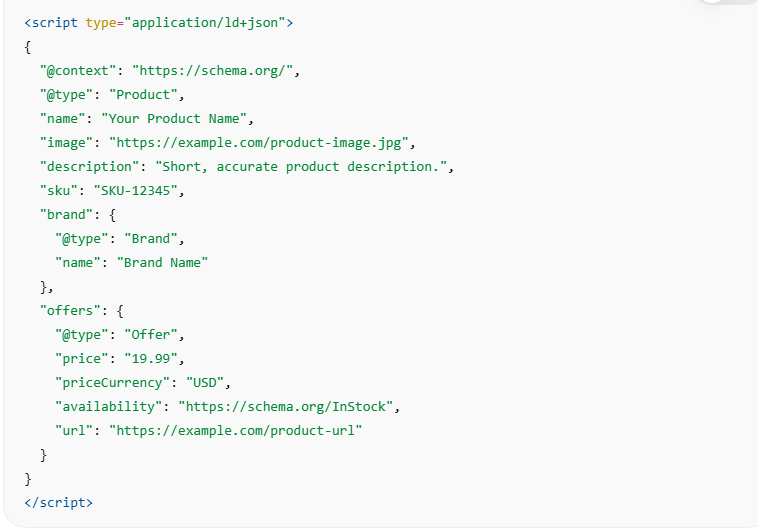
But in BigCommerce, we rarely hardcode values. We use dynamic variables.
Step 3: Validate Before Implementation
Before inserting the code into your store, test it.
Use:
Check for:
- Missing required properties
- Invalid URLs
- Incorrect nesting
- Syntax errors
If it doesn’t validate here, it won’t work in production.
This step prevents future BigCommerce technical SEO issues.
Step 4: Implement JSON-LD in BigCommerce (Correct Method)
This is where most mistakes happen.
Do NOT paste schema into:
- Product description editor
- Blog content editor
- Page builder content blocks
These often strip <script> tags or escape quotation marks.
Instead, use one of the following reliable methods.
Method A: Edit Theme Files (Recommended for Full Control)
Navigate to:
Storefront → My Themes → Advanced → Edit Theme Files
Before editing, download a backup of your theme.
For Product Pages
Open:

Or:

Now insert dynamic JSON-LD using Stencil (Handlebars) variables.
Example: Dynamic Product Schema
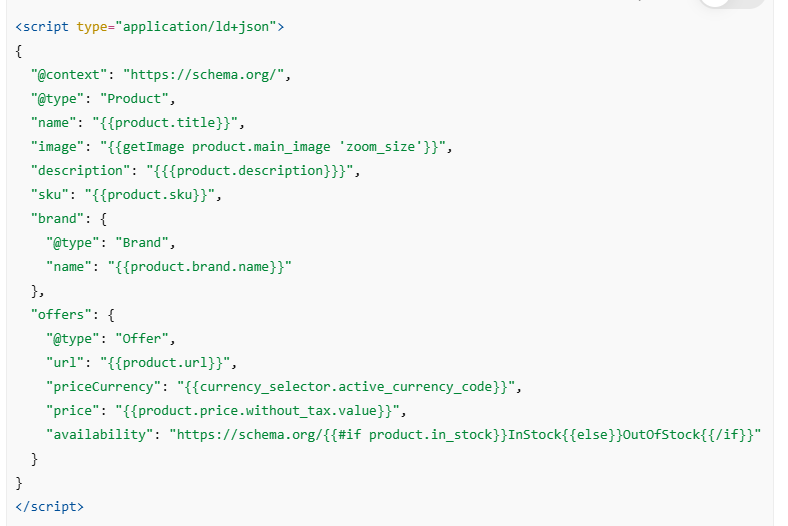
This ensures your BigCommerce schema for products updates automatically when:
- Price changes
- Stock changes
- Product name updates
Place it before the closing </head> tag (recommended by Google), or just before </body>.
Cornerstone Theme Warning
Cornerstone often includes a built-in schema.
Before adding custom markup:
- View page source
- Search for “@type”:”Product”
- Confirm whether the schema already exists
If it does, modify the existing block rather than duplicating it.
A duplicate Product schema can invalidate your BigCommerce rich snippets eligibility.
Step 5: Monitor and Measure Performance
1. Google Rich Results Test
After implementation:
- Run pages through Google Rich Results Test again
- Request indexing in Google Search Console
- Monitor the “Enhancements” section
You should start seeing:
- Product enhancements detected
- Structured data reports
- Fewer schema warnings
Remember: Schema does not guarantee rich snippets. It makes your content eligible.
Rich results depend on:
- Data completeness
- Trust signals
- Review quality
- Search intent
- Google’s algorithmic decisions
2. Google Search Console
In Search Console , view the Product Enhancements and Rich Results reports to monitor live issues and indexation.
Inside Search Console:
- Check “Product Snippets”
- Monitor Enhancements reports
- Track errors over time
Common Structured Data Errors in BigCommerce
Even properly implemented BigCommerce schema markup can run into errors that prevent eligibility for rich results. According to Google’s structured data guidelines, missing required properties or mismatched data can stop rich snippets from appearing.
The most common issues include:
- Missing required fields:
Product schema must include price, priceCurrency, availability, and url inside the Offer object. If any are missing, your page won’t qualify for product rich results.
- Duplicate Product schema:
This often happens when your BigCommerce theme includes default schema and a third-party app adds another JSON-LD block. Multiple “@type”: “Product” entries can confuse search engines.
- Mismatch between schema and visible content:
If your JSON-LD shows a different price, stock status, or review count than what’s visible on the page, Google may ignore the markup.
- Incorrect formatting:
Using currency symbols in the price field, wrong availability values (instead of https://schema.org/InStock), or invalid ISO currency codes can trigger errors.
To identify and fix these issues, test your pages using the Google Rich Results Test and monitor Enhancements reports in Search Console. Clean, accurate, and dynamically updated BigCommerce structured data is essential for reliable rich results eligibility.
Does Schema Improve BigCommerce Rich Snippets?
The honest answer: Schema improves eligibility, not guarantees.
Google clearly explains that structured data makes pages eligible for rich results, but the display depends on quality signals, relevance, and user intent.
When you properly implement JSON-LD in BigCommerce , you enable:
- Product price display in SERPs
- Star ratings
- Stock availability labels
- FAQ dropdowns
- Breadcrumb navigation paths
However, rich results are algorithmically determined. Even perfectly valid BigCommerce schema markup may not show enhanced features if:
- The page lacks authority
- There is insufficient review data
- Competing results are stronger
- Search intent doesn’t favor rich presentation
That said, from practical SEO experience, e-commerce stores with properly implemented structured data consistently outperform those without it in terms of CTR.
Schema improves how your listing looks. Better listings attract more clicks. More clicks improve performance signals over time.
Best Schema Types for BigCommerce Stores
While Product and Offer schemas are essential, advanced e-commerce stores benefit from expanding their structured data strategy.
Here’s where you can go beyond the basics.
FAQPage Schema
If your product pages include visible FAQ sections, implementing FAQPage schema can allow expandable FAQ dropdowns directly in search results.
Important: The FAQs must be visible on the page. Google does not allow hidden or misleading FAQ markup.
FAQ schema is particularly powerful for:
- Complex products
- Technical items
- High-consideration purchases
It enhances BigCommerce rich results and increases vertical SERP space.
LocalBusiness Schema
If you operate physical locations alongside your BigCommerce store, LocalBusiness schema helps reinforce:
- Store address
- Opening hours
- Contact details
- Geo-coordinates
This supports local SEO visibility and aligns with your Google Business Profile data.
For hybrid ecommerce + retail stores, this schema type strengthens overall BigCommerce SEO optimization.
BreadcrumbList Schema
Breadcrumb schema helps Google understand site hierarchy and navigation.
Instead of showing a messy URL like:

Search results may show:
Home > Category > Subcategory > Product
This improves clarity and user trust while strengthening contextual signals for search engines.
Review & AggregateRating Schema
If your store collects legitimate customer reviews, implementing AggregateRating schema can enable star ratings in search results.
However:
- Reviews must be genuine.
- Ratings must match visible content.
- Self-serving review markup (e.g., marking up reviews about your own organization incorrectly) may violate guidelines.
Properly implemented review schema enhances credibility and click-through performance.
Conclusion
Implementing BigCommerce schema markup correctly is one of the highest-impact technical SEO upgrades an ecommerce store can make.
By using BigCommerce JSON-LD, validating with Google’s tools, aligning schema with visible content, and eliminating duplicates, you create a search-friendly structure that improves eligibility for rich results.
Schema alone won’t rank your store, but in competitive ecommerce SERPs, enhanced visibility can be the difference between being ignored and being clicked.
If you treat structured data as part of your broader BigCommerce technical SEO strategy, not just a checkbox, you’ll build a stronger foundation for sustainable organic growth.
FAQs
Does BigCommerce support schema markup?
Yes. BigCommerce themes typically include basic structured data such as Product and Breadcrumb schema. However, advanced stores often enhance or customize BigCommerce schema markup using JSON-LD to fully align with Google’s rich result guidelines.
Where to add structured data in BigCommerce?
You can add structured data directly inside theme files like product-view.html or base.html. Theme-level implementation ensures dynamic variables populate correctly and prevents duplication issues that commonly occur with third-party schema apps.
How to test BigCommerce schema markup?
Use the Google Rich Results Test to check eligibility, errors, and warnings. Also monitor Enhancements reports in Google Search Console to identify product, FAQ, or breadcrumb schema issues across your store.
Best schema types for BigCommerce stores
The most impactful schema types include Product, Offer, AggregateRating, BreadcrumbList, FAQPage, and Organization. These support rich snippets like price, reviews, FAQs, and navigation paths, strengthening overall BigCommerce SEO optimization.
How to add JSON-LD to the BigCommerce theme?
Edit your theme files via Storefront → My Themes → Edit Theme Files and insert a <script type=”application/ld+json”> block in product templates. Use dynamic BigCommerce variables to keep price, stock, and reviews updated automatically.
Does Schema improve BigCommerce rich snippets?
Schema does not guarantee rich snippets, but it makes pages eligible. Properly implemented structured data improves how search engines understand products, increasing the likelihood of enhanced listings like star ratings and price visibility.
How to fix structured data errors in BigCommerce?
Resolve missing required fields, remove duplicate Product schema, and ensure JSON-LD matches visible content. Validate changes using the Rich Results Test and monitor Search Console for ongoing structured data performance issues.
How does structured data boost SEO in BigCommerce?
Structured data improves search appearance, enhances click-through rates, and clarifies page context for search engines. While not a direct ranking factor, it strengthens BigCommerce technical SEO and increases eligibility for rich results.