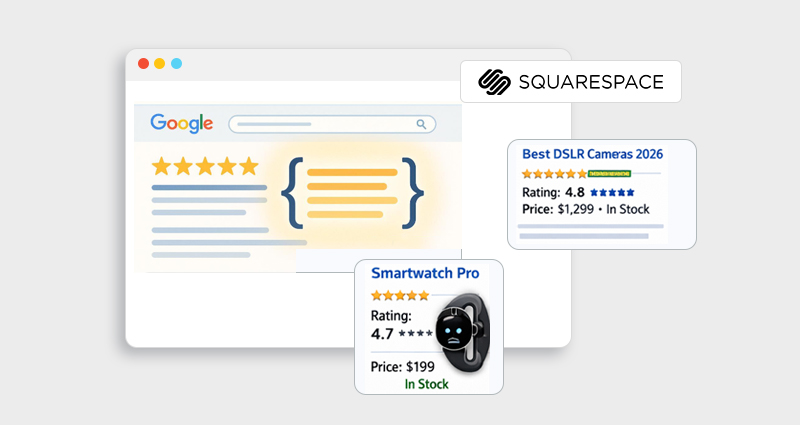

At its core, schema markup (also called structured data ) is a standardized vocabulary that tells search engines exactly what your content means. Encoding your site with schema allows Google and other search engines to parse your page contextually, beyond just keywords. The result? Your Squarespace listing becomes eligible for rich snippets, like star ratings, FAQs, event dates, and breadcrumbs, all of which dramatically increase click-through rates (CTR).
Multiple industry analyses show that pages with schema consistently outperform plain blue links in CTR. But how do you translate this into actionable SEO optimization for Squarespace? Let’s walk through strategy, implementation, and optimization, step by step.
What Is Squarespace Schema Markup (And What Squarespace Already Does)?
Squarespace schema markup refers to the structured data embedded within your Squarespace website that helps search engines understand your content type, purpose, and context.
Squarespace automatically includes basic structured data, such as:
-
Website schema
-
Organization schema
-
Article schema for blog posts
-
Product schema for commerce pages
However, here’s the critical detail most website owners miss: Squarespace’s default structured data is generic and limited.
For example:
-
It may not include the FAQ schema even if your page has FAQs.
-
It may not include the review schema unless you configure it.
-
It does not automatically implement advanced schema types like HowTo, Service, Course, or LocalBusiness (with full details).
This is where strategic implementation matters.
To truly improve CTR on your Squarespace website , you must go beyond default markup and intentionally add a schema that aligns with search intent.
Think of default Squarespace structured data as “minimum compliance.” What you need is “strategic optimization.”
How Schema Markup Boosts CTR on Your Squarespace Website
If your goal is to increase CTR with Schema Markup for Squarespace , the idea is simple: schema makes your search result more appealing, more informative, and more trustworthy, which leads to more clicks.
Here’s how it helps, explained clearly and simply:
1. It makes your listing stand out visually
When you add Squarespace schema markup, your search result can show extra details like star ratings, prices, FAQs, event dates, or breadcrumbs. These rich snippets make your result look larger and more noticeable compared to standard blue links. When users scan search results quickly, they are naturally drawn to listings that stand out.
2. It builds trust before users even click
People are more likely to click results that look credible and complete. If your listing shows ratings, review counts, pricing, or structured FAQs, it signals authority and reliability. This immediate trust factor plays a major role in improving CTR on a Squarespace website.
3. It provides helpful information upfront
Structured data gives users more context directly in search results. For example, the product schema shows price and availability, while the FAQ schema shows direct answers. When users feel informed before clicking, they are more confident choosing your result.
4. It increases your visibility on the search results page
Rich snippets often take up more space than normal listings. This extra space pushes competing results slightly lower and makes your listing more prominent. Even if your ranking position stays the same, your click-through rate can increase.
5. It helps you compete in crowded industries
Many Squarespace websites operate in competitive niches like ecommerce, coaching, or local services. If competitors are using Squarespace structured data and you are not, their listings will look more attractive. Adding JSON-LD schema for Squarespace gives you a competitive advantage in how your result appears.
6. It improves clicks without changing rankings
Schema does not directly boost rankings, but it can increase the percentage of people who click your result. More clicks from the same number of impressions means better performance overall. That’s why businesses focus on boosting click-through rate with schema as part of their Squarespace SEO optimization strategy.
How to Add Schema Markup to Squarespace
There are two primary methods to implement Squarespace structured data:
Method A: Code Injection (Best for Site-Wide or Page-Specific Schema)
- Log in to your Squarespace Dashboard.
- Go to Settings > Advanced > Code Injection.
- Paste your JSON-LD schema into the Header Code Injection area within <script type=”application/ld+json”>…</script>.
- Save and publish.
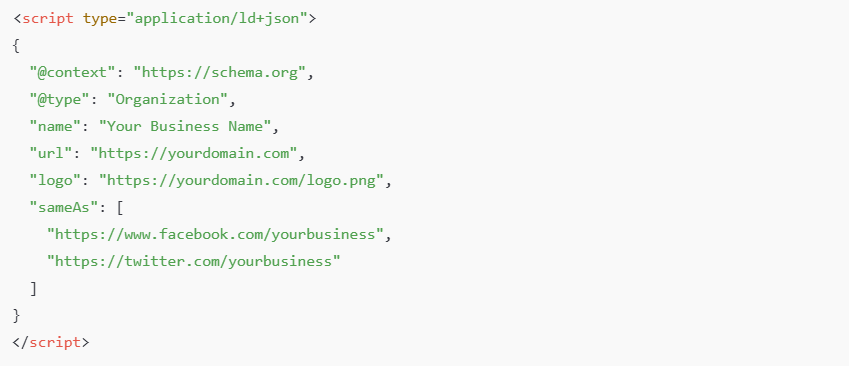
This is the preferred way to add schema like Organization, LocalBusiness, or Product schema, that applies across your entire site.
Here’s an example of Organization markup you might insert:
Method B: Code Block (Page-Level Schema)
If you want to target a specific page (like a service or landing page):
- Edit the page in Squarespace.
- Add a Code block where needed.
- Paste your JSON-LD schema script.
- Save and publish.
This method is useful when you want to implement FAQ schema or HowTo schema on a blog post or landing page.
If you’re not comfortable editing code manually, you can also use a Squarespace schema app to generate and manage structured data more efficiently. These tools simplify JSON-LD implementation and reduce the risk of syntax errors, especially for non-technical users.
Common Schema Types to Boost CTR on Squarespace
Not all schema types are equal.
If your objective is to increase CTR with Schema Markup for Squarespace, focus on high-impact types:
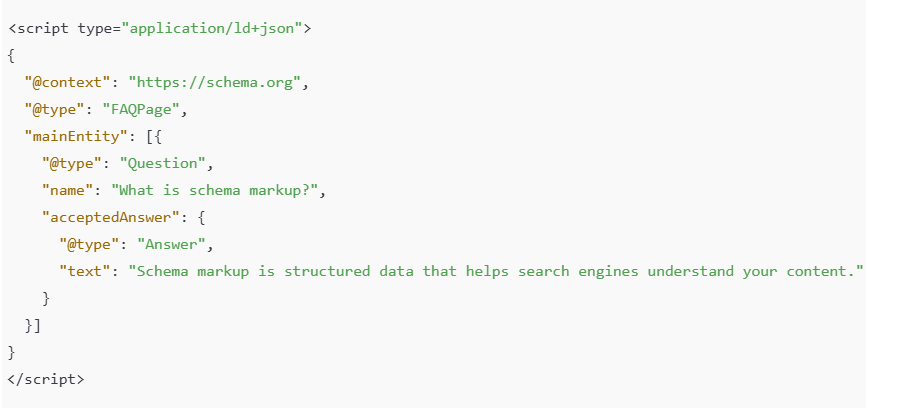
FAQ Schema
The FAQ schema can display your questions and answers right in search results, making it powerful for informational intent pages.
Example:
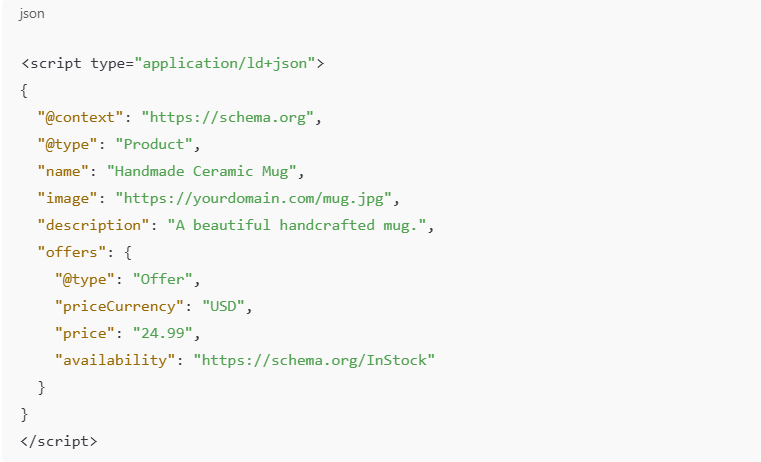
Product Schema
The Product Schema allows ecommerce websites to show price, availability, and review ratings directly in search results, making listings more informative and increasing purchase intent.
Example:
4. High-Impact Schema Types That Increase CTR the Most
Not all schema types are equal.
If your objective is to increase CTR with Schema Markup for Squarespace, focus on high-impact types:
FAQ Schema (Best for Informational Pages)
The FAQ schema can trigger expandable question boxes directly in search results.
This:
- Increases SERP real estate
- Pre-qualifies traffic
- Improves authority perception
It works exceptionally well for:
- Blog posts
- Service pages
- Pricing pages
(Insert link to related blog about adding FAQ schema to Squarespace)
Product Schema (Best for E-commerce)
If you sell products, this is essential.
It enables:
- Ratings
- Review count
- Price
- Availability
This dramatically improves trust and purchase intent.
LocalBusiness Schema (Best for Service Providers)
If you serve a specific city or region, adding the LocalBusiness schema helps:
- Reinforce NAP consistency
- Improve local SEO signals
- Increase CTR for branded searches
Breadcrumb Schema (Improves Visual Clarity)
Breadcrumb schema replaces long URLs in SERPs with structured navigation paths.
Example:
Home > Services > Web Design
This looks cleaner and increases click confidence.
Validate and Optimize Your Structured Data
After adding schema, you should test it:
Tools for Validation:
- Google’s Rich Results Test – checks eligibility for rich results
- Schema Markup Validator – verifies JSON-LD syntax
- Google Search Console – reports errors and enhancements
Make sure your structured data accurately matches visible content. Mismatches are a common cause of rich snippet failures.
Measuring CTR Improvements After Implementation
After adding schema:
- Go to Google Search Console
- Compare CTR before and after implementation
- Filter by page
- Monitor impressions + CTR over 28–90 days
Look for:
- Increased CTR with stable rankings
- New enhancement reports in Search Console
- Appearance of rich results in SERP
CTR improvements typically become visible after re-indexing and when Google decides to show enhanced features.
Conclusion
Increasing your CTR with schema markup for Squarespace is one of the most powerful yet often overlooked SEO strategies in 2026. By using Squarespace structured data, JSON-LD schema for Squarespace , and rich snippet optimization, you give your search listings a visual and semantic boost that goes beyond traditional meta tags.
This isn’t just technical SEO, it’s strategic positioning in search results. Proper implementation helps search engines understand your content better and gives searchers a reason to click your result over competitors. With a bit of planning, validation, and ongoing optimization, structured data can become a key pillar of your Squarespace SEO strategy.
Frequently Asked Questions (FAQs)
What is the difference between Squarespace’s default schema and custom schema?
The main difference between Squarespace’s default schema and custom schema is that the default version adds limited, automatic structured data, while custom schema allows you to control exactly what markup appears, improving rich snippet eligibility and search visibility.
Does adding schema markup guarantee rich snippets?
No. Schema makes your content eligible for rich results, but search engines ultimately choose whether to display them.
Will implementing the schema slow down my Squarespace site?
No, JSON-LD is lightweight and doesn’t impact loading speed. It simply adds context for search engines.
What is the JSON-LD schema for Squarespace?
JSON-LD is the recommended structured data format because it’s easy to maintain and separate from visible HTML.
Can the FAQ schema improve CTR on informational pages?
Yes, FAQ schema can improve CTR by displaying expandable questions and answers directly in search results, increasing visibility, building trust, and encouraging more users to click.
How soon can I expect to see CTR improvements?
Changes can appear within weeks after Google re-indexes your pages, watch your Search Console performance report for CTR trends.
Is there any other way instead of adding schema markup manually?
Yes, instead of adding code manually, you can use a Squarespace schema app like Schema (JSON-LD) or third-party schema generator to create and manage JSON-LD structured data more efficiently and with fewer errors.