

If you want search engines to understand your website better, Squarespace schema markup is one of the most powerful SEO tools you can implement. Structured data helps search engines interpret your content and can improve your chances of appearing in rich results such as star ratings, FAQs, product listings, and enhanced search snippets.
However, many site owners struggle with one key question: where exactly should you add schema markup in Squarespace?
Unlike some CMS platforms, Squarespace does not provide a dedicated interface for structured data. Instead, the schema must be added through specific areas such as code injection fields, page-level header injection, or code blocks . Knowing where to place your markup ensures search engines can correctly read it and avoid conflicts with Squarespace’s default structured data.
In this Squarespace schema markup guide, we’ll walk through how structured data works, where to add schema markup in Squarespace pages, and how to implement it correctly using JSON-LD .
Understanding Squarespace Schema Markup
Before implementing anything, it helps to understand what Squarespace schema markup actually does.
For a deeper Squarespace schema markup understanding, it can be helpful to review a complete guide that explains how structured data works across different Squarespace page types and schema implementations.
Schema markup is a form of structured data that provides additional context about the content on a webpage. It uses a standardized vocabulary maintained by Schema.org to help search engines interpret page information such as products, articles, organizations, reviews, and events.
Search engines like Google rely on structured data to generate enhanced search results. When the schema is implemented correctly, pages may qualify for rich results that display additional information directly in the search results.
For example:
| Page Type | Possible Rich Result |
|---|---|
| Product page | Price, availability, ratings |
| Blog post | Author, publish date |
| FAQ page | Expandable FAQ results |
| Event page | Event date and location |
These enhancements
Does Squarespace Automatically Add Schema?
Yes, Squarespace automatically adds some schema markup by default, but the implementation is limited. While the platform generates basic structured data for certain content types, it does not provide full control or support for many advanced schema features needed for modern SEO.
When you create a website using Squarespace, the platform automatically inserts some built-in Structured Data using the vocabulary from Schema.org. This helps search engines understand the fundamental elements of your site without requiring manual coding.
Typically, Squarespace automatically generates schema for several common content types, including:
- Organization schema for the website owner or business
- Website schema that describes the overall site
- Article / Blog Post schema for blog content
- Event schema for event pages
- Product schema for ecommerce listings
These default implementations provide a solid starting point because they allow search engines to interpret your site’s structure and content more effectively.
However, the default implementation lacks customization options. For example, advanced schema types like FAQ, HowTo, or detailed product review markup are typically missing.
This means many sites still need custom Squarespace SEO schema markup to optimize their pages fully.
Custom schema allows you to:
- Add rich result features
- Provide more detailed page information
- Implement structured data for specific content
- Improve search visibility
This is where understanding where to add schema markup in Squarespace becomes essential.
Where to Add Schema Markup in Squarespace
There are several locations where you can implement Squarespace structured data, depending on whether you want it applied site-wide or only on specific pages.
- Site-wide header code injection
- Page header code injection
- Collection page settings
- Code blocks within page content
Each method has a different use case.
Adding Schema Markup Using Squarespace Code Injection (Site-Wide)
One of the most common ways to add schema markup to Squarespace is through the site-wide code injection settings.
This method is ideal when the schema should appear on every page of the website, such as:
- Organization schema
- Website schema
- Business schema
- Global structured data scripts
How to implement site-wide schema:
- Go to Settings
- Click Advanced
- Open Code Injection
- Paste your schema code into the Header section
- Save changes
Code placed here is injected into the <head> of every page on the site.
Example: Organization Schema (JSON-LD)
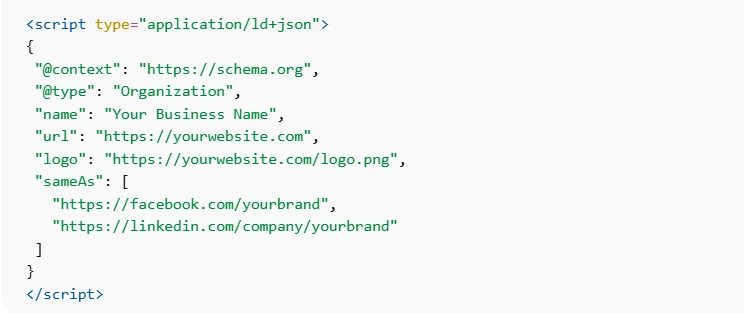
This is one of the most common Squarespace JSON-LD schema implementations. If writing JSON-LD manually feels complex, a Squarespace schema app can automatically generate the correct markup and deploy it across your site without requiring manual coding.
Adding Structured Data to Individual Squarespace Pages
Sometimes, structured data should only apply to one specific page.
For example:
- FAQ schema on a help page
- Product schema on a product page
- Article schema on a blog post
- Local business schema on a location page
In this case, you should use page-level header code injection.
Steps to add a schema to a page:
- Go to Pages
- Click the gear icon next to the page
- Open the Advanced tab
- Paste the schema code into Page Header Code Injection
- Save changes
This inserts the schema in the page’s HTML header, which is a recommended location for structured data.
Using page-specific schema prevents duplication and ensures search engines associate the markup with the correct content.
Adding Schema to Blog Posts or Collection Pages
Certain Squarespace content types, such as blog posts, events, or product pages, already include built-in schema.
However, if you want to add additional structured data , there are two common approaches:
Option 1: Collection page header injection
For dynamic content collections, you can add schema through collection settings → advanced → code injection.
Option 2: Code block inside page content
If header injection is not available, you can add structured data using a code block at the top of the page content.
This method works well for:
- FAQ schema
- HowTo schema
- Recipe schema
- Video schema
Because JSON-LD is not visible to users, it will not affect page design.
Best Format for Squarespace Schema Markup
When implementing Squarespace structured data, the recommended format is JSON-LD.
JSON-LD is preferred because it is easier to implement and does not interfere with page HTML.
Search engines including Google recommend JSON-LD for structured data whenever possible.
Example of JSON-LD article schema:
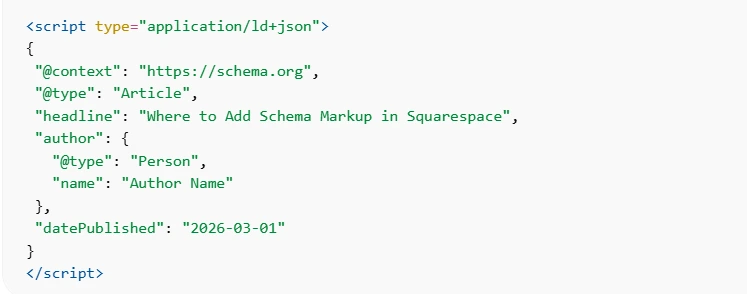
JSON-LD is also easier to maintain and update compared to inline structured data formats.
Testing Your Squarespace Schema Implementation
After implementing Squarespace schema markup, always test it to ensure search engines can read it correctly.
Recommended testing tools include:
Testing helps detect:
- Missing fields
- Invalid JSON syntax
- Duplicate schema
- Unsupported structured data types
Validation ensures your structured data implementation is eligible for rich results.
Common Mistakes When Adding Schema Markup in Squarespace
Even when implementing Squarespace schema markup carefully, small errors can prevent search engines from properly interpreting your structured data. Here are some common Squarespace schema markup mistakes to watch out for:
Duplicate Schema Markup
Squarespace already generates basic structured data for certain page types. Adding the same schema manually can create duplicates, which may confuse search engines. Always check existing markup before implementing custom schema to avoid conflicting or redundant structured data.
Incorrect Schema Placement
Schema markup should ideally be placed in the page’s head section using JSON-LD script tags. In Squarespace, this typically means using site-wide or page-level header code injection to ensure search engines can easily detect and process the markup.
Invalid JSON-LD Formatting
Even minor formatting mistakes in Squarespace JSON-LD schema can break the entire markup. Missing commas, quotation marks, or brackets will prevent search engines from reading the structured data, so always validate your code before publishing.
Using Outdated Schema Types
The structured data vocabulary maintained by Schema.org evolves regularly. Using outdated schema types or properties can lead to warnings or unsupported markup, so it’s important to follow the latest structured data guidelines.
Best Practices for Structured Data Implementation
To get the most value from Squarespace schema markup, it’s important to follow a few practical best practices. These ensure your structured data remains accurate, useful for search engines, and aligned with SEO guidelines.
Match Schema With Page Content
Structured data should always reflect the actual content visible on the page. Search engines compare schema with on-page information, so inaccurate or misleading markup can reduce trust and prevent your page from qualifying for rich results.
Use Relevant Schema Types
Only implement schema types that genuinely match the page content. For example, use Product schema for product pages or Article schema for blog posts. Adding unnecessary schema types can confuse search engines and weaken your structured data signals.
Keep Schema Updated
Structured data should be updated whenever important page details change. For example, product pricing, availability, or event dates should always remain consistent with the information shown on the page to maintain accuracy.
Test Your Structured Data Regularly
After implementing schema markup, regularly test it using tools like Google Rich Results Test or Schema Markup Validator to ensure your markup remains valid and detectable by search engines.
Conclusion
Implementing Squarespace schema markup is one of the most effective ways to help search engines understand your website content. While Squarespace provides some default structured data, it often lacks the flexibility required for advanced SEO strategies.
Knowing where to add schema markup in Squarespace, whether through site-wide code injection, page-level header injection, or code blocks, ensures your structured data is implemented correctly and recognized by search engines.
By combining proper Squarespace JSON-LD schema implementation , validation tools, and best practices, you can create a stronger foundation for rich results, improved search visibility, and a more structured website that search engines can easily interpret.
FAQs
Where do I add schema markup in Squarespace?
You can add schema markup in Squarespace using site-wide code injection, page header code injection, or code blocks, within pages. The header injection area is typically the best place for JSON-LD structured data.
Does Squarespace automatically add structured data?
Yes. Squarespace automatically generates basic schema for organizations, websites, blog posts, events, and products. However, this schema is limited and cannot be fully customized.
What is the best schema format for Squarespace?
The best format for Squarespace JSON-LD schema is JSON-LD. Search engines recommend this format because it is easier to implement and maintain.
Can I add schema markup to individual pages in Squarespace?
Yes. You can add structured data to individual pages using Page Settings → Advanced → Page Header Code Injection.
Do I need a schema plugin for Squarespace?
Not necessarily. You can manually implement the schema using code injection. However, a Squarespace schema app can automate structured data implementation and reduce manual work.
How do I test Squarespace schema markup?
You can test your structured data using tools such as Google Rich Results Test or Schema Markup Validator to verify that search engines detect your schema correctly.
Can schema markup improve SEO on Squarespace?
Schema markup does not directly increase rankings, but it helps search engines understand content and can enable rich results that improve visibility and click-through rates.