

Structured data plays a crucial role in modern SEO. For Shopify stores, properly implemented schema markup helps search engines understand product details, pricing, reviews, and site structure more accurately. But simply adding schema isn’t enough, you must test Shopify schema markup regularly to ensure it works correctly.
Broken or incomplete structured data can prevent your store from appearing in rich results such as product ratings, price snippets, FAQs, and breadcrumbs. That’s why Shopify schema markup validation is an essential step in technical SEO.
In this comprehensive Shopify schema markup testing guide, you’ll learn how to validate structured data, identify errors, and fix issues so search engines can interpret your store correctly.
Understanding Shopify Schema Markup
Before diving into testing, it’s important to deeply understand Shopify schema markup and what it actually does.
Schema markup is a type of structured data added to web pages using formats like JSON-LD. It helps search engines interpret page content more precisely. Instead of guessing what a page represents, search engines can clearly identify entities such as:
- Products
- Prices and availability
- Reviews and ratings
- Brand and organization information
- Breadcrumb navigation
For Shopify stores, this information is typically implemented using Shopify, JSON-LD schema, which Google recommends as the preferred format for structured data.
Most Shopify themes include basic schema markup, usually for products and organization data. However, these implementations are often incomplete or static, which means store owners must check Shopify schema markup and enhance it when needed.
For example, a product page might include only basic information like product name and image, but omit important attributes like aggregateRating, offers, or availability, which are required for rich results.
Why You Must Test Shopify Schema Markup
Testing structured data is not optional, it’s essential for maintaining SEO visibility. Because even small errors in your JSON-LD code can prevent rich results from appearing in search results. According to Google’s structured data documentation, websites should validate their markup using dedicated testing tools before publishing or updating pages.
Here are the main reasons you should test Shopify structured data regularly.
1. Ensure Eligibility for Rich Results
Structured data helps pages qualify for rich results such as:
- Product pricing snippets
- Star ratings and reviews
- FAQ dropdowns
- Breadcrumb navigation
If your schema contains errors or missing fields, Google may ignore it completely.
2. Detect Missing or Invalid Properties
When you validate Shopify schema markup, testing tools identify missing required properties, such as:
- name
- image
- price
- availability
- reviewCount
These fields are critical for product-rich results.
3. Avoid Conflicting Schema Markup
Many Shopify stores use multiple apps that generate schema automatically. For store owners who prefer a no-code approach, a Shopify schema app can automate structured data generation. But remember this can cause duplicate or conflicting markup. Schema testing helps detect those issues early.
4. Improve Search Engine Understanding
Schema markup is essentially structured context for search engines. Testing ensures that search engines interpret your content accurately, which improves indexing and semantic understanding.
Types of Schema You Should Test in Shopify
When running Shopify structured data testing, don’t limit validation to product pages only. A typical Shopify store may include multiple schema types.
Common Shopify Schema Types
| Schema Type | Purpose |
|---|---|
| Product | Provides product name, price, availability |
| Offer | Defines pricing and stock information |
| AggregateRating | Shows review stars and rating counts |
| BreadcrumbList | Helps search engines understand site hierarchy |
| Organization | Defines business information |
| FAQPage | Enables FAQ rich results |
Validating each schema type ensures your structured data remains complete and consistent.
How to Test Shopify Schema Markup (Step-by-Step)
Now, let’s walk through the actual process to test Shopify schema markup.
Step 1: Copy the Page URL
Start by selecting the page you want to validate. Typically, you should test:
- Product pages
- Collection pages
- Homepage
- Blog posts with FAQ schema
Testing multiple page types ensures complete coverage of your structured data implementation.
Step 2: Use Google Rich Results Test
One of the most reliable tools for Shopify schema testing is Google’s Rich Results Test.
This tool analyzes your page and determines whether the structured data qualifies for rich results. Google officially recommends using this test to check structured data eligibility.
How to Run the Test:
- Open the Rich Results Test tool
- Paste your Shopify page URL
- Click Test URL
- Wait for the analysis to complete
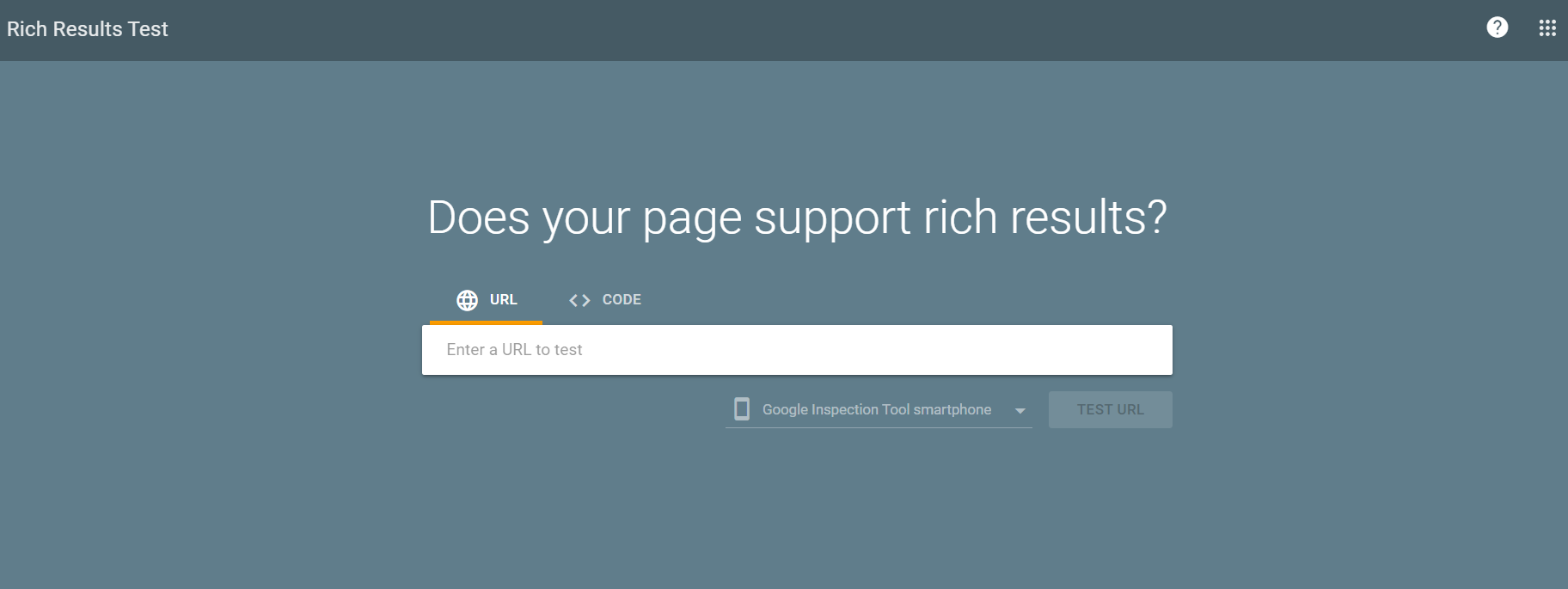
The tool will display:
- Detected schema types
- Rich result eligibility
- Errors and warnings
Example Output
You might see something like:
Detected structured data:
- Product
- BreadcrumbList
- Organization
If everything is valid, your page is eligible for product-rich results.
Step 3: Validate JSON-LD Schema
While the Rich Results Test checks Google-specific features, you should also perform JSON-LD schema testing using a schema validator.
The Schema Markup Validator checks all schema.org markup types and ensures your structured data follows official standards.
This step is particularly useful when debugging custom schema implementations or Liquid-generated JSON-LD code.
Step 4: Check for Errors and Warnings
When running Shopify schema markup validation, you’ll usually encounter two types of messages.
Errors
Errors must be fixed immediately. They prevent search engines from processing the schema.
Examples:
- Missing price property
- Invalid JSON formatting
- Incorrect schema type
Warnings
Warnings indicate optional properties that are recommended but not required.
Examples:
- Missing aggregateRating
- Missing reviewCount
- Missing shippingDetails
Even though warnings don’t break schema, fixing them improves rich result eligibility.
Example: Shopify Product Schema
Here’s a simplified example of Shopify JSON-LD schema for a product page.
{
  "@context": "https://schema.org",
  "@type": "Product",
  "name": "{{ product.title }}",
  "image": "{{ product.featured_image | img_url: '600x' }}",
  "description": "{{ product.description | strip_html }}",
  "sku": "{{ product.variants.first.sku }}",
  "offers": {
    "@type": "Offer",
    "priceCurrency": "USD",
    "price": "{{ product.price | money_without_currency }}",
    "availability": "https://schema.org/InStock"
  }
}
After implementing a schema like this, you should immediately check Shopify schema markup using validation tools.
Common Shopify Schema Errors (and How to Fix Them)
Even experienced developers encounter schema issues. Here are some common problems discovered during Shopify structured data testing.
Missing Required Fields
Many Shopify themes omit critical fields like:
- price
- availability
- brand
- aggregateRating
Fix by adding missing properties to your JSON-LD markup.
Duplicate Schema Markup
Multiple apps or theme scripts can generate duplicate schema types.
Solution:
- Remove redundant schema blocks
- Keep only one valid JSON-LD script per entity
Invalid JSON Syntax
Simple formatting mistakes can break structured data.
Example error:
"price": "29.99,
Fix by ensuring valid JSON formatting.
Outdated Schema Values
If schema values don’t update dynamically, they can display incorrect prices or availability.
The best solution is to use dynamic Liquid variables in Shopify.
Structured Data Validation Tools for Shopify
Several tools can help you validate Shopify schema markup and debug errors quickly.
Essential Tools
| Tool | Purpose |
|---|---|
| Google Rich Results Test | Checks rich result eligibility |
| Schema Markup Validator | Validates schema.org structure |
| Schema Validator tools | Tests JSON-LD formatting |
| Google Search Console | Reports structured data errors |
These tools provide different types of analysis, so using them together gives the most accurate results.
Advanced Testing Tips for Shopify Stores
If you want to take Shopify schema markup validation further, these expert tips can help.
Test Multiple Page Types
Don’t test only one product page. Validate:
- Multiple product templates
- Collection pages
- Blog posts
- Homepage
Different templates may output different schemas.
Monitor Google Search Console
Google Search Console provides reports for structured data issues.
Check for:
- Product schema errors
- FAQ schema issues
- Breadcrumb warnings
These reports reveal problems discovered during Google’s crawling process.
Test After Every Theme Update
Theme updates sometimes overwrite schema code. Always re-run Shopify structured data testing after updating themes or installing apps.
Conclusion
Schema markup is one of the most powerful technical SEO tools for Shopify stores, but its benefits only appear when the implementation is correct. That’s why it’s essential to test Shopify schema markup regularly.
By validating structured data with tools like the Rich Results Test and Schema Markup Validator, you can detect errors, fix missing properties, and ensure your store remains eligible for rich results. Proper Shopify schema markup validation not only improves search engine understanding but also strengthens visibility in competitive search results.
Testing structured data may take only a few minutes, but the impact on SEO, search visibility, and user trust can be significant.
FAQs
Q1: How do I test Shopify schema markup?
You can test Shopify schema markup by using tools like Google Rich Results Test or Schema Markup Validator. Enter your page URL to detect structured data, errors, warnings, and rich result eligibility.
Q2: What is the best Shopify schema markup validator?
The most reliable validators are:
- Google Rich Results Test
- Schema Markup Validator
- JSON-LD testing tools
These tools check schema formatting and rich result eligibility.
Q3: Why is my Shopify schema not showing rich results?
Common reasons include:
- Missing required schema properties
- Invalid JSON-LD formatting
- Duplicate schema markup
- Insufficient content for rich results
Testing your schema helps identify the exact issue.
Q4: How do I validate JSON-LD schema in Shopify?
You can validate JSON-LD schema in Shopify by copying the page URL or code and running it through a structured data validator. These tools analyze the markup and highlight errors or missing fields.
Q5: Does Shopify automatically add schema markup?
Yes, most Shopify themes include basic structured data for products and organization information. However, these implementations are often minimal and may require enhancement for full SEO benefits.
Q6: Can schema markup improve Shopify SEO?
Yes. Properly structured data can help search engines better understand your content and enable rich results like product ratings, pricing snippets, and FAQs.
Q7: How often should I test Shopify structured data?
You should test structured data:
- After adding schema markup
- After theme updates
- After installing SEO apps
- When Search Console reports errors
Regular testing ensures the schema remains valid.








 Wix Schema
 Squarespace Schema
 BigCommerce Schema
 Shopify Schema
 Hubspot Schema
 Webflow Schema
 GoHighlevel Schema
 Duda Schema
 Weebly Schema