


If you’re using ClickFunnels to sell products, you’re already focused on conversions. But here’s the gap most funnel builders overlook: search engines don’t fully understand your product pages without structured data.
That’s where ClickFunnels product schema markup becomes essential.
By adding structured data (especially JSON-LD product schema), you help search engines interpret your product details, price, availability, and reviews, which can unlock rich snippets in search results. These enhanced listings often lead to higher visibility and better click-through rates.
In this guide, you’ll learn:
- What ClickFunnels schema markup is and why it matters
- How to add product schema in ClickFunnels step by step
- JSON-LD examples you can copy and customize
- Tools to validate and test your schema
- Best practices to maximize SEO impact
Understanding ClickFunnels Schema Markup
Before diving into implementation, it’s important to understand what you’re actually adding.
ClickFunnels structured data is a way of embedding machine-readable information into your funnel pages. This data follows standardized formats (like JSON-LD) defined by Schema.org and supported by major search engines.
Why Product Schema Matters for Funnels
Unlike traditional e-commerce platforms, ClickFunnels doesn’t automatically generate rich structured data for products. That means:
- Search engines may not fully understand your offer
- You miss out on ClickFunnels product-rich snippets
- Competitors with structured data can outrank you visually
With proper product schema for ClickFunnels, you can display:
- Product name
- Price
- Availability
- Ratings and reviews
- Brand information
These elements directly influence how your page appears in search results.
Benefits of ClickFunnels Product Schema Markup
Adding schema markup for ClickFunnels products goes beyond technical SEO, it directly improves how your funnel appears and performs in search results. When implemented correctly, ClickFunnels product schema markup enhances visibility, builds trust, and attracts more qualified clicks.
Key SEO & Conversion Benefits:
1. Rich Snippets in SERPs
With structured data, your listings can display key product details like price, availability, and ratings. These enhanced results stand out visually and make your offer more compelling at first glance.
2. Improved Click-Through Rate (CTR)
Rich results naturally draw attention compared to standard listings. When users see detailed product information upfront, they’re more likely to click, especially if your pricing or ratings are competitive.
3. Better Search Engine Understanding
Search engines rely on structured data to interpret page content accurately. Adding ClickFunnels structured data ensures your product details are clearly defined, reducing ambiguity and improving relevance in search queries.
4. Competitive Advantage
Many ClickFunnels users skip schema implementation. By using ClickFunnels JSON-LD product schema, you gain a visibility edge, especially in competitive niches where every SERP feature matters.
Best Schema Types for ClickFunnels
While this guide focuses on product schema, combining multiple schema types can significantly strengthen your SEO strategy. Understanding the best schema types for ClickFunnels funnels helps you build a more complete search presence.
Core Schema Types You Should Consider
- Product Schema – Essential for showcasing product details like price, brand, and availability on sales pages.
- FAQ Schema – Ideal for addressing objections and qualifying leads directly in search results.
- Review Schema – Adds social proof, improving trust and increasing CTR.
- Organization Schema – Reinforces brand credibility and authority signals.
For product-driven funnels, ClickFunnels JSON-LD product schema delivers the most immediate SEO impact, especially when paired with FAQ or review schema.
How to Add Product Schema in ClickFunnels (Step-by-Step)
Adding ClickFunnels product schema markup is simple when you follow the right steps. Here’s how to create, add, and validate it for better search visibility.
Step 1 – Generate JSON-LD Product Schema
You can manually write a schema or use a schema markup generator or a ClickFunnels Schema Markup tool.
Here’s a basic example:
{
  "@context": "https://schema.org/",
  "@type": "Product",
  "name": "Your Product Name",
  "image": "https://yourwebsite.com/image.jpg",
  "description": "Short product description",
  "brand": {
    "@type": "Brand",
    "name": "Your Brand Name"
  },
  "offers": {
    "@type": "Offer",
    "url": "https://yourfunnel.com/product-page",
    "priceCurrency": "USD",
    "price": "49.99",
    "availability": "https://schema.org/InStock"
  }
}
Step 2 – Add Schema to ClickFunnels Page
To implement the ClickFunnels schema markup implementation:
- Open your funnel page editor
- Go to Settings → Tracking Code
- Paste your JSON-LD inside <script type=”application/ld+json”>
- Save and publish
Step 3 – Validate Your Schema
After adding the schema, always test it using a schema markup validator or JSON-LD schema validator.
Recommended tools:
These tools help identify errors in your ClickFunnels JSON-LD implementation guide.
How to Get Rich Snippets for ClickFunnels Pages
Adding schema doesn’t guarantee rich snippets, but it significantly improves eligibility. Search engines evaluate multiple factors before displaying enhanced results.
What Influences Rich Results?
- Correct schema implementation – Structured data must follow the proper format and include the required fields
- High-quality content – Clear, relevant, and user-focused content improves eligibility
- Page authority – Strong domain and page signals increase trust
- Compliance with search guidelines – Misleading or spammy schema can disqualify your page
Pro Tips for Better Results
- Keep pricing and availability accurate and updated
- Use genuine, verifiable reviews when adding review schema
- Avoid over-optimization or misleading structured data
- Combine schema with solid on-page SEO (titles, headings, internal links)
- Consistency and accuracy are key to turning ClickFunnels schema markup into visible rich results.
Common Mistakes in ClickFunnels Schema Markup
Even small implementation errors can prevent your schema from working or being recognized by search engines.
Avoid These Pitfalls
- Missing required fields such as price, currency, or availability
- Using incorrect or irrelevant schema types
- Adding fake or unverified reviews (can lead to penalties)
- Skipping validation after implementation
- Not updating the schema when product details change
If you’re investing in ClickFunnels schema markup, regular audits and updates are essential to maintain accuracy and eligibility.
Best Practices for ClickFunnels Product Schema
To get the most out of your ClickFunnels product schema markup, follow these proven best practices.
Keep It Accurate and Updated
Your structured data must always match what’s visible on the page. Any mismatch, like outdated pricing, can cause search engines to ignore your schema or reduce trust signals.
Use JSON-LD Format
JSON-LD is the recommended format because it’s clean, easy to implement, and doesn’t interfere with your page layout. It also aligns with search engine best practices for structured data.
Combine with Other Schema Types
For stronger SERP visibility:
- Add FAQ schema to address common objections
- Include review schema for social proof
This layered approach creates a richer, more informative search listing and improves overall performance.
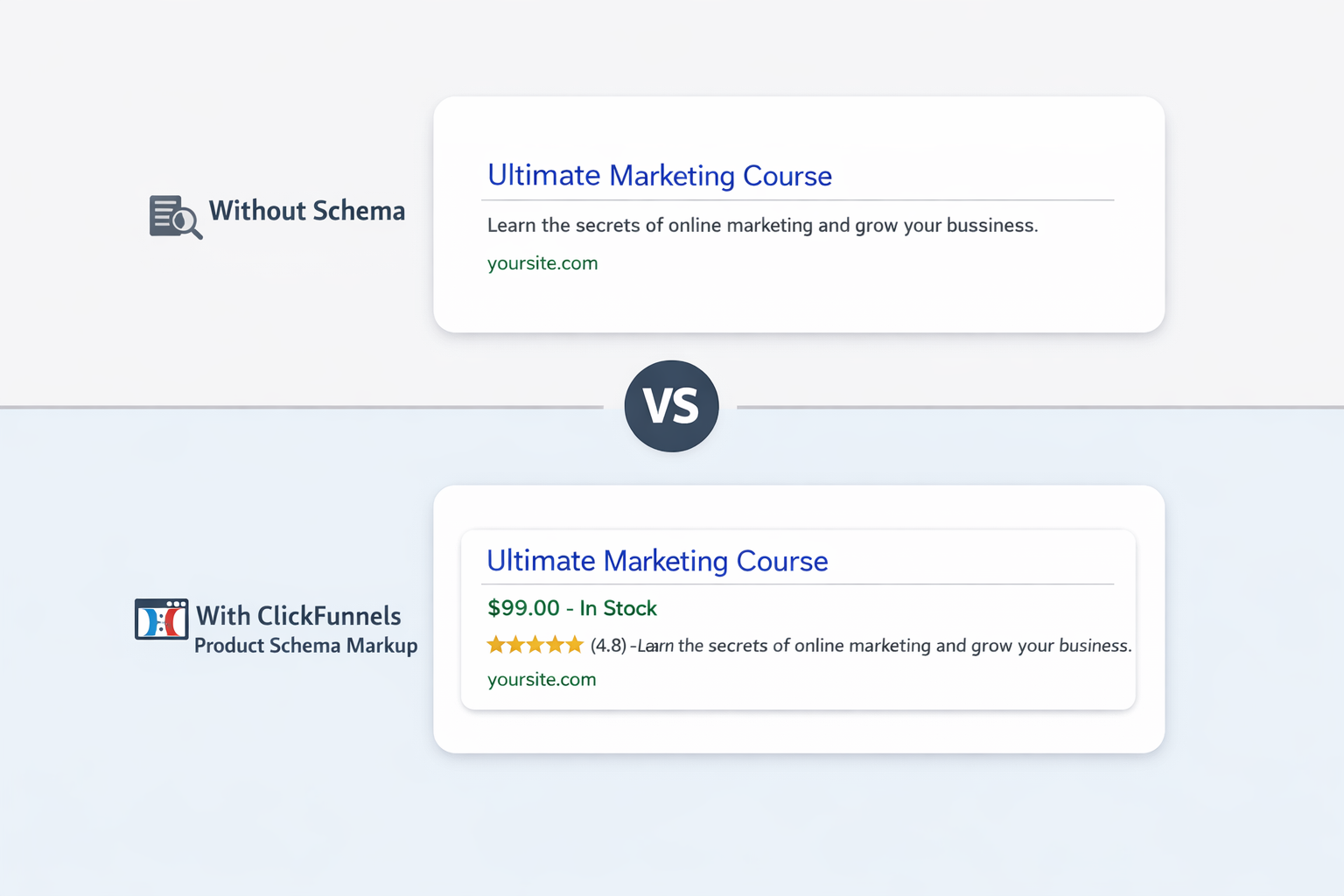
Real-World Example: Optimizing a ClickFunnels Product Page
Let’s say you’re selling a digital course.
Without schema:
- Your listing shows only title + meta description
With the ClickFunnels product schema markup:
- Price appears directly in search results
- Availability is shown
- Ratings (if added) increase trust
This small technical addition can significantly impact traffic quality and conversions.
Conclusion
Implementing ClickFunnels product schema markup is one of the most overlooked yet powerful ways to improve your funnel’s SEO performance.
It bridges the gap between what users see and what search engines understand, unlocking richer search results, better visibility, and higher-quality traffic.
Once you set up your ClickFunnels JSON-LD product schema, validate it, and keep it updated, you’re no longer just competing on copy and design, you’re competing on search intelligence. And in today’s SEO landscape, that edge matters.
FAQs
Q1: What is ClickFunnels product schema markup?
It’s structured data added to your funnel pages that helps search engines understand product details like price, availability, and reviews, enabling rich results in search listings.
Q2: How to add product schema markup in ClickFunnels?
You can insert JSON-LD code in the Tracking Code section of your funnel page, ensuring it’s properly formatted and placed within script tags.
Q3: Do I need coding skills to implement the schema?
Not necessarily. A schema markup generator or a ClickFunnels Schema Markup tool can help you create and deploy structured data without manual coding.
Q4: Can schema markup improve rankings?
Schema isn’t a direct ranking factor, but it enhances visibility and CTR, which can indirectly improve your SEO performance over time.
Q5: How long does it take to see rich snippets?
There’s no fixed timeline. It depends on indexing, page authority, and eligibility. Typically, it can take a few days to several weeks.
Q6: What is the best schema type for ClickFunnels products?
Product schema is essential, but combining it with FAQ and review schema delivers better results in terms of visibility and engagement.
Q7: How do I validate ClickFunnels schema markup?
Use tools like Google Rich Results Test or a reliable schema markup validator to check for errors and ensure proper implementation.
Q8: Can I use multiple schema types on one page?
Yes, and it’s recommended. Using multiple relevant schema types creates a more comprehensive search listing and improves your chances of earning rich results.








 Wix Schema
 Squarespace Schema
 BigCommerce Schema
 Shopify Schema
 Hubspot Schema
 Webflow Schema
 GoHighlevel Schema
 Duda Schema
 Weebly Schema