

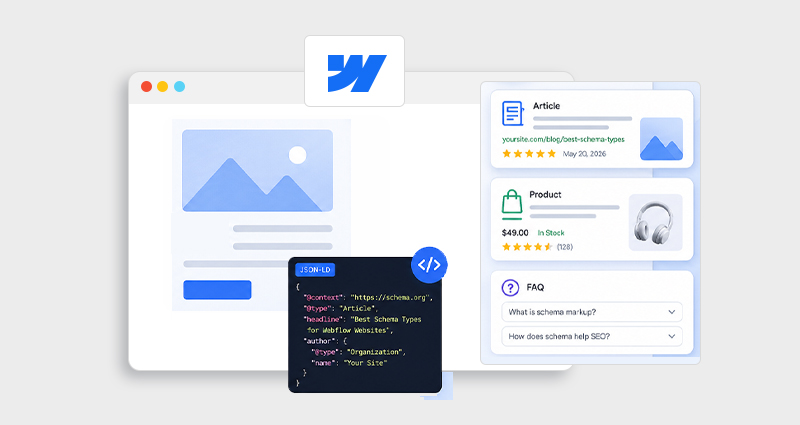
Most Webflow sites today are visually impressive, but structurally invisible to search engines. That’s the gap schema markup fills.
In 2026, SEO isn’t just about keywords or backlinks. It’s about context. Search engines and AI systems want structured, machine-readable signals to understand what your content actually represents. And that’s where many Webflow users fall short, they either skip schema entirely or implement it without a clear strategy.
This guide is built to fix that. You’ll learn the best schema types for Webflow websites, that unlock Webflow rich snippets, improve CTR, and make your site more understandable to both search engines and AI-driven results.
What Is Schema Markup in Webflow?
Before diving into the best schema types for Webflow websites, it’s important to understand what schema actually does at a deeper level.
Webflow schema markup is structured data, most commonly written in JSON-LD, that you add to your pages to describe content in a standardized way. It acts like a translation layer between your design-heavy Webflow site and search engines.
Instead of relying on visual cues or assumptions, schema gives explicit meaning. For example, you’re not just publishing content, you’re telling search engines:
- This page is an Article with an author and a publish date
- This section is an FAQ Page with defined questions and answers
- This is a Product with pricing and availability
- This represents a business entity
That distinction matters. Search engines like Google use this structured data to determine eligibility for rich results, the enhanced listings that show FAQs, ratings, breadcrumbs, and more. Without a schema, your content may still rank, but it won’t stand out.
Why Schema Matters for Webflow SEO
Schema isn’t just a “nice-to-have” anymore, it’s a competitive advantage, especially for Webflow sites that rely heavily on visual structure rather than semantic HTML.
From real-world implementations, here’s what properly executed Webflow structured data actually improves:
1. Higher CTR Through Rich Snippets
When your result shows FAQs, ratings, or pricing, it naturally improves search click-through rates. You’re not just ranking, you’re occupying more SERP space.
2. Clearer Indexing for Complex Pages
Webflow CMS pages can sometimes look similar to crawlers. Schema removes ambiguity by clearly defining each page type (Article, Product, etc.).
3. Stronger Visibility in AI Search
Modern search experiences (AI overviews, voice assistants) rely heavily on structured data to extract and summarize content. Schema increases your chances of being referenced.
4. Eligibility for Enhanced Features
Without a schema, you simply can’t qualify for features like:
- FAQ dropdowns
- Review stars
- Breadcrumb paths
Google itself states that structured data helps its systems “better understand page content and enable rich results,” which directly impacts how your page appears, not just where it ranks.
How to Choose Schema Types for Webflow
One of the biggest mistakes is treating schema like a checklist. Adding more types doesn’t improve SEO, adding the right types does.
To choose the best schema types for Webflow websites, think in terms of alignment:
1. Match Schema to Page Intent
Every page has a purpose:
- Informational → Article or FAQ
- Transactional → Product or Offer
- Brand-focused → Organization
2. Reflect the Actual Content Structure
Your schema must mirror what users see. If your page doesn’t visibly contain FAQs, adding FAQ schema won’t work (and may be ignored).
3. Optimize for SERP Outcomes
Think beyond implementation, focus on results:
- Want expandable listings? → FAQ schema
- Want pricing visibility? → Product schema
- Want a better navigation display? → Breadcrumb
Quick Mapping Example
| Page Type | Recommended Schema |
|---|---|
| Blog Post | Article + FAQ |
| Product Page | Product + Review |
| Homepage | Organization |
| Category Page | Breadcrumb |
This structured approach ensures you’re not just adding schema, you’re using the best structured data for Webflow to achieve specific SEO outcomes.
Best Schema Types for Webflow Websites (With Deep Examples)
Now let’s break down the best schema types for Webflow websites with deeper context, practical use cases, and complete JSON-LD examples you can actually implement.
The goal here isn’t just to “add schema”, it’s to use the right schema to unlock specific SEO outcomes like rich snippets, higher CTR, and better indexing.
1. Article Schema (Content Authority Builder)
If your Webflow site publishes blogs, guides, or resources, the Article schema is foundational.
But beyond basic implementation, the Article schema plays a bigger role in E-E-A-T (Experience, Expertise, Authoritativeness, Trustworthiness). It helps search engines connect your content to:
- A real author
- A consistent publishing pattern
- Content freshness and updates
This is especially important for content-heavy Webflow sites competing in SEO-driven niches.
Where it fits best: Blog posts, long-form guides, case studies
Advanced JSON-LD Example
{
  "@context": "https://schema.org",
  "@type": "Article",
  "headline": "Best Schema Types for Webflow Websites",
  "description": "Complete guide to choosing schema types for Webflow SEO",
  "author": {
    "@type": "Person",
    "name": "Your Name"
  },
  "datePublished": "2026-04-10",
  "dateModified": "2026-04-12",
  "mainEntityOfPage": {
    "@type": "WebPage",
    "@id": "https://yourwebsite.com/blog/schema-types-webflow"
  },
  "publisher": {
    "@type": "Organization",
    "name": "Your Brand",
    "logo": {
      "@type": "ImageObject",
      "url": "https://yourwebsite.com/logo.png"
    }
  }
}
Pro Tip: Always include dateModified and mainEntityOfPage, these improve content trust and indexing clarity.
2. Product Schema (Revenue Driver)
For any Webflow site that sells products, services, templates, or SaaS, Product schema is one of the most impactful schema types.
It doesn’t just describe your product, it enables transactional rich results, such as:
- Price
- Availability
- Ratings
However, most implementations are incomplete.
The common mistake: adding Product schema without Offer and AggregateRating , which are critical for rich snippets.
Where it fits best: Product pages, pricing pages, SaaS landing pages
Complete JSON-LD Example
{
  "@context": "https://schema.org/",
  "@type": "Product",
  "name": "Webflow SEO Template",
  "image": "https://example.com/image.jpg",
  "description": "High-converting Webflow template designed for SEO",
  "brand": {
    "@type": "Brand",
    "name": "Your Brand"
  },
  "offers": {
    "@type": "Offer",
    "url": "https://yourwebsite.com/product",
    "priceCurrency": "USD",
    "price": "49",
    "availability": "https://schema.org/InStock"
  },
  "aggregateRating": {
    "@type": "AggregateRating",
    "ratingValue": "4.8",
    "reviewCount": "124"
  }
}
Real Insight: Including price + availability + ratings significantly increases purchase-intent clicks.
3. FAQ Schema (SERP Real Estate Winner)
The FAQ schema for Webflow is one of the most effective ways to expand your presence in search results without improving rankings.
It allows your listing to show expandable questions directly in SERPs, which:
- Increases visibility
- Improves CTR
- Pre-qualifies users
However, Google now enforces stricter guidelines.
Only use the FAQ schema when:
- Questions are clearly visible on the page
- Answers are helpful, not promotional
- Content genuinely adds value
Where it fits best: Blog posts, landing pages, help sections
Advanced JSON-LD Example
{
  "@context": "https://schema.org",
  "@type": "FAQPage",
  "mainEntity": [{
    "@type": "Question",
    "name": "How to choose schema types for Webflow?",
    "acceptedAnswer": {
      "@type": "Answer",
      "text": "Choose schema based on page intent, content type, and the rich results you want to achieve."
    }
  },
  {
    "@type": "Question",
    "name": "Does FAQ schema improve SEO?",
    "acceptedAnswer": {
      "@type": "Answer",
      "text": "FAQ schema improves click-through rate and visibility, which indirectly impacts SEO performance."
    }
  }]
}
Pro Tip: Keep answers concise (40–60 words) for better SERP display.
4. Organization Schema (Brand Authority Layer)
The Organization schema defines your brand as an entity in Google’s knowledge graph.
This is critical for:
- Brand recognition
- Trust signals
- Entity-based SEO
It connects your website to your broader digital presence, including social profiles.
Where it fits best: Homepage or global site-wide implementation
Enhanced JSON-LD Example
{
  "@context": "https://schema.org",
  "@type": "Organization",
  "name": "Your Company",
  "url": "https://yourwebsite.com",
  "logo": "https://yourwebsite.com/logo.png",
  "sameAs": [
    "https://twitter.com/yourprofile",
    "https://linkedin.com/company/yourcompany",
    "https://www.facebook.com/yourpage"
  ]
}
Expert Tip: Keep sameAs links consistent across all platforms to strengthen entity signals.
5. Breadcrumb Schema (UX + SEO Boost)
Breadcrumb schema helps search engines understand your site structure and hierarchy.
Instead of showing messy URLs, Google can display clean navigation paths in search results.
This improves:
- Click-through rate
- Crawl efficiency
- User experience
Where it fits best: Blogs, category pages, multi-level sites
JSON-LD Example
{
  "@context": "https://schema.org",
  "@type": "BreadcrumbList",
  "itemListElement": [{
    "@type": "ListItem",
    "position": 1,
    "name": "Blog",
    "item": "https://yourwebsite.com/blog"
  },
  {
    "@type": "ListItem",
    "position": 2,
    "name": "SEO",
    "item": "https://yourwebsite.com/blog/seo"
  },
  {
    "@type": "ListItem",
    "position": 3,
    "name": "Schema Guide",
    "item": "https://yourwebsite.com/blog/schema-guide"
  }]
}
Pro Tip: Align breadcrumbs with your actual site navigation for consistency.
6. Local Business Schema (For Geo SEO)
If your Webflow website targets a specific location, the LocalBusiness schema is essential.
It provides search engines with precise business details, which helps with:
- Local pack rankings
- Google Maps visibility
- Location-based queries
Where it fits best: Service pages, contact pages, local landing pages
JSON-LD Example
{
  "@context": "https://schema.org",
  "@type": "LocalBusiness",
  "name": "Your Business",
  "image": "https://yourwebsite.com/image.jpg",
  "url": "https://yourwebsite.com",
  "telephone": "+91-1234567890",
  "address": {
    "@type": "PostalAddress",
    "addressLocality": "Delhi",
    "addressCountry": "India"
  },
  "openingHours": "Mo-Fr 09:00-18:00"
}
Expert Insight: Combine this with optimized location pages and Google Business Profile for maximum impact.
7. Review & AggregateRating Schema (Trust Multiplier)
Review and AggregateRating schema add visible trust signals directly into search results.
When implemented correctly, it can display:
- Star ratings
- Review counts
This builds instant credibility and improves CTR.
But it must follow strict rules:
- Reviews must be real
- They must be visible on the page
- No fake or self-serving ratings
Where it fits best: Product pages, SaaS tools, service pages
JSON-LD Example
{
  "@context": "https://schema.org",
  "@type": "Product",
  "name": "Webflow SEO Template",
  "aggregateRating": {
    "@type": "AggregateRating",
    "ratingValue": "4.7",
    "reviewCount": "89"
  },
  "review": [{
    "@type": "Review",
    "author": {
      "@type": "Person",
      "name": "John Doe"
    },
    "reviewRating": {
      "@type": "Rating",
      "ratingValue": "5"
    },
    "reviewBody": "Excellent template for SEO optimization."
  }]
}
Real Insight: Even without ranking changes, star ratings alone can significantly increase clicks.
Webflow Schema Markup Implementation (Step-by-Step)
Now let’s move from theory to execution. A well-planned schema strategy only works if it’s implemented correctly, and in Webflow, that comes down to where and how you inject your JSON-LD.
Method 1: Static Pages (Quick Implementation)
This is the simplest way to add Webflow schema markup for pages that don’t change frequently.
Steps:
- Open your page in Webflow
- Go to Page Settings
- Scroll to Custom Code → Inside <head>
- Paste your JSON-LD schema
- Publish the site
This method works well for:
- Homepage (Organization schema)
- Landing pages (FAQ schema)
- Static service pages
Important: Always ensure the schema matches the visible content on the page. Even small mismatches can prevent rich results.
Method 2: Dynamic CMS Schema (Scalable & Advanced)
If your site uses Webflow CMS (blogs, products, directories), the static schema won’t scale. This is where the dynamic JSON-LD schema Webflow implementation becomes essential.
Instead of hardcoding values, you bind schema fields to CMS data.
Example:
- Title → {{wf { “path”: “name” } }}
- Price → dynamic CMS field
- Description → CMS rich text
This allows each CMS page to generate its own unique structured data automatically.
Best use cases:
- Blog collections (Article schema)
- Product listings (Product schema)
- Directory or listing sites
Expert Insight: A dynamic schema is what separates basic implementation from production-level Webflow structured data. Without it, your schema becomes outdated or inconsistent as content grows.
If you don’t want to manually write JSON-LD, you can simplify the process using a Webflow Schema Markup tool that generates ready-to-use code for your pages.
Generate & Validate Schema Efficiently
Even experienced SEOs rely on trusted tools to streamline Webflow schema markup implementation. The goal is to ensure your structured data is accurate, complete, and eligible for rich results.
When working with Webflow structured data, the process comes down to two steps: generating the schema and validating it.
For generating code, tools like Google’s Structured Data Markup Helper make it easy to create a basic schema by tagging page elements, reducing manual effort and minimizing errors, especially if you’re not writing JSON-LD from scratch.
Once implemented, validation is critical. Even small issues can prevent rich results. Use:
- Google Rich Results Test→ Checks eligibility for rich snippets
- Schema Markup Validator (Schema.org) → Validates structure and syntax
Expert Tip: Always test after publishing, as Webflow rendering or CMS bindings can affect how the schema is interpreted.
Common Mistakes (That Kill Schema Performance)
From real-world audits, most schema issues aren’t technical, they’re strategic or consistency-related.
Here are the mistakes that quietly prevent Webflow rich snippets from appearing:
- Mismatch between schema and visible content
- Missing required properties
- Duplicate or conflicting schema blocks
- Using static schema on dynamic CMS pages
- Not updating the schema after content changes
If your page doesn’t show FAQs but your schema includes them, Google may ignore it.
Especially in Product schema (e.g., price, availability), which makes it ineligible for rich results.
Adding multiple versions of the same schema confuses search engines.
This leads to outdated or incorrectly structured data.
For example, changing pricing but not updating the Product schema.
Fixing these alone can significantly improve Webflow structured data performance and eligibility .
Advanced Strategy: Combining Schema Types
This is where most Webflow sites leave SEO gains on the table.
Instead of using a single schema type per page, the real advantage comes from layering complementary schema types to provide richer context.
Example: Blog Page
- Article → Defines the main content
- FAQ → Expands SERP visibility
- Breadcrumb → Improves navigation display
Example: Product Page
- Product → Core offering details
- Review / AggregateRating → Adds trust signals
- Breadcrumb → Enhances structure
Example: Homepage
- Organization → Defines brand entity
- WebSite → Helps with sitelinks and search box features
Key Insight: Each schema type serves a different purpose, when combined correctly, they create a complete semantic picture of your page.
This layered approach is what truly defines the best schema types for Webflow websites in competitive niches.
Conclusion
The best schema types for Webflow websites aren’t about adding more markup for the sake of it, they’re about applying the right structured data with clear intent and purpose. When your schema aligns with what each page is trying to achieve, and you implement clean, validated JSON-LD, it creates a layer of clarity that search engines can actually understand and trust.
Over time, combining relevant schema types across your site doesn’t just improve how your pages appear in search results, it strengthens how they are interpreted, indexed, and surfaced in both traditional and AI-driven search experiences. In a space where visibility increasingly depends on structured understanding rather than just content alone, this level of precision becomes a true competitive advantage.
FAQs
Q1: Which schema types are best for Webflow SEO?
The most effective schema types include Article, Product, FAQ, Organization, and Breadcrumb, as they directly impact rich results and search visibility.
Q2: How do I choose schema types for Webflow?
Choose based on page intent, content type, and the type of rich result you want to trigger in search results.
Q3: What is the best format for Webflow schema markup?
JSON-LD is the recommended format because it’s flexible, easy to implement, and supported by Google.
Q4: Can I use multiple schema types on one page?
Yes. Combining relevant schema types improves context and increases your chances of appearing in enhanced search results.
Q5: Do I need a schema markup generator?
Not necessarily, but using a schema markup generator or JSON-LD schema generator can save time and reduce errors.
Q6: How do I test Webflow structured data?
Use tools like a JSON-LD schema validator or Google’s Rich Results Test to verify accuracy and eligibility.
Q7: Does schema directly improve rankings?
Schema doesn’t directly affect rankings, but it improves CTR, indexing clarity, and visibility, which indirectly boosts SEO performance.
Q8: What are Webflow rich snippets schema types?
These are schema types like FAQ, Product, and Review that enable enhanced search results such as dropdowns, ratings, and pricing.








 Wix Schema
 Squarespace Schema
 BigCommerce Schema
 Shopify Schema
 Hubspot Schema
 Webflow Schema
 GoHighlevel Schema
 Duda Schema
 Weebly Schema