


Ranking on the first page of Google does not automatically guarantee traffic. Many pages compete for attention in the same search results, and users often choose the listing that looks the most informative, trustworthy, and relevant at a glance. This is where structured data a becomes an important advantage.
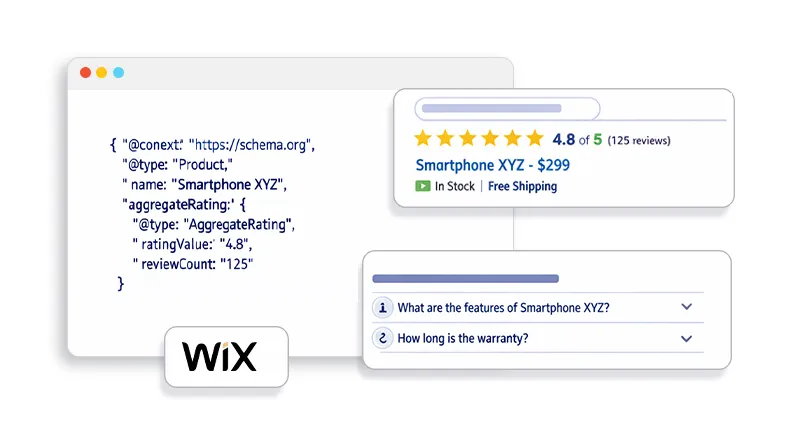
Using Wix schema markup for CTR allows website owners to enhance how their pages appear in search results. Instead of showing only a title and description, schema markup can enable rich snippets such as review stars, FAQs, product prices, and breadcrumbs. These enhanced results provide additional context that helps users quickly understand what a page offers.
Research consistently shows that rich snippets significantly improve engagement. According to research, websites using schema markup see an average CTR increase of approximately 20-30%. For Wix site owners, implementing structured data for Wix SEO can make listings more visible, improve credibility, and ultimately encourage more users to click through to the website.
What Is Schema Markup and Why Does It Matter for CTR
Schema markup is a type of structured data that helps search engines better understand the context of your webpage. Instead of relying only on visible text, structured data provides machine-readable information that explains what the content represents, such as a product, article, review, or FAQ.
This markup follows the standardized vocabulary maintained by Schema.org and is typically implemented using JSON-LD, the format recommended by Google. When search engines clearly interpret your content, they may display enhanced search results known as rich snippets.
Rich snippets can include elements such as:
- Review ratings
- FAQ dropdowns
- Product pricing and availability
- Article details, such as the author or the publishing date
- Breadcrumb navigation
These enhancements make a listing more informative and visually prominent in search results. For Wix site owners, implementing Wix SEO schema markup helps search engines understand page content more accurately, which can lead to richer search listings and ultimately improve the chances of users clicking your result.
Understanding Wix Schema Markup for CTR
When users search on Google, they rarely read every result carefully. Most people quickly scan the search page and choose the listing that looks the most useful, relevant, and trustworthy. Because of this behavior, how your result appears in the search results can strongly influence whether someone clicks it.
This is where Wix schema markup for CTR becomes valuable. By adding structured data to your pages, you help search engines display richer and more informative search listings. Instead of showing only a standard title and description, your result can include extra details that immediately communicate the value of your page.
For example:
| Without Schema | With Schema |
|---|---|
| Basic title and meta description | Title + star rating + review count |
| Standard listing | FAQ dropdowns under the result |
| Simple blue link | Product price and availability |
These enhanced elements make your listing more informative and visually prominent in search results. As a result, Wix rich snippets often attract more attention than standard listings. Rich results also occupy more space on the search page and provide useful context before the click, making it easier for users to decide that your page is the one they want to visit.
How Schema Markup Increases Click-Through Rates
To understand how Wix schema markup for CTR works, it’s helpful to see how search users behave. Users don’t read every result, they scan for signals that indicate relevance and trust. Schema markup helps by providing those signals.
1. Rich Snippets Improve Visual Visibility
Listings with rich snippets immediately stand out in search results. Star ratings, images, and FAQ dropdowns create a larger and more informative result that attracts user attention.
Research shows that rich results receive a larger share of clicks than standard results, even when ranking positions remain the same.
2. Schema Builds Trust Before the Click
Users often hesitate to click results that look unclear or generic.
However, when your listing shows:
- Ratings
- Reviews
- Product availability
- Structured FAQs
Users perceive the result as more trustworthy. This psychological effect often leads to higher CTR.
3. Structured Data Improves Relevance Signals
Schema markup helps Google understand the context of your page.
For example:
- A tutorial can be marked as HowTo schema
- A product page can use Product schema
- Blog content can include Article schema
Because search engines understand the content better, your listing may become eligible for additional SERP features, increasing visibility.
These enhancements make a listing more informative and visually prominent in search results. For Wix site owners, implementing Wix SEO schema markup helps search engines understand page content more accurately, which can lead to richer search listings and ultimately improve the chances of users clicking your result.
To fully understand how structured data works, it’s helpful to start by understanding Wix schema markup deeply and how search engines interpret structured data on your website.
Types of Schema Markup That Can Improve CTR on Wix
Not every type of schema markup delivers the same impact. The effectiveness of structured data often depends on the type of page and the intent behind the search. Choosing the right schema format helps search engines present your content more clearly and increases the chances of earning Wix rich snippets that attract clicks.
Below are some of the most useful schema types for Wix structured data SEO.
FAQ Schema
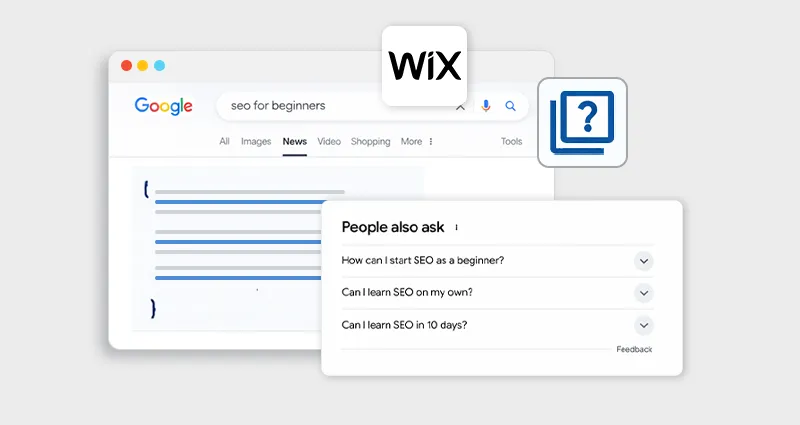
FAQ schema allows search engines to display expandable questions and answers directly under your search listing. When implemented correctly, these dropdown sections provide users with quick answers before they even visit the page.
Benefits include:
- Occupying more space on the search results page
- Addressing common user questions instantly
- Increasing perceived authority and relevance
Because the result becomes more informative, it often stands out among standard listings.
Review Schema
Review schema addsv star ratings and review counts to search results. These visual signals immediately communicate credibility and social proof.
This type of schema works especially well for:
- Product pages
- Service-based businesses
- Software or SaaS tools
Since users often rely on ratings when making decisions, review stars can strongly influence whether someone clicks your result.
Product Schema
Product schema is designed for e-commerce pages. It can display key details such as:
- Price
- Availability or stock status
- Ratings and reviews
Showing this information directly in search results helps users evaluate the product quickly, making them more likely to click if the offer matches their needs.
Article Schema
For blogs, guides, and editorial content, span.text-highlight] Article schema helps search engines better understand the structure and authorship of the content. It can highlight details such as:
- Author name
- Publication date
- Featured image
This improves how blog posts appear in search results and supports stronger Wix rich snippets SEO for content-driven websites.
How to Add Schema Markup in Wix
Adding structured data to Wix is easier today than it was a few years ago. You can add schema markup in Wix by inserting JSON-LD structured data in the page’s advanced SEO settings or by using schema markup tools to generate and manage schema automatically across your website.
Method 1: Add JSON-LD Manually
Steps:
- Open your Wix dashboard
- Go to Page Settings
- Select SEO Advanced Settings
- Add your JSON-LD schema code
Example:
<script type="application/ld+json">
{
"@context": "https://schema.org",
"@type": "Article",
"headline": "How to Increase CTR with Schema Markup in Wix",
"author": {
"@type": "Person",
"name": "Author Name"
},
"publisher": {
"@type": "Organization",
"name": "Website Name"
}
}
</script>
JSON-LD is preferred because it is easy for search engines to parse.
Best Practices for Wix Rich Results Optimization
To maximize results from Wix rich results optimization, follow these best practices:
Use Schema That Matches Page Intent
The schema type must match the content.
example:
| Page Type | Recommended Schema |
|---|---|
| Blog post | Article schema |
| Product page | Product schema |
| Tutorial | HowTo schema |
| FAQ page | FAQ schema |
Incorrect schema may be ignored by Google.
Use Google Validation Tools
Always test your markup.
Recommended tools:
These tools help ensure your schema is eligible for rich snippets. For larger websites, managing structured data manually can become complex. In these cases, tools like a Wix Schema App can help automate structured data generation and maintain consistent markup across pages.
Track CTR Improvements in Search Console
Once the schema is implemented, monitor performance.
Use Google Search Console to track:
- impressions
- clicks
- CTR changes
CTR improvements usually appear within a few weeks once rich results begin appearing.
Does Schema Markup Increase CTR on Google?
Yes, but mostly indirectly. Schema markup itself is not a direct ranking factor, meaning adding structured data will not automatically move your page higher in search results. However, it can significantly influence how your listing appears on the search engine results page (SERP), which plays an important role in helping improve click through rate.
When structured data is implemented correctly, search engines may display rich results such as review stars, FAQs, product details, or breadcrumbs. These elements add more context to a listing and make it stand out compared to standard results that only show a title and meta description.
Because users can quickly see helpful information directly in the search results, they are more likely to trust the listing and click it. By making your search result clearer, more informative, and visually prominent, schema markup helps improve click through rate and increase engagement, even if your ranking position remains the same.
Common Mistakes When Adding Schema in Wix
Even though schema markup is powerful, incorrect implementation can prevent search engines from generating rich results for your pages. Even small mistakes in structured data can cause Google to ignore the markup completely. Some of the most common issues include:
Using incorrect schema types
For example, applying Product schema to a blog post or guide can confuse search engines about the page’s purpose. Schema types should always match the actual content of the page so search engines can interpret it correctly.
Missing required properties
Many schema types require specific fields to work properly. For instance, a review or Product schema often needs properties like rating value, review count, price, or availability. If these required attributes are missing, the structured data may not qualify for rich results.
Invalid JSON-LD code
Even a small formatting mistake, such as a missing bracket, comma, or quotation mark, can break the schema markup. When the JSON-LD code is invalid, search engines may not be able to read the structured data at all.
Always validate your markup using structured data testing tools after implementation to ensure it is correctly formatted and eligible for rich results.
Conclusion
Improving search rankings is important, but earning the click is what truly drives traffic. Implementing Wix schema markup for CTR helps transform ordinary search listings into informative, visually engaging results that attract attention.
By using structured data, Wix websites can generate rich snippets, improve search visibility, and build trust with users before they even visit the page. When combined with strong content and accurate schema implementation, structured data becomes one of the most effective ways to improve Google CTR and organic traffic, without needing to change your rankings.
FAQs
Q1: What is Wix schema markup?
Wix schema markup is structured data added to a Wix website that helps search engines understand page content and generate rich snippets in search results.
Q2: Does schema markup increase CTR on Google?
Yes. While schema does not directly affect rankings, it enables rich snippets that make search listings more attractive and informative, often increasing click-through rates.
Q3: How do rich snippets improve CTR?
Rich snippets display additional information such as ratings, FAQs, and pricing. These elements make listings more visible and trustworthy, encouraging users to click.
Q4: What schema types work best for Wix websites?
Common schema types include:
- Article schema
- Product schema
- FAQ schema
- Review schema
- Breadcrumb schema
The best type depends on the page content.
Q5: How do I add schema markup in Wix?
You can add schema markup by inserting JSON-LD code in advanced SEO settings or by using a Wix Schema App that automatically generates structured data.
Q6: How long does it take for a schema to appear in Google results?
After implementing schema markup, it may take a few days to several weeks for Google to crawl the page and display rich results.
Q7: Can schema markup improve Wix SEO?
Yes. Schema improves how search engines interpret content and enhances search listings with rich results, which can increase CTR and organic traffic.








 Wix Schema
 Squarespace Schema
 BigCommerce Schema
 Shopify Schema
 Hubspot Schema
 Webflow Schema
 GoHighlevel Schema
 Duda Schema
 Weebly Schema