

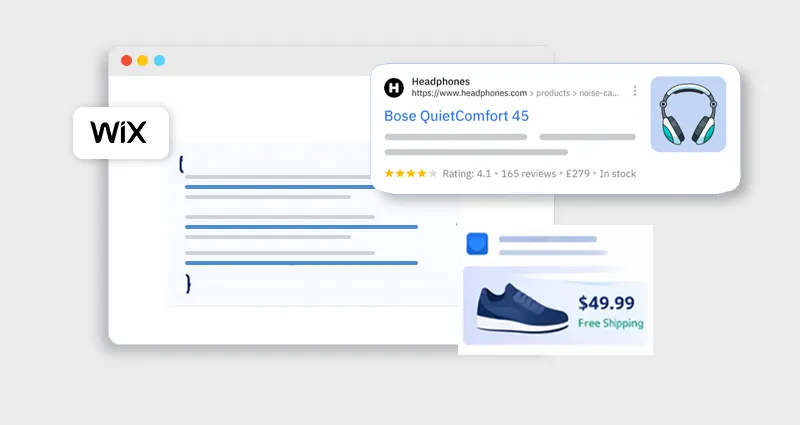
If you’re using Wix and trying to improve your SEO, you’ve probably come across Wix schema markup, but figuring out what to use (and how to implement it) can feel overwhelming.
Not all schema types deliver the same results, and adding the wrong Wix structured data can do more harm than good. The key is choosing the right schema for your content and implementing it correctly.
In this guide, we’ll break down the best schema types for Wix, share practical Wix schema markup examples, and show you exactly how to add schema markup in Wix without technical confusion.
Understanding Wix Schema Markup (Why It Matters First)
Before jumping into the best schema types for Wix, it’s important to get clear on what you’re actually implementing.
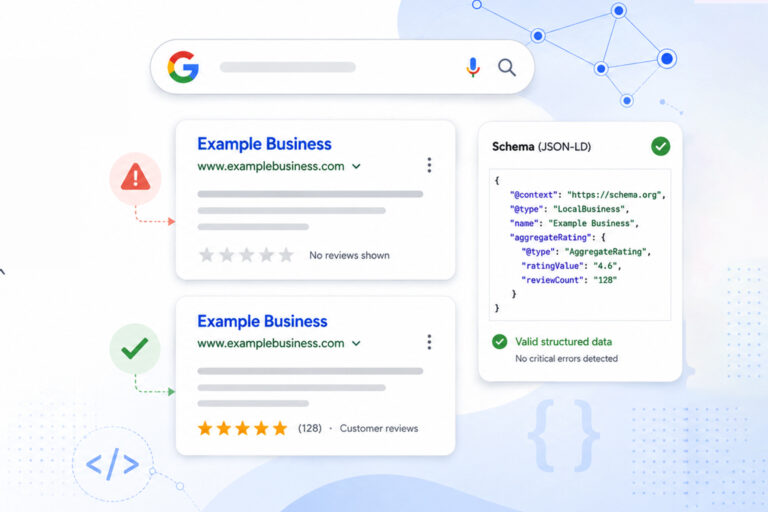
Wix schema markup is a form of structured data (usually in JSON-LD format) that helps search engines interpret your website content more accurately. Instead of guessing what your page is about, Google gets explicit signals, whether it’s a product, blog post, FAQ, or business.
From experience working on multiple Wix SEO projects, one thing is consistent:
Sites that implement Wix structured data correctly tend to get:
- Higher click-through rates (CTR)
- Enhanced listings (rich snippets)
- Better indexing clarity
This isn’t about “ranking hacks.” It’s about improving how your pages appear in search.
What Schema Markup Should You Use on Wix?
There’s no one-size-fits-all answer. The best schema types for Wix depend on your website type and goals.
Here’s a simple mapping:
| Website Type | Recommended Schema |
|---|---|
| E-commerce store | Product, Review, Offer |
| Blog | Article, FAQ |
| Local business | LocalBusiness, Organization |
| Service site | Service, FAQ |
| Content-heavy site | Breadcrumb, Article |
The key is alignment. Your Wix SEO schema should match the intent of each page, not just be added for the sake of it.
Best Schema Types for Wix Websites (With Examples)
Let’s break down the most effective schema types, when to use them, and how they actually look in practice.
1. Product Schema (For Wix Stores)
If you run a Wix store, this is non-negotiable.
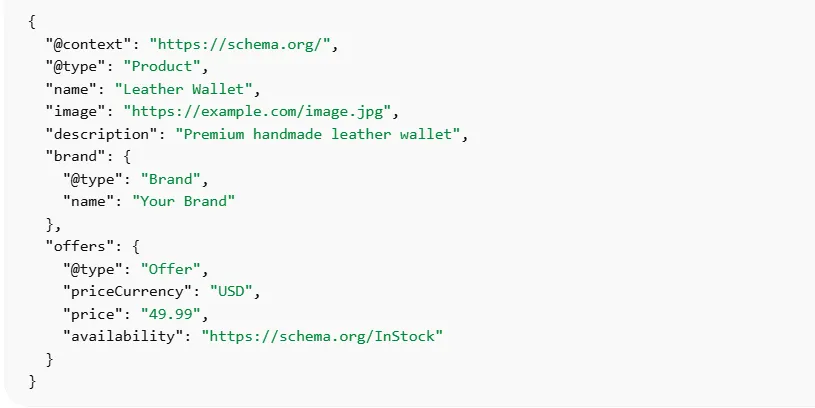
Product schema enables:
- Price display in search results
- Availability (In stock / Out of stock)
- Star ratings
Example: Wix JSON-LD Schema Markup
Expert tip:
Many Wix themes add basic product schema automatically, but they often miss key fields like brand, review, or aggregateRating. Enhancing these manually or via a Wix schema app can unlock full Wix rich snippets.
2. FAQ Schema (For Informational & Service Pages)
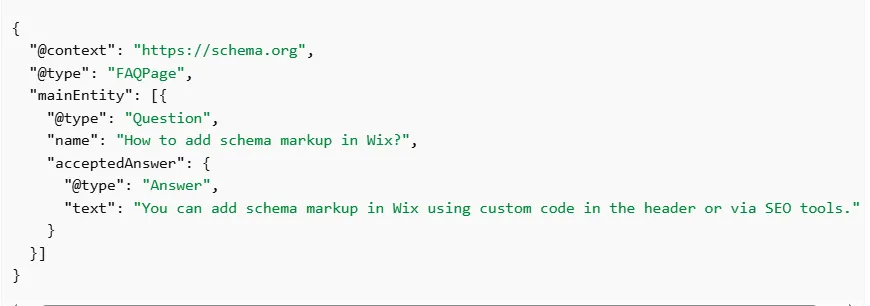
The FAQ schema is one of the easiest wins in structured data for Wix SEO.
It allows your questions and answers to appear directly in search results.
Example
Real-world insight:
FAQ schema works best when the answers are concise and match actual search queries (People Also Ask). Avoid stuffing too many FAQs, it reduces impact.
3. Local Business Schema (For Local SEO)
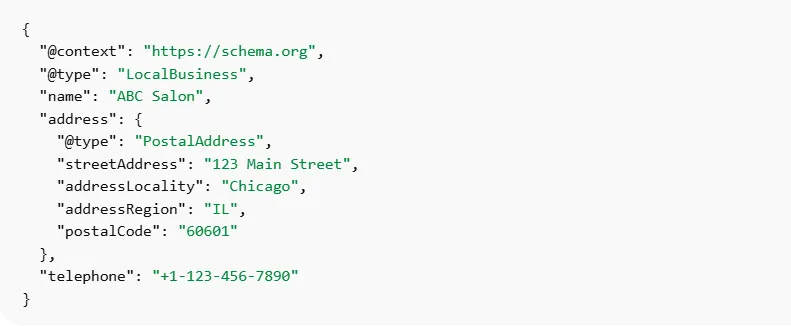
If your Wix site represents a business with a physical presence, this schema is critical.
It helps Google connect your site with local search results and map listings.
Example
Best practice:
Keep this consistent with your Google Business Profile. Inconsistent data weakens trust signals.
4. Article Schema (For Blogs & Content Pages)
If you’re publishing blogs, guides, or resources, Article schema helps search engines understand your content type and authority.
Example

It supports better indexing and can improve eligibility for enhanced search features.
5. Breadcrumb Schema (For Site Structure Clarity)
Breadcrumb schema improves navigation in search results and gives Google a clear site hierarchy.
Example

Hidden benefit:
It reduces bounce rates by helping users understand where they are before clicking.
6. Organization Schema (For Brand Identity)
This schema defines your business as an entity.
It’s especially useful for:
- Branding
- Knowledge panel signals
- Trust building
How to Add Schema Markup in Wix (Step-by-Step)
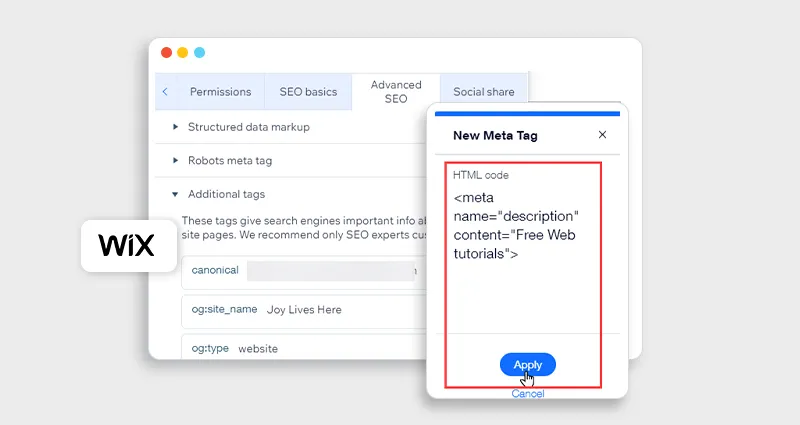
One of the most common questions is: how to add schema markup in Wix without breaking your site or causing errors? The key is choosing the right method based on your technical comfort and the level of control you need.
Here are the most reliable ways to implement Wix schema markup safely and effectively:
Method 1: Using Wix Custom Code (Most Flexible)
This method gives you full control over your Wix JSON-LD schema markup, making it ideal for advanced users or custom implementations.
Steps:
- Go to Settings → Custom Code
- Paste your JSON-LD schema
- Place it in the head section
- Choose whether to apply it site-wide or on specific pages
Why this works best:
It allows precise targeting and complete customization of your schema markup for a Wix website, which is essential for complex setups like combining Product + FAQ schema.
Method 2: Using Wix SEO Tools (Built-in Option)
Wix automatically adds basic Wix structured data for certain page types, including:
- Products
- Blog posts
- Events
What to expect:
This is a good starting point, but the default Wix SEO schema is often limited. It may miss important properties like reviews, FAQs, or detailed business information.
Best use case:
If you’re just getting started with understanding Wix schema markup, this method covers the basics without needing technical setup.
Common Mistakes to Avoid in Wix Schema Implementation
Even with the right tools, small mistakes can prevent your Wix rich snippets from appearing.
From real-world audits, these are the most common issues:
- Adding schema that doesn’t match the actual page content (e.g., Product schema on a blog page)
- Duplicate schema types, especially multiple Product schemas on the same page
- Missing required properties like price, availability, or author
- Invalid JSON formatting (extra commas, incorrect nesting)
- Using outdated or unsupported schema types
Pro tip:
Always test your Wix JSON-LD schema before publishing. Use:
- Google Rich Results Test
- Schema Markup Validator
- Catching errors early ensures your Wix structured data is eligible for rich results and performs as expected.
Advanced Tips for Better Wix Structured Data SEO
Combine schema types intelligently (e.g., Product + FAQ)
Pair relevant schema types to enhance context and increase rich result eligibility without creating conflicts or duplicate structured data signals.
Use a dynamic schema for large catalogs
Automate schema generation for products or pages to ensure consistency, scalability, and accurate structured data across large Wix websites.
Keep the schema updated with content changes
Ensure your schema reflects real-time content updates like pricing, availability, or business details to maintain accuracy and trust signals.
Monitor performance in Google Search Console
Track impressions, clicks, and rich result performance to identify issues, optimize schema strategy, and improve overall Wix SEO results.
Conclusion
Implementing the right Wix schema markup isn’t about adding as many schema types as possible, it’s about choosing the right ones for your content and executing them correctly.
When done properly, Wix structured data helps search engines understand your site better, unlocks Wix rich snippets, and improves how your pages appear in search results.
Start with the essentials, Product, FAQ, Local Business, and Article schema, then refine your Wix schema implementation based on real performance data.
FAQs
What is Wix schema markup?
Wix schema markup is structured data added to your website to help search engines understand your content and display rich results.
How do I add schema markup to a Wix website?
You can add schema using custom code, built-in Wix SEO settings, or a Wix schema app, depending on your technical level.
Which schema type is best for Wix SEO?
It depends on your site, but Product, FAQ, Local Business, and Article schema are among the most effective.
Does Wix automatically add structured data?
Yes, Wix adds basic structured data for certain pages, but it’s often limited and may require enhancement.
Can schema markup improve rankings?
Not directly, but it improves visibility and CTR through rich snippets, which can indirectly impact performance.
What is Wix JSON-LD schema markup?
It’s the recommended format for adding structured data in Wix using JSON-LD scripts in the page header.
How do I test my Wix schema?
Use tools like Google Rich Results Test or Schema Validator to check for errors and eligibility.
Is using a Wix schema app worth it?
Yes, especially for non-technical users or large websites where manual implementation becomes complex.







 Wix Schema
 Squarespace Schema
 BigCommerce Schema
 Shopify Schema
 Hubspot Schema
 Webflow Schema
 GoHighlevel Schema
 Duda Schema
 Weebly Schema