


Adding structured data to your website is a smart SEO move, but without proper validation, it’s just code sitting in the background. Many Webflow users implement schema markup expecting rich results, only to find that nothing appears in search.
The missing piece? Webflow schema markup testing.
Search engines like Google rely on clean, valid, and complete structured data to generate rich snippets. Even a small syntax error, misplaced script, or missing property can make your schema invisible.
This guide is designed to go beyond basics. You’ll learn not only how to test Webflow schema markup, but also how to interpret results, fix issues, and ensure your structured data consistently performs.
Understanding Webflow Schema Markup
At its core, Webflow schema markup is structured data added to your website to help search engines better understand your content. It is typically written in JSON-LD (JavaScript Object Notation for Linked Data) and embedded within your site’s code.
In Webflow, schema can be implemented in multiple ways:
- Inside the Custom Code (Head or Body sections)
- Using Embed elements on specific pages
- Dynamically via CMS collections
Each method affects how search engines crawl and render your schema, which is why Webflow structured data testing becomes essential.
Why JSON-LD Is Preferred
Google officially recommends JSON-LD because:
- It is easier to implement and maintain
- It separates content from presentation
- It reduces the risk of breaking the HTML structure
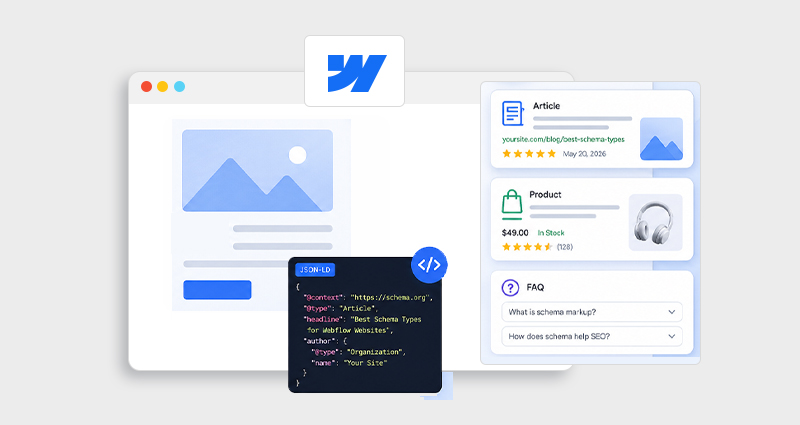
Examples of Schema Types in Webflow
Depending on your site, you might use:
- Organization schema (brand information)
- FAQ schema (questions and answers)
- Product schema (pricing, availability)
- Article schema (blogs and news content)
However, implementing these correctly is only the first step. Without Webflow schema validation, even a well-written schema may fail to produce results.
Why Webflow Schema Markup Testing Matters
Schema markup directly impacts how your content appears in search, but only if it’s valid.
1. Ensures Search Engine Readability
Search engines must be able to parse your structured data without errors. If your schema contains invalid syntax or incorrect nesting, it will simply be ignored.
2. Determines Rich Result Eligibility
Google has strict requirements for rich snippets. For example:
- The FAQ schema must follow the content guidelines
- Product schema must include price and availability
- Review schema must not be misleading
Webflow rich snippets testing helps confirm whether your schema qualifies.
3. Prevents Hidden SEO Loss
Many websites unknowingly lose traffic because:
- Schema is not detected
- Errors go unnoticed
- Incorrect schema types are used
Regular Webflow schema markup testing ensures your SEO efforts are not wasted.
4. Helps Debug Implementation Issues
Testing allows you to identify:
- Incorrect placement of code
- JavaScript rendering issues
- Conflicts between multiple schema blocks
This is especially important for complex or dynamic Webflow sites.
Step-by-Step: How to Test Webflow Schema Markup
Follow this practical, step-by-step process to perform accurate Webflow schema markup testing, identify errors early, and ensure your structured data is fully optimized for search engine visibility and rich results.
Step 1: Publish Your Webflow Site
Before you begin testing, ensure your site is live. Webflow’s preview mode does not always reflect how search engines see your content.
Why this matters:
- The Schema may not render properly in the preview
- External tools cannot access unpublished pages
- CMS-driven schema only works on published URLs
Step 2: Use Google Rich Results Test
This is the most important tool for Webflow rich snippets testing.
What it does:
- Detects structured data on your page
- Shows which rich results your page is eligible for
- Highlights errors and warnings
How to interpret results:
- Valid: Schema is eligible for rich results
- Warnings: Optional fields missing (still usable)
- Errors: Critical issues preventing eligibility
Pro Insight:
A “valid” result does not guarantee rich snippets, it only means your page qualifies.
Step 3: Perform Webflow JSON-LD Validation
Next, validate the technical structure of your schema using a JSON-LD schema validator or a reliable Webflow Schema Markup tool.
This step focuses on:
- Syntax correctness
- Proper formatting
- Data structure integrity
Common issues detected:
- Missing commas or brackets
- Incorrect data types
- Invalid nesting of properties
Even a single syntax error can break your entire schema block, making this step crucial in Webflow structured data testing.
Step 4: Use a Schema Markup Validator for Deep Analysis
A schema markup validator goes beyond syntax and checks:
- Compliance with schema.org standards
- Correct schema types
- Required vs optional properties
Example: Product Schema
| Property | Required | Example |
|---|---|---|
| name | Yes | Product title |
| price | Yes | 29.99 |
| availability | Yes | InStock |
| review | Optional | Ratings |
If required fields are missing, your schema won’t qualify for rich results.
Step 5: Monitor in Google Search Console
Once your schema is live and validated, ongoing monitoring is essential.
Inside Google Search Console:
- Check the Enhancements reports
- Track structured data performance
- Identify new errors after updates
Real-world insight:
The schema can break over time due to CMS changes or design updates, continuous Webflow schema validation is necessary.
Best Tools to Test Webflow Schema Markup
Choosing the right tools can significantly improve your workflow and ensure your structured data is both technically correct and eligible for rich results. Each tool serves a slightly different purpose, so using them together gives a more complete validation process.
1. Google Rich Results Test
Best for checking eligibility for rich snippets.
Google Rich Results Test is the most important tool for Webflow schema markup testing because it shows whether your structured data qualifies for rich results like FAQs, products, or breadcrumbs. It not only detects schema but also highlights critical errors and warnings that may prevent eligibility.
Use it for:
- Validating rich result eligibility
- Identifying missing required fields
- Previewing how Google interprets your schema
2. Schema Markup Validator
Best for full structured data validation.
This tool validates your schema against schema.org standards, ensuring your markup uses the correct structure, types, and properties. Unlike Google’s tool, it focuses more on correctness than eligibility.
Use it for:
- Verifying schema structure and hierarchy
- Checking required vs optional properties
- Ensuring compliance with schema.org
3. Google Search Console
Best for long-term performance tracking.
After implementation, Google Search Console helps monitor how your schema performs over time. It provides insights into detected structured data, errors, and improvements.
Use it for:
- Tracking structured data reports
- Monitoring errors after updates
- Measuring the performance of rich results
Expert Tip:
For accurate Webflow schema validation, always combine at least two tools, one to check rich result eligibility (like Google Rich Results Test) and another to verify technical accuracy (like a JSON-LD validator).
Common Webflow Schema Markup Errors (And Fixes)
Even small issues can break your schema, identifying and fixing them is key to effective Webflow schema markup testing.
1. Schema Not Detected
Problem: Search engines don’t recognize your schema
Cause: Incorrect placement or rendering issues
Fix:
- Place schema in the <head> section when possible
- Ensure it appears in rendered HTML
2. Invalid JSON Syntax
Problem: Schema fails to parse
Cause: Formatting errors
Fix:
Run your code through a JSON-LD validator before publishing
3. Missing Required Fields
Problem: Schema not eligible for rich results
Cause: Incomplete data
Fix:
Follow schema.org documentation and include all required properties
4. Duplicate or Conflicting Schema
Problem: Multiple schema blocks confuse search engines
Fix:
- Avoid duplicate schema types
- Merge related data into a single block
5. JavaScript Rendering Issues
Problem: Schema not visible to search engines
Fix:
- Ensure schema loads without requiring user interaction
- Test rendered HTML using browser DevTools
Best Practices for Webflow Schema Markup Validation
To maintain consistent results, follow these guidelines:
- Validate the schema after every update
- Keep the schema relevant to the page content
- Avoid overusing multiple schema types on one page
- Use JSON-LD instead of microdata
- Test across multiple pages, not just one
Key Insight:
Schema quality matters more than quantity. A single well-implemented schema can outperform multiple poorly configured ones.
Advanced Tips for Better Webflow Schema Testing
1. Test Dynamic CMS Schema
For CMS-driven sites:
- Verify that dynamic fields populate correctly
- Check multiple CMS items for consistency
2. Validate Template Pages
Don’t just test individual pages, test templates like:
- Blog posts
- Product pages
- Category pages
3. Use Schema Generators Carefully
A schema markup generator or JSON-LD schema generator can speed up implementation, but:
- They often include unnecessary fields
- They may not match your exact use case
Always follow up with Webflow schema markup testing.
4. Compare Rendered vs Source Code
Sometimes a schema appears in source code but not in rendered HTML.
Solution:
- Use browser DevTools
- Inspect the DOM after page load
How Webflow Schema Markup Testing Impacts SEO
Proper Webflow schema markup testing doesn’t directly boost rankings, but it plays a crucial role in improving how your pages appear and perform in search results.
Improved Click-Through Rates (CTR)
Rich snippets enhance your listings with additional details like FAQs, ratings, or pricing. These visual enhancements make your result stand out, increasing the likelihood of improved click-through rates on your page over competitors.
Better Content Understanding
Structured data helps search engines clearly interpret your content’s context, whether it’s a product, article, or organization. This improved understanding can lead to better matching with relevant search queries.
Higher Visibility in SERPs
Validated schema increases your chances of appearing in enhanced search features such as rich snippets, knowledge panels, or featured results. These placements often appear above traditional listings, improving overall visibility.
Reduced Errors and Compliance Risks
Consistent Webflow schema validation ensures your markup adheres to search engine guidelines. This reduces the risk of errors, manual actions, or ignored schema, keeping your structured data effective over time.
Key Insight:
Schema doesn’t guarantee rankings, but without proper Webflow structured data testing , you miss out on visibility opportunities that can significantly impact traffic and engagement.
Conclusion
Effective Webflow schema markup testing is not optional, it’s essential for unlocking the full value of structured data. By combining the right tools, thoroughly validating, and continuously monitoring performance, you ensure your schema works as intended.
Instead of treating schema as a one-time setup, approach it as an ongoing optimization process. This mindset will not only improve your chances of earning rich results but also strengthen your overall SEO foundation.
FAQs
Q1: How do I test Webflow schema markup effectively?
Use a combination of tools like Google Rich Results Test, schema markup validators, and JSON-LD validators to check eligibility, syntax, and structure.
Q2: Why is my Webflow schema not showing rich snippets?
This usually happens due to validation errors, missing required fields, or failure to meet Google’s rich result guidelines.
Q3: What is the difference between schema validation and testing?
Testing checks if the schema is detected and eligible for rich results, while validation ensures the code is technically correct.
Q4: Can I test schema markup before publishing in Webflow?
You can test code snippets, but accurate results require a live URL.
Q5: What is the best schema markup validator?
Google’s Rich Results Test for eligibility and schema.org validator for deeper analysis.
Q6: How often should I perform Webflow schema markup testing?
After every major update, CMS change, or schema modification.
Q7: Does schema markup guarantee rich snippets?
No, it only makes your content eligible. Google ultimately decides whether to display them.
Q8: What are the most common schema errors in Webflow?
Syntax issues, missing fields, incorrect placement, and duplicate schema.








 Wix Schema
 Squarespace Schema
 BigCommerce Schema
 Shopify Schema
 Hubspot Schema
 Webflow Schema
 GoHighlevel Schema
 Duda Schema
 Weebly Schema