TL;DR: Learn how to implement Shopify JSON-LD Schema Using Liquid to generate dynamic structured data for your store. This Shopify schema markup guide explains how to add JSON-LD in Shopify themes, create dynamic product schema, avoid common errors, and improve eligibility for rich snippets.
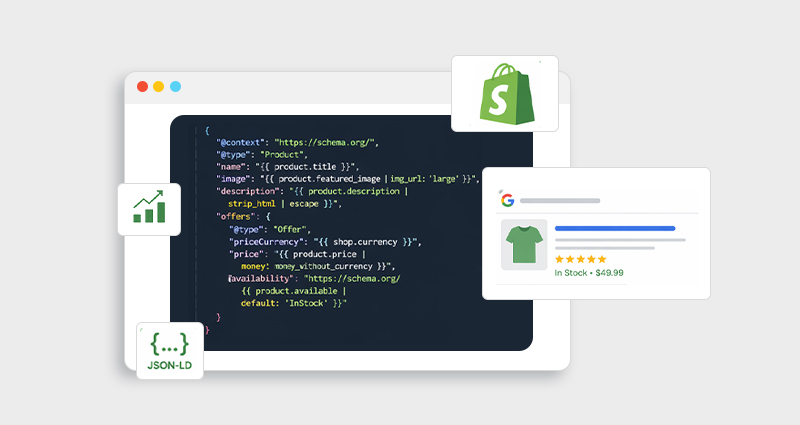
Shopify JSON-LD Schema Using Liquid is one of the most effective ways to implement dynamic structured data for a Shopify store. By combining JSON-LD schema with Shopify’s Liquid templating language, you can automatically generate structured data that pulls real product information like price, availability, images, and reviews directly from your store database.
Modern e-commerce SEO goes beyond keywords and backlinks. Search engines rely on structured data to better understand product details, which helps pages become eligible for rich results such as star ratings, price, stock availability, and product images in search results.
Instead of adding a static schema to every page, Shopify JSON-LD Schema Using Liquid allows you to create dynamic schema markup that updates automatically as product data changes. Liquid is Shopify’s templating language that enables dynamic schema by pulling real-time data directly from your store.
What Is JSON-LD Schema in Shopify?
JSON-LD (JavaScript Object Notation for Linked Data) is the structured data format recommended by Google for implementing schema markup.
It uses standardized vocabulary from Schema.org to describe content in a way search engines can understand.
For example, JSON-LD can tell search engines that a page contains:
A product
Its price
Stock availability
Reviews
Brand and images
When search engines interpret this information correctly, they can display enhanced search results called rich snippets.
Structured product schema helps search engines interpret product details like price, stock status, and reviews more accurately, increasing the chances of enhanced results appearing in search listings.
Why Shopify JSON-LD Schema Using Liquid Matters for SEO
Shopify JSON-LD Schema Using Liquid matters for SEO because it generates structured data dynamically using real product information from your store. Many Shopify themes include basic schema markup, but it is often incomplete or static. If you want to understand how different schema types work across a Shopify store, you can explore our detailed Shopify schema markup guide for a broader overview.
Dynamic schema markup in Shopify solves this problem by automatically generating structured data using store variables such as product title, price, availability, and images. This ensures the schema stays accurate and updates automatically whenever product data changes.
Benefits of Dynamic Schema Markup in Shopify
1. Accurate product information
Dynamic schema pulls real data from Shopify variables, such as:
product title
price
availability
variants
images
This keeps the schema aligned with the page content.
2. Better search visibility
Rich snippets display additional information like ratings, prices, and stock availability, helping listings stand out and attract more clicks.
Some implementations report CTR improvements when rich results appear, since enhanced listings visually stand out in SERPs.
3. Scalability for large catalogs
Instead of writing schema manually for every product, dynamic product schema Shopify setups apply automatically across the entire store.
4. Reduced schema errors
Dynamic schema ensures product data always matches visible content, which helps avoid structured data warnings.
What Is Shopify Liquid?
Shopify Liquid is the templating language used by Shopify to build and customize store themes. It acts as a bridge between the Shopify store database and the front-end design, allowing developers to dynamically display store data such as products, prices, images, and inventory directly within theme files.
In simple terms, Liquid enables Shopify themes to generate content dynamically instead of relying on static code. This makes it possible to automatically display updated product information across different pages without manually editing each page.
Liquid allows developers to insert dynamic store data into code using built-in variables and filters. These variables pull real-time data directly from Shopify’s backend and render it on the storefront.
For example:
Shopify Data
Liquid Variable
Product title
{{ product.title }}
Product price
{{ product.price }}
Product image
{{ product.featured_image }}
Product availability
{{ product.available }}
When these Liquid variables are used inside JSON-LD scripts, they generate dynamic structured data that automatically reflects the latest product details. This is what enables dynamic Shopify structured data using Liquid, ensuring that schema markup stays accurate as product information changes.
Static vs Dynamic Shopify Schema Markup
Understanding this difference is key to implementing Shopify JSON-LD schema correctly.
Type
Description
Limitations
Static Schema
Hardcoded schema for a single product
Requires manual updates
Dynamic Schema
Generated using Liquid variables
Automatically updates
For stores with dozens or hundreds of products, dynamic schema markup Shopify setups are essential.
Step-by-Step: Shopify JSON-LD Implementation Using Liquid
Now, let’s walk through how to add JSON-LD schema in Shopify theme files.
Step 1: Open Your Shopify Theme
Go to:
Shopify Admin → Online Store → Themes → Edit Code
Locate your product template, typically:
sections/main-product.liquid
or product.liquid
Step 2: Add JSON-LD Script Tag
Insert a JSON-LD script inside the product template.
This code dynamically pulls product data directly from Shopify.
While implementing Shopify JSON-LD Schema using Liquid manually gives you full control, it can become complex for large stores with hundreds of products. In such cases, using a Shopify schema app can automate structured data generation, reduce errors, and ensure your store always has optimized schema markup.
Dynamic Product Schema With Shopify Liquid (Advanced Example)
Here’s a more complete Shopify product schema Liquid implementation.
This creates dynamic schema markup Shopify developers rely on for scalable SEO.
Where to Place Shopify Schema Markup
The placement of Shopify schema markup is important because different pages on your store serve different purposes and require specific structured data types. Adding the correct schema to the appropriate page helps search engines better understand the content and context of each page.
Implementing schema strategically across key page types also improves the chances of earning rich results in search. Below is a quick overview of where different schema types should typically be placed within a Shopify store.
Page
Recommended Schema
Homepage
Organization, WebSite
Product pages
Product
Collection pages
ItemList
Blog posts
Article
Navigation
BreadcrumbList
Many Shopify themes include partial schema, but adding custom JSON-LD ensures full structured data coverage.
How to Test Your Shopify JSON-LD Schema
Once your schema is implemented, testing it is essential to ensure search engines can properly read and interpret your structured data. Even small errors in formatting or missing fields can prevent your pages from qualifying for rich results.
You can test your Shopify JSON-LD schema using the following tools:
These tools help verify whether your structured data is valid and eligible for enhanced search features. They typically confirm:
The schema type detected (such as Product or Breadcrumb)
Whether the required properties are present
If the page is eligible for rich results
In addition, monitoring the Enhancements and Structured Data reports in Google Search Console helps identify warnings, missing fields, or errors that may affect your Shopify rich snippets schema.
Common Mistakes in Shopify Schema Implementation
Even experienced developers can encounter issues when implementing Shopify schema markup. Small mistakes in structured data can lead to errors, warnings, or rich result ineligibility.
1. Duplicate schema
Sometimes multiple apps or themes generate schema markup simultaneously. This can create duplicate or conflicting structured data, which confuses search engines.
2. Incorrect price format
Product prices in the schema must match the price displayed on the page and follow the correct numeric format without currency symbols.
3. Missing required fields
A valid Shopify product schema usually requires essential properties such as:
name
image
price
availability
Missing these fields can prevent your product pages from qualifying for rich snippets.
4. Static schema
Hardcoded schema can quickly become outdated when product information changes. Using dynamic product schema with Shopify Liquid ensures the structured data updates automatically as product details are modified.
Best Practices for Shopify Structured Data Using Liquid
To maintain a clean, scalable, and SEO-friendly schema setup, it’s important to follow a few best practices when implementing Shopify structured data using Liquid.
Keep schema dynamic:
Always use Liquid variables instead of hardcoding values. A dynamic schema ensures product details like price, availability, and images update automatically whenever the store data changes.
Match page content
Structured data should accurately reflect the visible information on the page. If schema values differ from what users see, search engines may ignore the markup or flag it with warnings.
Avoid duplicate markup
If a Shopify schema app already generates structured data, remove any duplicate schema from your theme files to prevent conflicts or validation errors.
Validate regularly
Run periodic tests using Google’s Rich Results Test or a schema validator to catch errors early and ensure your Shopify schema markup remains eligible for rich results.
Advanced Implementation Tips for Shopify JSON-LD Schema Using Liquid
When implementing Shopify JSON-LD schema using Liquid, a few technical techniques can make your structured data more dynamic, flexible, and scalable.
Use JSON-LD format
Always implement schema using JSON-LD which is the structured data format recommended by Google. It keeps markup separate from HTML and is easier to maintain and update.
Leverage the structured_data Liquid filter
Shopify provides a structured_data filter that can automatically generate certain schema types for products and other objects. This can simplify implementation and reduce manual coding.
Use metafields for custom product attributes
Metafields allow you to include additional product details that are not available in the default Shopify fields. For example:
{{product.metafields.specs.material}}
This helps add structured data for technical specifications, dimensions, or ingredients.
Use dynamic Liquid variables
Instead of hardcoding values, use Liquid variables like:
{{ shop.name }}
{{ product.title }}
{{ product.price }}
This ensures the dynamic product schema with Shopify Liquid updates automatically whenever store data changes.
Validate schema regularly
After implementing the schema, test it using structured data validation tools to ensure the markup is correctly interpreted and eligible for rich results.
Conclusion
Implementing Shopify JSON-LD Schema Using Liquid is one of the most effective ways to strengthen technical SEO for an e-commerce store. By generating dynamic schema markup, Shopify stores can ensure product data stays accurate, scalable, and aligned with search engine guidelines.
When implemented correctly, structured data helps search engines interpret product information more clearly, which improves eligibility for rich results and enhances search visibility.
Whether you implement schema manually through Liquid or use a Shopify schema app, the key is maintaining accurate, validated structured data that evolves with your store.
FAQs
Q1: What is Shopify JSON-LD schema?
Shopify JSON-LD schema is structured data added to a Shopify store using the JSON-LD format to help search engines understand products, pricing, and reviews.
Q2: How does Shopify JSON-LD schema using Liquid work?
Liquid variables pull real product data from Shopify and automatically insert it into JSON-LD structured data, creating a dynamic schema for each page.
Q3: Does Shopify automatically add schema markup?
Some Shopify themes include basic schema markup, but it is often incomplete. Custom schema or apps are typically required for full implementation.
Q4: What schema types are important for Shopify stores?
The most valuable schema types for Shopify include:
Product schema
Breadcrumb schema
Organization schema
FAQ schema
These help improve search visibility and eligibility for rich results.
Q5: Can Shopify rich snippets increase click-through rates?
Yes. Rich snippets display additional product information such as price, ratings, and availability, which can improve visibility and attract more clicks.
Q6: Should I use a Shopify schema app or manual coding?
It depends on your store size and technical expertise. Manual implementation provides more control, while a Shopify schema app simplifies setup and maintenance.
Q7: Where should I add JSON-LD in a Shopify theme?
Most schema markup is added inside theme template files such as:
product.liquid
main-product.liquid
theme.liquid
These files allow dynamic schema generation using Liquid variables.
Ishan Makkar is a web performance and structured data specialist and the founder of JSON Schema App.
He helps businesses implement scalable, AI-ready schema strategies that improve search visibility,
strengthen Knowledge Graph presence, and drive measurable SEO growth.
“The agent doesn’t return ten blue links… it pulls from structured business data… to complete the job.”
- Sundar Pichai
JSON Schema App
automatically detects, fixes, and manages structured data to help search engines and AI understand your website, improving visibility and rich results.
Try our Other Product
Website Speedy is a SaaS-based website optimization tool that instantly reduces website loading times.
This tool allows you to optimize images automatically on any platform, including Wix, Shopify, BigCommerce, and more.










 Wix Schema
 Squarespace Schema
 BigCommerce Schema
 Shopify Schema
 Hubspot Schema
 Webflow Schema
 GoHighlevel Schema
 Duda Schema
 Weebly Schema