

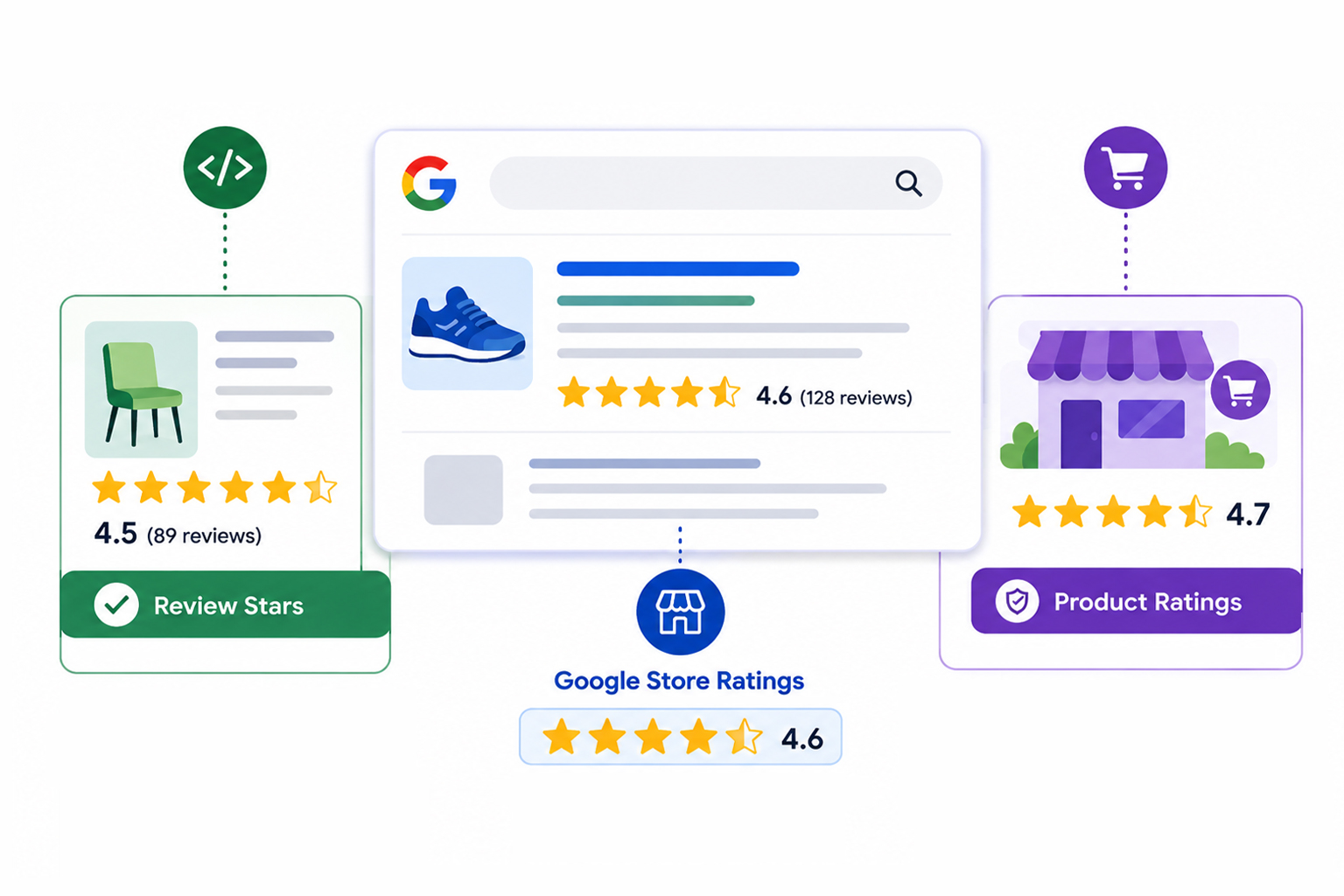
Search for almost any product or service on Google, and you’ll see stars across the results, under organic listings, next to domain names, beneath ads. They all look identical. They are not. Some come from structured data a site owner added to a page. Others come from a Google review program that has nothing to do with the website’s code at all.
This confusion has a real cost. Businesses add schema markup expecting stars under their ads, or sign up for review platforms expecting stars on their blog posts, fixing the wrong system in both cases. This guide separates the three star types, explains where each one comes from, and clears up the Google Store ratings vs seller ratings naming mess along the way.
Quick Answer: Google Store Ratings vs Seller Ratings vs Review Stars
First, the naming confusion: Google Store Ratings and Google Seller Ratings are the same program, just old and new names for one system. The real difference is between that program and review stars, and this table shows exactly where they diverge.
| Review Stars (Review Snippets) | Google Store Ratings / Seller Ratings | |
|---|---|---|
| What it rates | A specific product, service, or item on a page | Your business as a whole |
| Data source | Reviews on your own site, marked up with schema | Google Customer Reviews + Google-approved review partners |
| Where it appears | Organic search results, under your page listing | Google Ads, Shopping, and organic results next to your domain |
| Does schema control it? | Yes, it requires valid JSON-LD markup | No, schema has zero influence |
| Are they the same thing? | — | Yes. Google renamed Seller Ratings to Store Ratings |
What Do Google Review Stars, Store Ratings, and Product Ratings Mean?
Google can show several types of star ratings across Search, Shopping, and ads. The important distinction is where the rating comes from and what it actually measures. Review stars can come from eligible structured data on a page, while Store Ratings and Product Ratings are generated from Google’s own review and shopping systems.
Review Stars (Review Snippets)
Review stars, also called review snippets, are the stars and rating information Google may show with eligible pages in Search. They can appear when Google finds valid review or rating structured data that follows its guidelines.
You can add review or AggregateRating markup to an eligible page, such as a product page, and Google may use that information to create a review snippet. The markup makes the page eligible; it does not guarantee that stars will appear in search results.
The key idea: review stars are page-level and self-managed. You collect the reviews, you add the markup, and Google decides whether to display the result.
Google Store Ratings and Google Seller Ratings
Here’s where most of the confusion lives: Google Store Ratings and Google Seller Ratings are the same program. Google’s own documentation now uses “store ratings,” while the older “seller ratings” name still appears in the Google Ads interface and dominates PPC conversations, so both terms circulate freely.
Unlike review stars, this rating evaluates your entire business, including shipping, support, and the overall transaction experience. It runs entirely on Google’s side. There is no code you add to trigger it.
One recent shift raises the stakes. Seller ratings were historically associated with ads, but in October 2024, Google expanded Store Ratings to Search in Australia, Canada, India, and the UK, after they were already available in the US. Store Ratings can now appear alongside eligible search results when people are shopping on Google, so the Google Store Ratings vs Seller Ratings question is no longer just a paid-search topic.
Product Ratings vs Store Ratings: What’s the Difference?
If you sell through Google Shopping, separate one more pair: product ratings vs store ratings. Product ratings attach to a specific item, store ratings attach to your business. Product reviews are matched by the product’s GTIN, so they apply to that product across all sellers, which is why the review count in search results often differs from what your own site shows. Both can appear on the same Shopping listing at once.
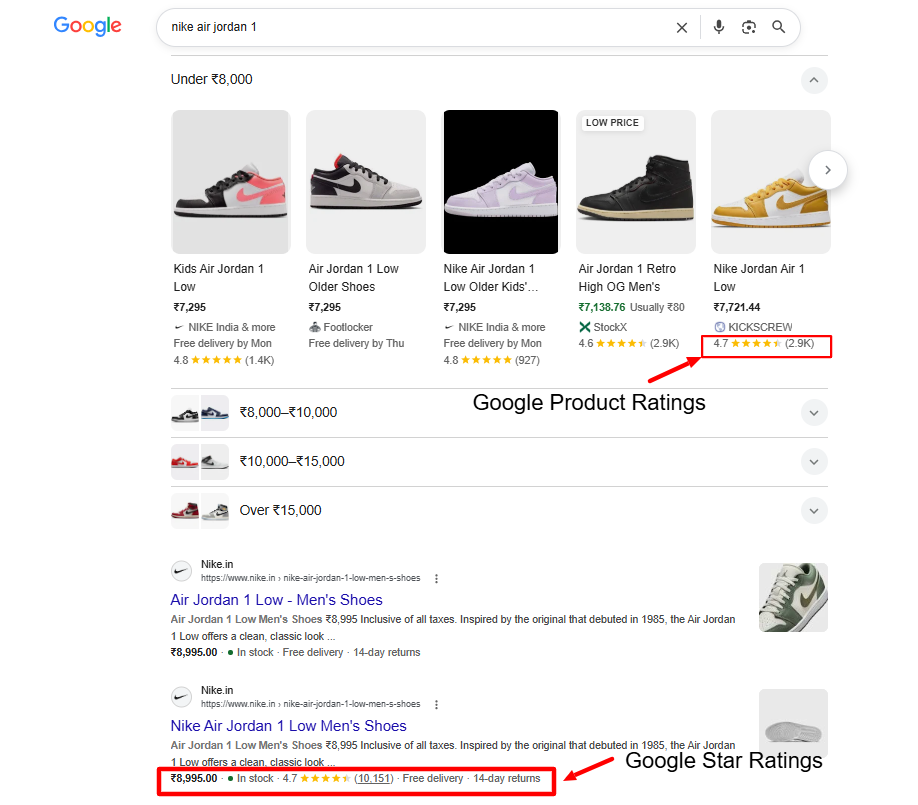
Where Do Organic Review Stars Come From?
The organic review stars Google displays under your listings come from one source: valid structured data describing real reviews on your page. For an eCommerce product page, that typically means Product schema with an AggregateRating:
{
"@context": "https://schema.org",
"@type": "Product",
"name": "Acme Standing Desk",
"aggregateRating": {
"@type": "AggregateRating",
"ratingValue": "4.7",
"reviewCount": "212"
}
}
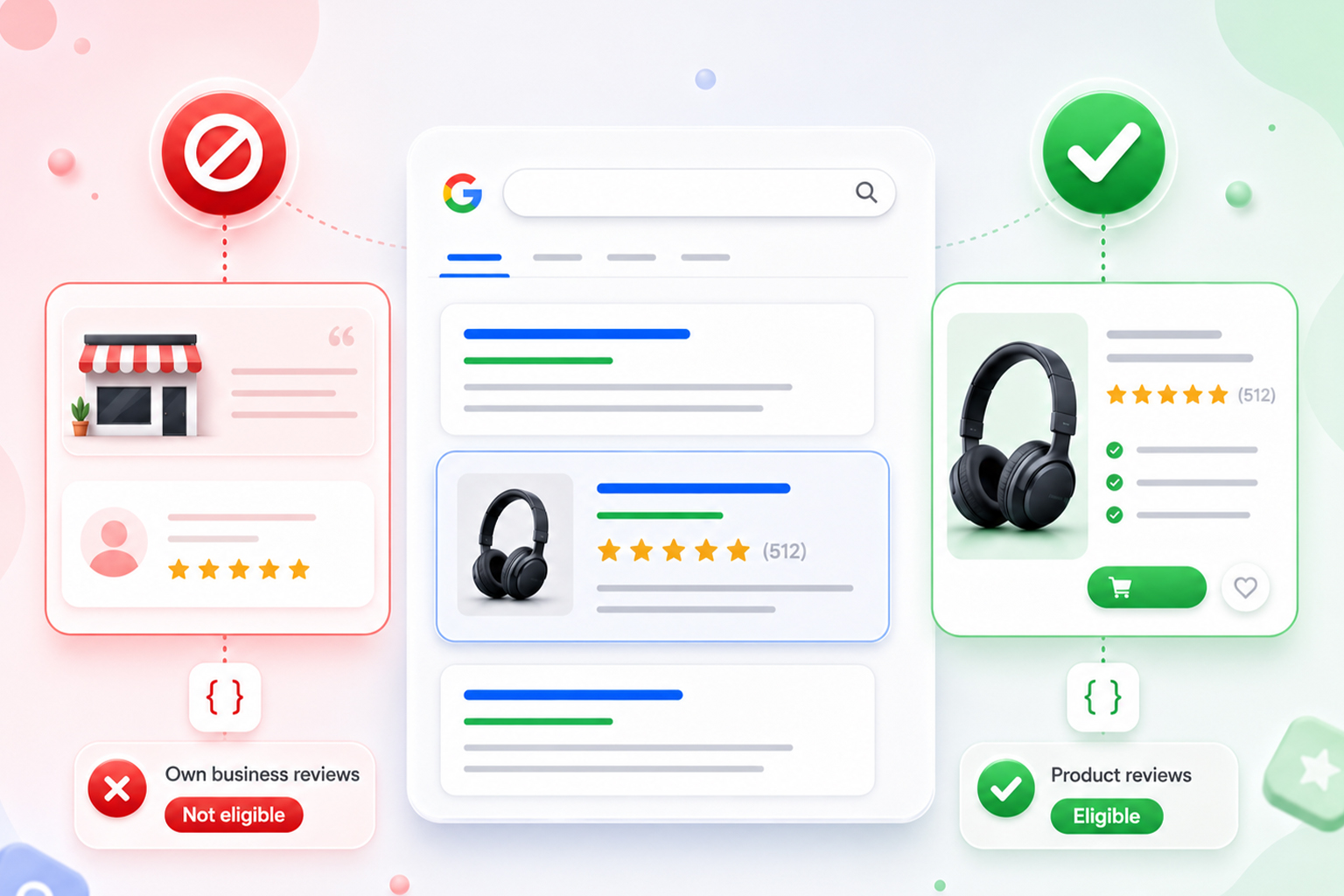
Service businesses and SaaS companies can do the same on service and software pages, with one major restriction. In 2019, Google stopped showing stars for what it calls self-serving reviews: when a review about entity A sits on the website of entity A, Google no longer displays review rich results for LocalBusiness and Organization schema types. In plain terms, you can’t mark up testimonials about your own company on your own homepage and earn stars.
Product and Software App are among the types Google supports for review snippets, while self-serving reviews about your own organization or local business are not eligible for this feature.
Also important: valid markup makes you eligible, but it’s never guaranteed. Google chooses when stars appear based on query, page quality, and its own judgment. Confirm your markup passes Google’s Rich Results Test, then focus on how to get rich snippets on Google the right way: genuine reviews, accurate markup, ongoing validation.
Where Do Google Seller Ratings Come From?
So where do Google seller ratings come from, if not your website? From Google’s own review pipeline. As per Google’s documentation, the rating draws on Google Customer Reviews (a free program that collects post-purchase reviews for merchants), aggregated metrics from Google-led shopping research, and shopping reviews for your store domain from third-party sources, meaning Google-approved review partners like Trustpilot, Reviews.io, or Feefo.
There are eligibility requirements, but there isn’t one universal review-count threshold for every merchant. Google says the number of eligible reviews needed can vary by merchant, and reviews are evaluated on a country basis. For ratings to appear in a particular country, Google needs enough eligible reviews from that country to calculate a Store Rating. For ads, an additional requirement is an average composite rating of at least 3.5 stars.
There are thresholds. For seller ratings in Google Ads placements, you generally need an average rating of 3.5 stars or higher, and the count is country-specific, so reviews from one country don’t trigger the rating in another. The commonly cited baseline is around 100 eligible reviews within 12 months per country, and Google’s own data shows ads with seller ratings earn roughly 10% higher average click-through rates, which is why advertisers care so much about qualifying.
How to check your current rating: Google exposes your standing at a public URL. Visit https://customerreviews.google.com/v/merchant?q=yourdomain.com&c=US , swapping in your domain and the two-letter country code for each market you target. If nothing appears, you haven’t crossed the threshold there yet.
Does Schema Markup Affect Google Seller Ratings?
No, and this misconception is worth killing directly. Schema markup does not affect Google seller ratings or Store Ratings in any way. The two systems never touch. Your JSON-LD influences review snippets on your own pages; Store Ratings are computed from verified reviews Google collects through its own channels. You could have flawless structured data and zero Store Ratings, or a prominent Store Rating with no schema at all.
The takeaway: For stars under your ads or next to your domain, collect verified reviews through Google Customer Reviews or an approved partner. For stars under your organic page listings, invest in a review schema. Separate projects, separate levers.
Why Are Google Stars Not Showing on My Website?
If your website has valid markup but the stars still aren’t showing, the reason usually depends on which rating system you’re trying to qualify for.
On the schema side, common issues include using an unsupported review type, self-serving LocalBusiness or Organization markup, invalid or incomplete structured data, or marking up reviews that aren’t clearly visible on the page. Google can also choose not to show an eligible review snippet even when the markup is valid.
On the Store Ratings side, the business may not have enough eligible reviews to generate a rating in that country, the reviews may not come from a source Google uses, or the store may not meet the requirements for the specific placement. For ads, the average composite rating must also be at least 3.5 stars.
In most cases, diagnosing which system you’re failing in is the entire battle. The fix follows naturally.
Does Review Schema Improve Rankings?
Review schema is not a direct ranking factor. Google’s John Mueller has confirmed that star ratings and customer reviews are not factored into web search rankings. Adding aggregate rating schema won’t move your position by itself.
The indirect path is where the value lives. Stars make your listing visually distinct, which typically lifts click-through rate, and stronger engagement never hurts. That CTR effect is measurable and worth pursuing on its own, which is why we focus on helping sites improve search click-through rate with schema rather than promising ranking jumps.
The pattern extends beyond blue links: our Squarespace schema page is currently cited inside Google’s AI Overview for queries about increasing CTR with schema, evidence that clearly structured pages earn visibility in AI-generated answers too.
Common Misconceptions, Corrected
-
The Misconception: Adding schema markup gets you Seller Ratings.
It doesn’t. Store Ratings run entirely on Google’s review pipeline; your code is never consulted.
-
The Misconception: Stars are guaranteed once markup validates.
Validation makes you eligible. Display is always Google’s call, query by query.
-
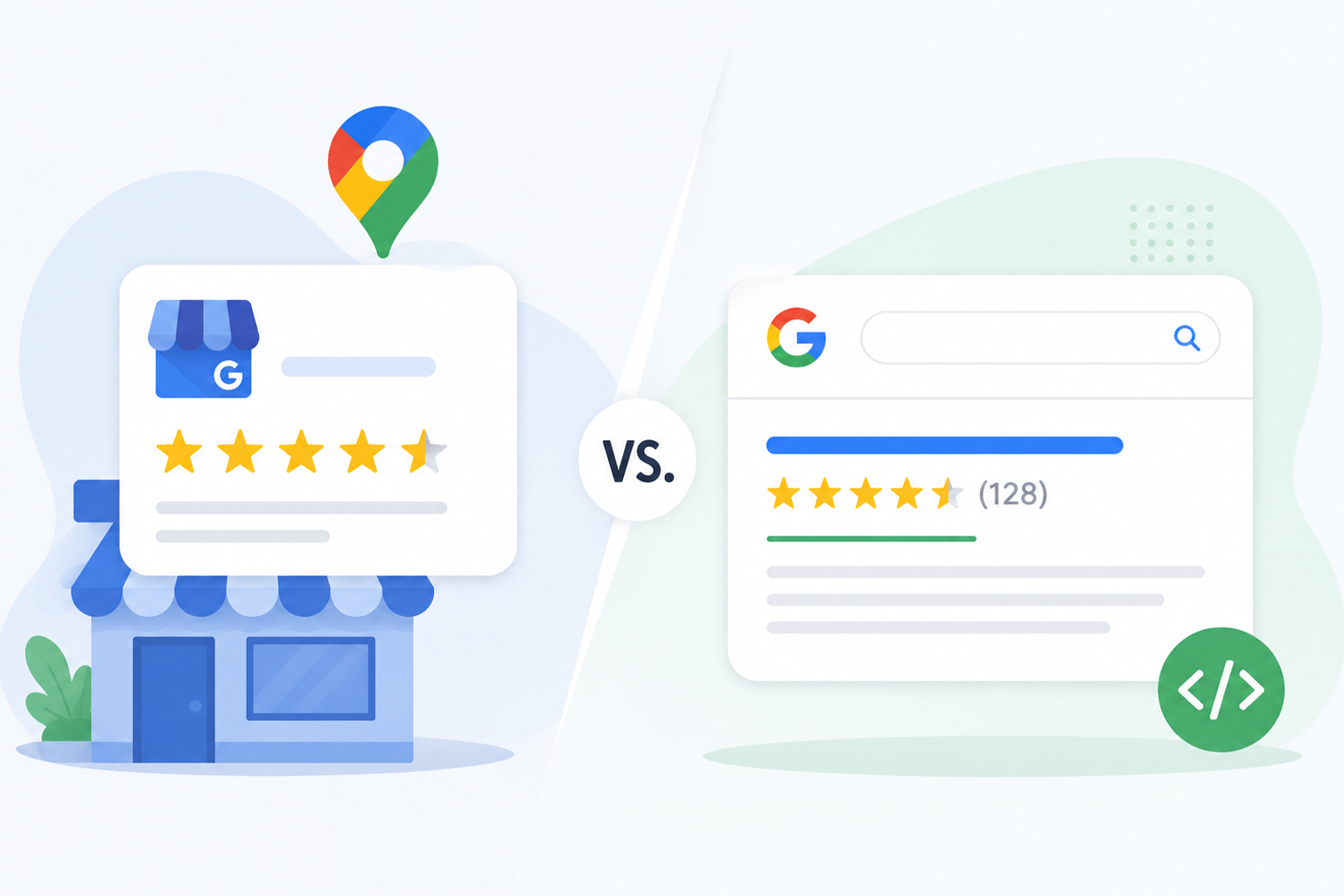
The Misconception: Google Business Profile reviews feed Store Ratings .
They don’t. Business Profile reviews power local results through a separate mechanism.
-
The Misconception: Review stars directly boost rankings.
They influence clicks, not position. The benefit is CTR, and any ranking effect is indirect.
Conclusion
Review stars, Store Ratings, and Product Ratings may look similar in Google, but they come from different systems and serve different purposes. Review stars can be generated from eligible structured data on a page, while Store Ratings reflect the overall shopping experience with a merchant. Product Ratings, meanwhile, are tied to individual products and aggregate reviews from multiple sources. Schema controls the first and does not affect the second.
That distinction is the whole game. Check your Seller Rating standing, identify which system you’re actually eligible for, and validate the markup for the stars you can earn on-page. Match the fix to the system, and the results follow.
FAQs
Q1: Are Google Store Ratings and Seller Ratings the same thing?
Yes. Google now uses Store Ratings instead of Seller Ratings in its own documentation. Same program, same data sources, same placements. Most PPC documentation still uses the old name, which is why both terms persist.
Q2: How do I get star ratings on Google organic search results?
Add eligible review or AggregateRating structured data to a page that contains genuine, visible review information. Product is one of the schema types Google supports for review snippets. Follow Google’s review-snippet guidelines and validate the markup with the Rich Results Test. Even valid markup does not guarantee that Google will display stars.
Q3: Are Google Business Profile Reviews the Same as Store Ratings?
No. Google Business Profile reviews are part of Google’s local business review system, while Store Ratings are calculated using Google’s merchant-review and shopping-experience data sources. Store Ratings can use ratings from Google and supported review sources, so the two should not be treated as interchangeable.
Q4: Why are my Google star ratings not showing despite a valid schema?
Common reasons include self-serving review markup, reviews in markup that aren’t visible on the page, too few reviews, or Google simply choosing not to display the snippet for that query. Valid markup is necessary but not sufficient.
Q5: Can review stars and Store Ratings appear at the same time?
Yes. A single results page can show your Store Rating next to your domain and review snippets under individual product pages simultaneously, because independent systems generate them.
Q6: Do Seller Ratings work for service businesses and SaaS companies?
Yes. The program isn’t limited to physical-goods retailers. Any business collecting verified reviews through Google Customer Reviews or an approved partner can qualify, provided it meets the per-country review count and the 3.5-star minimum.








 Wix Schema
 Squarespace Schema
 BigCommerce Schema
 Shopify Schema
 Hubspot Schema
 Webflow Schema
 GoHighlevel Schema
 Duda Schema
 Weebly Schema
 ClickFunnel Schema