


TL;DR: Shopify product review stars in Google depend on genuine customer feedback, visible product ratings, and correctly implemented Product structured data. Review apps can help manage this process, but valid markup only makes products eligible. Google ultimately decides whether review stars appear in search results.
To get product review stars in Google, a Shopify store needs genuine customer reviews, visible ratings on the relevant product page, and accurate Product structured data containing Review or AggregateRating information. Even when everything is valid, Google decides whether the stars appear.
There are really two separate jobs: collecting authentic customer reviews and making that review information understandable to Google through your Shopify product review schema. Even then, Google controls whether eligible stars actually appear.
Here's how to build the setup correctly, and what to check when the stars still don't show.
Ways to Get Product Review Stars on Shopify
Shopify review stars can appear in Google when your product pages provide trustworthy, verifiable review information that meets Google's structured-data guidelines.
| Step | What you need |
|---|---|
| 1. Collect reviews | Get genuine customer ratings and review comments for individual products. |
| 2. Display them | Make the ratings and reviews visible on the corresponding Shopify product page. |
| 3. Add structured data | Use Product structured data with valid Review and/or AggregateRating information. |
| 4. Keep data consistent | Product name, rating value, review count, and visible reviews should agree with the markup. |
| 5. Validate | Test the page with Google's Rich Results Test and inspect the generated structured data. |
| 6. Wait for Google | Eligibility does not guarantee that Google will show product review stars. |
In simple terms: genuine product reviews + visible ratings + accurate Product/Review/AggregateRating markup + Google's eligibility assessment are the core requirements. There is no code or Shopify setting that can force Google to display the stars.
What Are Shopify Product Review Stars?
Shopify product review stars are the star ratings shoppers see alongside a product, either on your Shopify storefront or, when Google chooses to display them, in Google Search.
These are different things. A five-star widget underneath a product title on your Shopify store is controlled by your theme and review system. Product stars in Google Search are a search appearance generated by Google from information it can understand and trust about the product.
Google says Product structured data can make product information eligible for richer search appearances, including ratings, review information, price, and availability. This distinction matters because adding stars to your storefront does not automatically mean Google will show those stars.
How Do Shopify Product Review Stars Appear in Google?
The basic relationship looks like this:
Customer review → Shopify product page → Review/AggregateRating data → Product structured data → Google crawls page → Google evaluates eligibility → Possible star enhancement
The important word is possible.
Google's documentation states that search result enhancements are shown at its discretion and can change between search experiences. Valid structured data makes a page eligible; it doesn't force a particular appearance.
For Shopify stores, this means your goal should not be "add code that makes Google show five stars." The real goal is to give Google accurate, complete, and verifiable product review information.
Steps to Make Your Shopify Products Eligible for Review Stars
These steps help ensure your Shopify product pages provide the review information Google needs to understand and evaluate your ratings. From collecting authentic reviews to validating your markup, each step supports eligibility for product review stars in Search.
Step 1: Collect Genuine Product Reviews
You can't create legitimate Shopify review stars by adding an arbitrary rating such as 5.0 to your structured data. The rating should represent actual customer feedback.
A useful review setup typically includes:
- A numerical rating, such as 4.6 out of 5
- A review or rating count
- Review content and an identifiable reviewer where applicable
- A clear connection between the review and the specific product
Google recommends ratings accompanied by a review comment and author's name, and prohibits fake or undisclosed incentivized reviews. It also says not to aggregate reviews or ratings from other websites for this structured-data feature.
Where should the reviews appear?
The reviews and overall rating should be visible on the same product page described by the markup.
Acme Running Shoes
★★★★☆ 4.6/5 — 128 reviews
"Comfortable enough for long-distance runs…" – Sarah M.
If the page shows a 4.6 rating from 128 reviews, your structured data should represent that same information.
Step 2: Use Product Structured Data Correctly
Product structured data is the key technical component for Google, while your Shopify theme and review app determine how the reviews and ratings are collected and displayed on the storefront.
Google supports product snippets that can include ratings and review information when eligible. A Product can contain AggregateRating, Review, or both.
A simplified example:
{
    "@context": "https://schema.org",
    "@type": "Product",
    "name": "Acme Running Shoes",
    "aggregateRating": {
        "@type": "AggregateRating",
        "ratingValue": "4.6",
        "reviewCount": "128"
    }
}
An individual review can also be included within the Product structured data:
{
    "@type": "Review",
    "reviewRating": {
        "@type": "Rating",
        "ratingValue": "5",
        "bestRating": "5"
    },
    "author": {
        "@type": "Person",
        "name": "Sarah M."
    }
}
In a real implementation, these properties must be connected to the correct Product and accurately reflect the visible page content.
Step 3: Understand AggregateRating vs. Review
This is a common source of confusion:
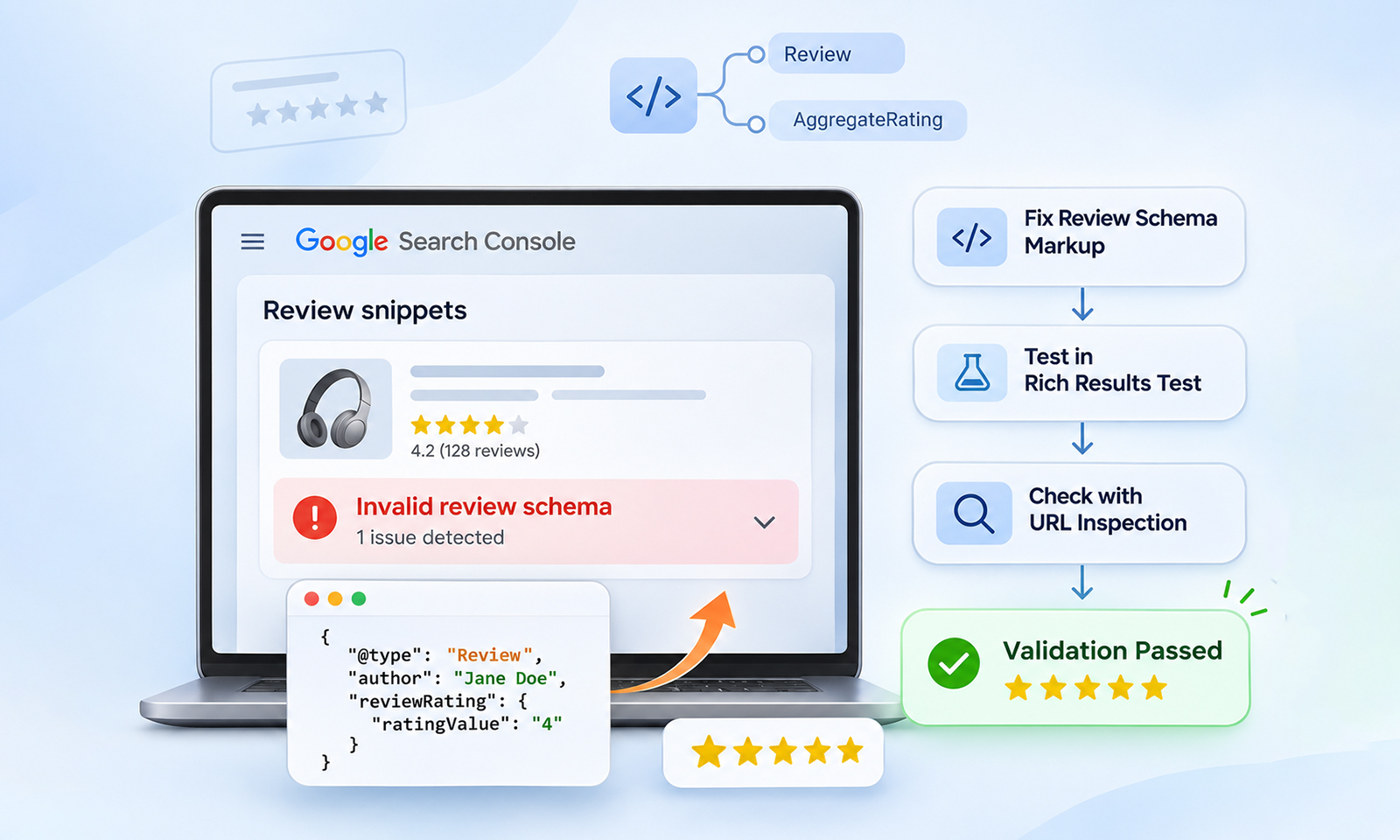
Reviewdescribes an individual customer's review.AggregateRatingsummarizes ratings from multiple reviews or ratings.
For example:
Individual review: "The fit is excellent, and the shoes are comfortable." ★★★★★ – 5/5
Aggregate rating: ★★★★☆ 4.6/5 from 128 reviews
A Review represents an individual customer's review, while AggregateRating summarizes the ratings given by multiple reviewers. You can use either or both, depending on the review data available on the product page.
Step 4: Make Sure Shopify Actually Outputs the Review Data
Installing a Shopify review app doesn't automatically guarantee that the correct Shopify review structured data reaches Google.
Shopify review apps can add review displays to product pages through theme app blocks or other theme integrations. However, displaying a rating widget and generating the structured data Google uses are separate functions, so check both the visible review section and the page's structured data.
Depending on the app and theme, it may:
- Display review stars without adding structured data
- Add JSON-LD markup
- Inject markup dynamically
- Store review information in Shopify's review data structures
- Add Product markup alongside existing theme markup
Inspect the live product page rather than assuming the app handles everything correctly.
What to check in Shopify: Open a product page on your live store and inspect its source or structured data output. Confirm that the Product entity includes the current rating and review information, and check whether your review app, theme, or another SEO app is generating additional Product markup. If multiple apps output Product schema, compare the entities for conflicting ratings, review counts, prices, or product URLs.
Step 5: Keep Visible Ratings and Markup Consistent
Your structured data should match what shoppers can actually see. For example, if your product page shows:
★★★★★ 4.8 – 250 reviews
but your JSON-LD says:
"aggregateRating": {
    "ratingValue": "4.2",
    "reviewCount": "97"
}
The two sources conflict. Check these fields regularly:
| Visible product information | Structured data property |
|---|---|
| Average product rating | aggregateRating.ratingValue |
| Number of written reviews | aggregateRating.reviewCount |
| Total number of ratings | aggregateRating.ratingCount |
If reviews are removed and the count drops from 250 to 241, the structured data should be updated as well.
Step 6: Test Your Shopify Product Review Schema
Before expecting Shopify product review stars in Google results, test the live product page with Google's Rich Results Test.
Check for:
Productstructured dataReviewand/orAggregateRating- Validation errors
- Missing properties
- Warnings that could affect eligibility
If the results aren't what you expect, inspect the live HTML and JSON-LD as well. Testing a theme-editor version isn't enough, the publicly accessible product page is what Google needs to crawl.
Google recommends putting product structured data in the initial HTML where possible.
Why Aren't My Shopify Product Review Stars Showing in Google?
Even technically correct Shopify product review markup may not produce visible stars. Common reasons include:
The markup isn't valid
A missing or incorrectly nested property can prevent eligibility.
The rating isn't visible
If Google finds an AggregateRating in structured data but users can't see the corresponding rating on the page, the implementation can violate Google's review structured-data guidelines.
Reviews are not genuine
Fake, fabricated, or undisclosed incentivized reviews are not an acceptable foundation for review markup.
Multiple Product entities conflict
Your theme, review app, and SEO app may each output different versions of the same product.
Google hasn't recrawled the page
After changing structured data or review information, Google needs to crawl and process the updated page.
Google simply chose not to show the enhancement
This is easy to overlook. Eligible for rich results does not mean guaranteed to appear as a rich result.
If your implementation is valid but the stars remain absent, troubleshoot the situation systematically rather than repeatedly changing the schema.
Shopify Product SEO: What Else Should You Check?
Review markup is only one part of product search visibility. A strong Shopify product page should also have accurate product information, useful descriptions, appropriate images, price and availability information, canonical URLs, and relevant product identifiers where applicable.
Google recommends providing product structured data and, for ecommerce sites, combining webpage structured data with Merchant Center product feeds where appropriate. Doing both can help Google understand and verify product information across shopping experiences.
This also helps explain why Shopify product rich results are broader than star ratings alone. Product results can surface information such as price, availability, shipping, and other product details depending on the search experience.
Don't confuse product review stars with:
- Google Business Profile stars
- Google Seller Ratings
- Google Store Ratings
- Third-party review profiles
A Practical Shopify Product Review Stars Checklist
Before considering your implementation complete, check the following:
- Your products have genuine customer reviews.
- Ratings are visible on the relevant product pages.
- Your page uses valid
Productstructured data. Reviewand/orAggregateRatingaccurately describes the product.- Rating values and review counts match the visible page.
- Reviews aren't copied or aggregated from unrelated third-party sites.
- Your theme and apps aren't generating conflicting Product entities.
- The live URL passes Google's Rich Results Test.
- Your product pages are crawlable and indexable.
- You understand that eligibility doesn't guarantee Google will display stars.
That final point is worth emphasizing: schema creates eligibility, not entitlement.
Conclusion
Getting Shopify product review stars in Google is about more than adding a five-star symbol. You need authentic customer reviews, visible ratings, and accurate Shopify product review schema, Product structured data, and AggregateRating.
Validate the live implementation and keep the review data consistent after changes. Most importantly, valid Shopify review markup makes a page eligible for Google's review-related enhancements, it does not guarantee that stars will appear in Search.
FAQs
How do I get product review stars on Shopify?
Collect genuine customer reviews, display the ratings on the relevant product pages, and implement valid Product structured data containing accurate Review and/or AggregateRating information. Then validate the live page with Google's Rich Results Test. Google ultimately decides whether eligible stars appear.
Does Shopify automatically add a review schema?
Not necessarily. The behavior depends on your theme, review solution, and implementation. A review app may display stars without producing the structured data Google needs, while another may generate its own JSON-LD. Always inspect the live product page rather than assuming the app handles schema correctly.
How many reviews do I need for Google product stars?
There is no simple minimum number of product reviews that guarantees Google will show stars. The more important requirements are that the review information is genuine, visible, specific to the product, accurately marked up, and compliant with Google's guidelines.
Do Shopify review stars improve Google rankings?
You shouldn't treat review stars as a direct ranking shortcut. They can make an eligible search result more informative and visually distinctive, but Google does not guarantee the enhancement, and structured data itself is not a ranking guarantee.
Why do my Shopify review stars show on my website but not Google?
Your storefront stars and Google's search enhancements are separate. Google must be able to crawl, understand, and validate the underlying review information, and it may still choose not to display the enhancement. Conflicting markup, invisible ratings, stale data, and invalid structured data are common issues.
Can I add a 5-star AggregateRating manually?
You should not add an arbitrary rating simply to obtain stars. AggregateRating should represent genuine ratings associated with the specific product and should match information available to users on the page. Fabricated or misleading review data can violate Google's structured-data guidelines.








 Wix Schema
 Squarespace Schema
 BigCommerce Schema
 Shopify Schema
 Hubspot Schema
 Webflow Schema
 GoHighlevel Schema
 Duda Schema
 Weebly Schema
 ClickFunnel Schema