

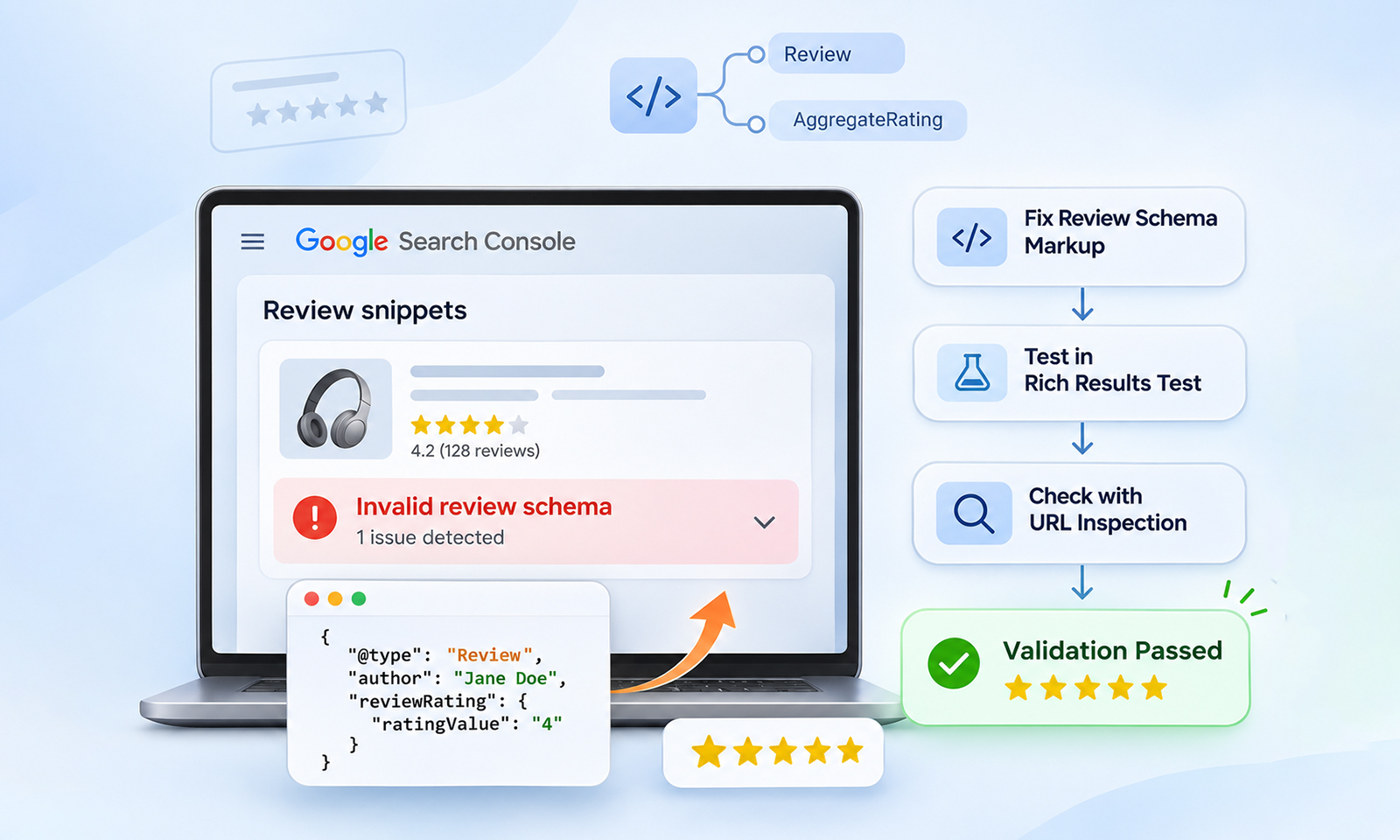
Seeing Review schema errors in Search Console can be confusing, especially when the markup looks correct in your source code. The important distinction is that valid structured data and eligibility for a Google rich result are not exactly the same thing.
Search Console can flag technical problems, missing properties, warnings, or issues that affect eligibility. Separately, Google may decide not to show review stars even when the markup passes validation.
The practical approach is to identify what Search Console is actually reporting, verify the underlying Review or AggregateRating markup, and then check whether the page follows Google’s review-specific guidelines.
How Do You Fix Review Schema Errors in Search Console?
Review schema errors in Search Console can usually be fixed by identifying the specific markup issue, correcting the affected Review or AggregateRating properties, and validating the live page against Google’s structured data guidelines.
| Issue | What to Check | Typical Fix |
|---|---|---|
| Missing required property | author, itemReviewed, or another required field |
Add valid, relevant values |
| Invalid schema type | Unsupported or incorrect @type |
Use an eligible schema type |
| Invalid rating | Incorrect ratingValue or rating range |
Match the actual rating system |
| Review content mismatch | Markup describes content users cannot see | Make the review/rating visible on the page |
| Self-serving reviews | Business marks up reviews about itself | Follow Google’s self-serving review restrictions |
| Stars not showing | Markup is valid but Google does not display it | Check eligibility, indexing, guidelines, and allow time for recrawling |
What Are Review Schema Errors in Search Console?
Review schema errors in Search Console are problems Google identifies while processing review-related structured data on your pages. Review markup typically uses schema.org types such as Review and AggregateRating.
When Google can understand this markup and the page meets its guidelines, the information can make the page eligible for a review snippet containing ratings or other review details.
It’s useful to distinguish three concepts:
- Schema markup describes entities and relationships using vocabulary such as schema.org.
- Structured data is the machine-readable implementation of that information on a webpage.
- Google rich results are search features that Google may generate when eligible structured data is detected.
This distinction matters because fixing review structured data errors does not automatically guarantee Google review stars in search.
Common Review Schema Errors and Their Causes
Review schema errors usually stem from missing properties, invalid rating values, unsupported schema types, mismatched page content, or duplicate markup. Identifying the exact cause helps you apply the right fix without changing the schema that is already working correctly.
| Search Console Issue | Likely Cause | What to Check |
|---|---|---|
| Missing field | A required property isn’t present | Check the affected property and add a valid value |
| Invalid value | The value doesn’t match the expected format or requirements | Check the rating, review count, or other reported value |
| Invalid object type | Incorrect @type or entity relationship | Verify that the schema type and entity relationship are appropriate |
| Structured data not eligible | The implementation doesn’t meet Google’s rich-result requirements | Check Google’s structured data and review guidelines |
1. Missing Required Properties
One common review schema markup error is a missing required property. Google requires author and reviewRating for a Review. If the review isn’t nested within another supported entity, it also requires itemReviewed. For nested reviews, Google identifies the parent entity as the item being reviewed, so a separate itemReviewed property isn’t needed. Make sure the reviewed item’s name is provided in either implementation.
For example:
{
"@type": "Review",
"author": {
"@type": "Person",
"name": "Jane Smith"
},
"reviewRating": {
"@type": "Rating",
"ratingValue": "4"
},
"itemReviewed": {
"@type": "Product",
"name": "Example Product"
}
}
The exact properties required depend on the implementation and the Google-supported feature. Don’t add properties simply to make an error disappear; each value should accurately describe the visible page content.
2. Incorrect or Unsupported Schema Types
Another common cause of Review schema validation errors is using the wrong @type.
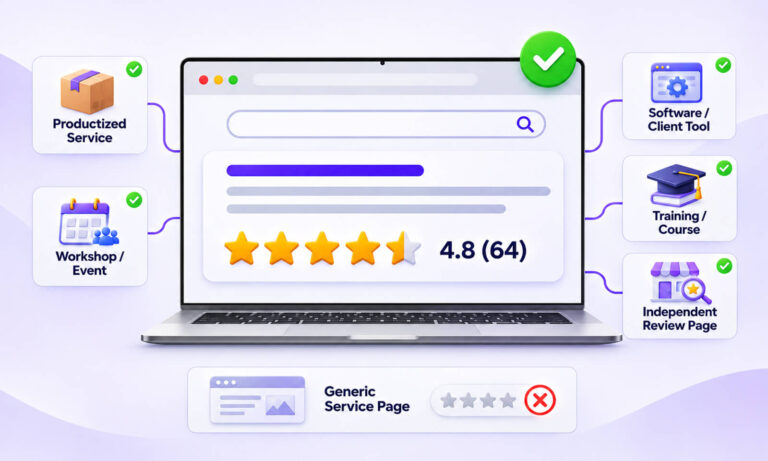
Google’s review snippet documentation supports review information for specific content types. The schema vocabulary itself contains many schema types, but not every type is eligible for Google’s review rich result.
This is where many implementations go wrong: a markup structure can be valid Schema.org while still being unsuitable for a particular Google Search feature.
Before changing your markup, check whether the parent entity is supported for review snippets.
3. Invalid Rating Values
AggregateRating and Rating values need to represent the actual rating system used by the page. For example, if a product has an average rating of 4.6 out of 5, the structured data should not claim a different maximum or invent a rating value that users cannot verify.
A simplified example looks like:
{
"@type": "AggregateRating",
"ratingValue": "4.6",
"reviewCount": "128"
}
For Google review snippets, AggregateRating must include ratingValue and at least one of ratingCount or reviewCount. If your rating system uses a scale other than 1–5, specify the appropriate bestRating and worstRating values so Google can interpret the rating correctly.
The numbers should correspond to the ratings displayed on the page. Structured data should describe the content users can actually see, rather than create a separate version of it for search engines.
4. Review Content Is Not Visible on the Page
Google’s guidelines require review information represented in structured data to be available to users on the marked-up page.
This creates a common source of review structured data issues: a website adds an AggregateRating to the HTML, but the corresponding rating is not actually displayed to visitors.
If the markup says a product has a 4.8/5 rating from 250 reviews, users should be able to find that rating and review information on the page.
5. Self-Serving Review Markup
This is one of the most important causes of confusion around Google review schema errors.
Google restricts review snippets for certain LocalBusiness and Organization implementations when an entity controls the reviews about itself. This restriction also applies when a business embeds reviews from third-party platforms, such as Google or Yelp, on its own website. Simply displaying externally collected reviews does not make a company’s own business or organization markup eligible for review stars.
This is particularly important when marking up reviews from platforms such as Google, Yelp, or Trustpilot.
6. Duplicate or Conflicting Markup
A page can contain more than one structured data implementation, especially after adding a plugin, app, theme feature, or custom JSON-LD. For example, one system may generate:
"@type": "Product"
with an AggregateRating, while another implementation adds a second Product entity with different review information. This can create confusing review markup errors in Search Console or make troubleshooting difficult.
Check the rendered page source and identify where each schema entity comes from before adding another implementation.
Review Schema Errors vs Warnings: What’s the Difference?
Review schema errors indicate issues that can prevent structured data from being eligible for a rich result, while warnings point to non-critical issues or recommended improvements. Knowing the difference helps you prioritize fixes without treating every Search Console message as a critical problem.
| Status | What It Generally Means | What to Do |
|---|---|---|
| Error/Invalid | A problem prevents the structured data item from qualifying for the associated rich result | Fix it |
| Warning/Non-critical issue | The markup may still be eligible, but Google identifies an improvement or limitation | Investigate and fix when relevant |
| Valid | Google can process the structured data | Continue monitoring |
| No rich result | Markup may be valid, but Google has not displayed the feature | Check eligibility and Google’s guidelines |
A warning should not automatically be treated as a reason that your markup is “broken.” Conversely, a page passing a validation test does not guarantee that Google will display review stars.
Google explicitly notes that structured data makes a feature eligible; it does not guarantee that the feature will appear in search.
How to Fix Review Schema Errors in Google Search Console
If you’re wondering how to fix review schema errors in Google Search Console, use this workflow rather than repeatedly editing the markup.
Step 1: Read the Exact Search Console Error
Open the relevant review or rich result report and identify the exact affected property.
Don’t start by replacing the entire schema. A message such as a missing property requires a different fix from an invalid value or guideline-related issue.
Step 2: Test the URL
Use Google’s Rich Results Test to check the page’s current structured data.
This helps determine whether the reported issue is still present in the live implementation.
Step 3: Compare Markup With Visible Content
Check the actual webpage.
Ask:
- Is the review visible?
- Is the rating visible?
- Does the rating match the structured data?
- Is the correct product, service, book, course, or other entity being reviewed?
- Are the reviews genuine and properly attributed?
This step catches problems that a purely technical validator may not.
Step 4: Check the Google-Specific Guidelines
A technically valid JSON-LD implementation can still fail Google’s eligibility requirements.
Review Google’s structured data guidelines, particularly the requirements for review snippets and self-serving reviews.
Step 5: Inspect the Live URL in Search Console
After fixing the markup, use URL Inspection to check how Google currently sees the page. This is especially important after template or CMS changes because the source code you inspect locally may not perfectly reflect what Googlebot receives.
Step 6: Request Validation
Once the issue is fixed, use Search Console’s validation process. Google may need to recrawl and reprocess the affected pages before the status changes.
A successful validation confirms that the reported issue has been resolved; it does not mean review stars will immediately appear.
Why Is Review Schema Showing Errors in Search Console Even When the Code Looks Correct?
This usually happens because valid syntax is only one part of the equation.
Your JSON-LD can be correctly formatted while the implementation has a missing required property, incorrect entity relationship, unsupported schema type, inconsistent rating information, or a violation of Google’s review guidelines.
There is also a separate scenario: the markup is valid, but review rich results are not showing. That’s not necessarily a schema error.
Google can choose not to display a rich result even when the structured data is technically valid and eligible. Search appearance depends on Google’s systems and the context of the search.
What to Check Before Requesting Validation
Before clicking “Validate Fix,” make sure:
- The reported error has been corrected on the live page.
- Required properties contain valid values.
- The
RevieworAggregateRatingdescribes the correct entity. - Ratings and review counts match visible page content.
- Review content is accessible to users.
- The implementation uses an eligible schema type.
- The page is accessible to Googlebot.
- There is no accidental duplicate or conflicting markup.
- The implementation follows Google’s review-specific and general structured data guidelines.
If you’re troubleshooting markup on a particular CMS, the same principle applies. For example, [Wix review rich snippets not showing internal link] covers a platform-specific version of this problem.
Conclusion
Review schema errors in Search Console are best treated as diagnostic signals rather than a reason to replace your entire schema implementation. Start with the exact reported issue, verify the relevant Review or AggregateRating, compare it with the visible page, and then check Google’s feature-specific guidelines.
Most importantly, separate schema validity, rich-result eligibility, and actual search appearance. Fixing the first does not automatically guarantee the third. A careful validation process gives you a much clearer path to resolving review structured data issues and maintaining accurate markup over time.
FAQs
Q1. Why are review schema errors showing in Google Search Console?
They usually indicate missing or invalid structured data properties, incorrect schema relationships, unsupported implementations, or guideline-related problems. Check the exact error before changing the markup.
Q2. Do review schema errors affect Google rankings?
A structured data error does not automatically mean a page will lose its organic ranking. However, invalid markup can make the page ineligible for the associated rich result. Structured data also does not function as a direct ranking factor.
Q3. Why are my review rich results not showing even though the schema is valid?
Google does not guarantee rich-result display. The page must meet Google’s eligibility requirements, and Google ultimately decides whether and when to show a particular search feature.
Q4. How long does it take for review schema errors to disappear?
After you fix the markup and request validation, Google needs to recrawl and reprocess the affected pages. The status may therefore take time to update.
Q5. Can I use AggregateRating without individual Review markup?
Yes. You can use AggregateRating without individual Review markup when the page represents a genuine aggregate rating for a supported entity. Google requires ratingValue and at least one of ratingCount or reviewCount. The aggregate rating must accurately reflect the ratings displayed to users on the page.
Q6. Does valid review schema guarantee Google review stars?
No. Valid structured data can make a page eligible for a rich result, but it does not guarantee that Google will display review stars for every query or page.









 Wix Schema
 Squarespace Schema
 BigCommerce Schema
 Shopify Schema
 Hubspot Schema
 Webflow Schema
 GoHighlevel Schema
 Duda Schema
 Weebly Schema
 ClickFunnel Schema