

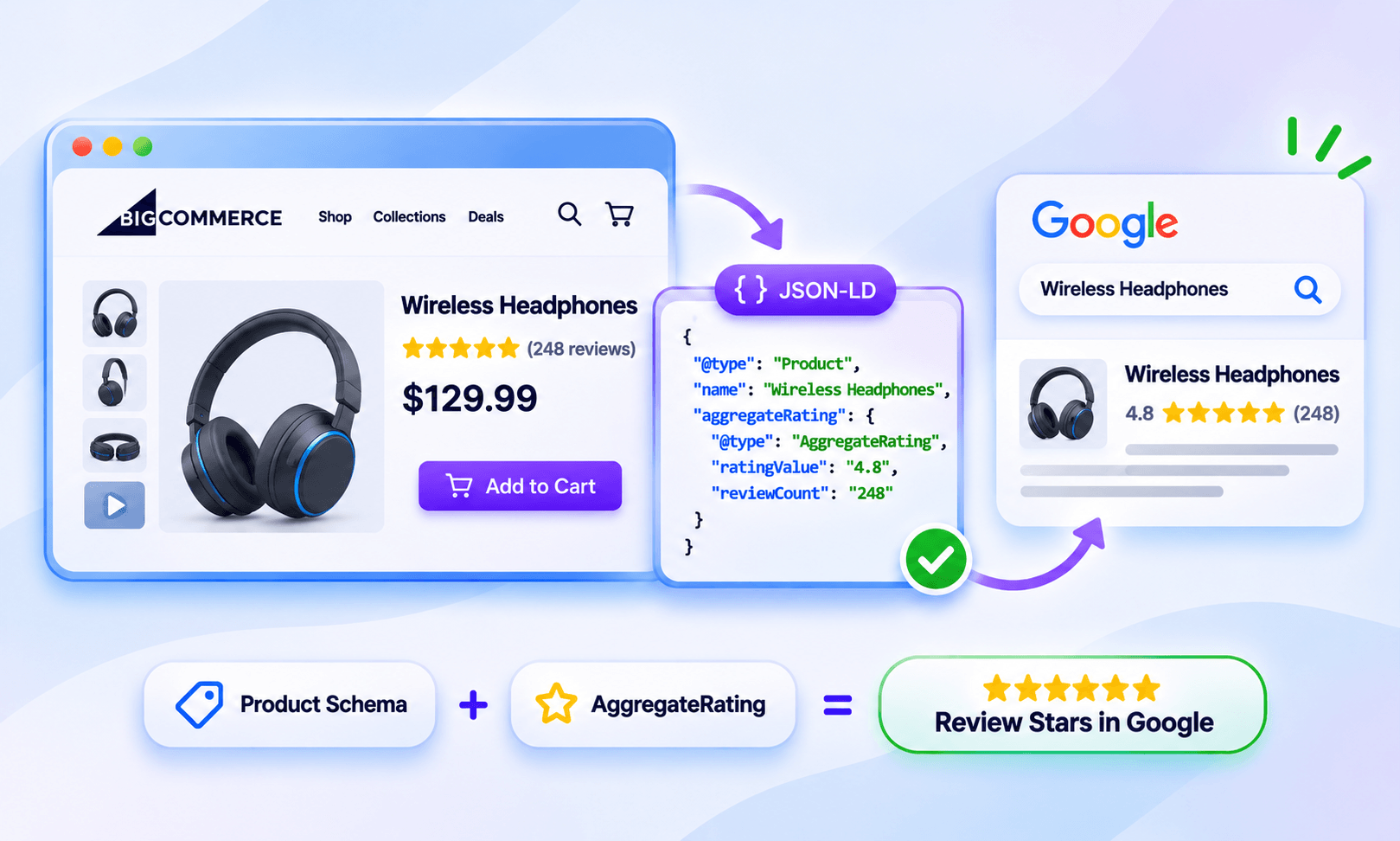
TL;DR: To get BigCommerce product review stars in Google, collect genuine product reviews, display them on product pages, and use accurate Product structured data with Review or AggregateRating. Validate the markup and monitor Google Search Console, but remember that a valid schema doesn't guarantee stars.
Product review stars can make a BigCommerce listing more noticeable in Google Search by showing a product’s rating and review information alongside the result. But adding reviews to your store is only one part of the process.
For BigCommerce product review stars to become eligible for Google’s product rich results, reviews need to be genuine and visible to shoppers, while the product and review information must be accurately represented in structured data.
How Can a BigCommerce Store Get Product Review Stars
BigCommerce stores can earn product review stars by collecting genuine customer reviews, displaying them on product pages, and implementing accurate Product structured data with review information. The process is:
- Enable BigCommerce product reviews and collect genuine customer ratings.
- Display ratings and reviews on product pages so the marked-up information is visible to shoppers.
- Check your storefront implementation, especially if you're using Stencil, Catalyst, or a headless setup.
- Add or verify Product structured data with
Reviewand/orAggregateRating. - Validate the markup using Google's Rich Results Test.
- Monitor Google Search Console and wait for Google to recrawl the affected pages.
Google can show ratings and review information in product snippets when eligible structured data is found, but appearance is not guaranteed.
Steps to Get Product Review Stars on BigCommerce
Getting review stars to appear in Google involves more than collecting ratings. These steps cover the key BigCommerce setup, review visibility, structured data, and validation requirements.
1. Enable BigCommerce Product Reviews
BigCommerce has a native product-review system, so you don't necessarily need a separate review platform just to collect product ratings.
The Storefront GraphQL API supports creating and querying product reviews, including a review's title, text, author, rating, and creation date. Ratings submitted through the API use a 1-5 scale. BigCommerce also provides settings for enabling product reviews, restricting reviews to previous customers, and using reCAPTCHA.
For most stores, the important starting point is simple: make sure product reviews are enabled, and customers can actually submit and see them.
If you want stricter review collection, BigCommerce can also limit submissions to previous customers. This can help keep your review base tied to real store customers.
2. Collect Genuine Ratings for Individual Products
Google's product review markup is about the specific product being reviewed, not simply your business's overall rating.
That means reviews should be associated with the correct BigCommerce product page. Avoid copying a general company rating onto every product or combining unrelated ratings into a product's AggregateRating.
A product page with several genuine customer ratings can have an overall rating such as 4.6 out of 5, along with the number of reviews supporting that rating.
Keep the Rating Visible on the Product Page
The review information you mark up should correspond to content users can access on the page. Don't add ratings to structured data simply because you want stars in Google.
If you offer discounts, free products, or other incentives in exchange for reviews, clearly and prominently disclose the incentive. Google does not allow fake or undisclosed incentivized reviews in review structured data.
Your BigCommerce product page should therefore show the relevant review content or rating information to shoppers.
3. Display the Rating Through Your BigCommerce Storefront
This is where the BigCommerce implementation differs from a generic schema setup.
BigCommerce can expose product review information through its storefront architecture. Its GraphQL Storefront API can retrieve approved product reviews, including the review rating and review content.
How that data reaches your product page depends on your storefront:
- Stencil: Your theme controls how product information and reviews are rendered.
- Catalyst: BigCommerce provides native product-review functionality through its Storefront GraphQL architecture.
- Headless/custom storefront: Your frontend needs to retrieve and render the relevant product and review information itself.
BigCommerce's GraphQL Storefront API can be used with both Stencil themes and headless storefronts, which makes the review implementation more flexible than a single theme-based setup.
This distinction matters because BigCommerce providing review data does not automatically mean your storefront's JSON-LD is correctly configured for Google.
4. Connect BigCommerce Reviews to Product Structured Data
Once your product reviews are working on the storefront, check the structured data attached to the product page.
Google's product snippet documentation supports Product markup with properties such as:
reviewaggregateRatingoffers
For product snippets, Google requires name plus at least one of review, aggregateRating, or offers.
A simplified example could look like this:
{
"@context": "https://schema.org",
"@type": "Product",
"name": "Example Product",
"aggregateRating": {
"@type": "AggregateRating",
"ratingValue": "4.6",
"reviewCount": "128"
}
}
This is only an illustrative example. Don't copy it onto every BigCommerce product page without dynamically connecting the values to the actual product and review data.
The important part is that the structured data reflects what shoppers can actually find on that product page.
5. Use AggregateRating for the Overall Product Rating
If a product has multiple customer reviews, AggregateRating can describe the combined rating.
For example:
- Rating: 4.7/5
- Review count: 86
Those values should be calculated from the actual reviews associated with that product.
Don't manually create a 5-star rating simply because you want a visual star result. The structured data needs to accurately represent the underlying review information.
If you use a third-party review app alongside BigCommerce's native reviews, check whether both systems are generating Product, Review, or AggregateRating markup. Duplicate or conflicting structured data can make troubleshooting much harder.
You can also review Google's guidelines on schema types eligible for review stars to understand which markup types can qualify for review-related enhancements.
6. Add Individual Review Markup Where Appropriate
AggregateRating summarizes multiple ratings, while Review represents an individual review.
A product can therefore have both:
Product
 ├── AggregateRating
 │    ├── ratingValue
 │    └── reviewCount
 │
 └── Review
      ├── reviewRating
      ├── author
      └── review text
The important thing is consistency. The review markup, aggregate rating, product information, and visible page content should all describe the same product.
7. Validate Your BigCommerce Product Schema
Before expecting Google to display BigCommerce Google review stars, test the actual product URL.
Use Google's Rich Results Test to check whether Google can understand the Product structured data and whether there are errors that could prevent eligibility. Google also recommends using Search Console and allowing time for recrawling after changes.
Check for:
- Correct Product markup
- Correct product name
- Valid
AggregateRatingvalues - Valid
Reviewinformation where used - Accurate review and rating counts
- No conflicting Product markup
- Structured data that matches visible page content
This is particularly important for BigCommerce stores using custom themes, third-party review apps, or headless implementations.
8. Check Google Search Console After Implementation
A successful validation test does not mean stars will immediately appear in Google.
Google decides whether and how eligible structured data appears in Search. Even correctly implemented markup doesn't guarantee a rich result.
After publishing changes:
- Test the product URL.
- Check the relevant enhancement or product reporting in Search Console.
- Inspect the URL if necessary.
- Request indexing after significant changes.
- Give Google time to recrawl and process the page.
If your markup is valid but stars still don't appear, don't immediately assume the schema is broken. First, check for common reasons eligible markup may not produce visible stars.
Why BigCommerce Product Stars May Not Appear in Google
Several issues can prevent or delay BigCommerce product review stars:
- The product doesn't have genuine ratings or reviews.
- Reviews aren't visible on the corresponding product page.
- The structured data contains incorrect rating or review counts.
- The
Productmarkup doesn't correctly connect the review information. - A theme or custom storefront isn't outputting the expected schema.
- A review app and the native BigCommerce implementation are generating conflicting markup.
- Google hasn't recrawled the page yet.
- The page is valid, but Google simply doesn't choose to display the enhancement.
Also, don't confuse product review stars with other Google rating systems. Product stars, Google Business Profile ratings, and seller/store ratings are separate concepts.
BigCommerce Product Review Stars vs. Seller Ratings
A BigCommerce product rating describes an individual product. A seller or store rating describes the merchant or shopping experience more broadly. Likewise, Google Business Profile reviews relate to a business or local entity rather than a specific product.
So if you're trying to get product ratings in Google Search, adding your company's overall review score to every BigCommerce product page isn't a substitute for product-level review markup.
Conclusion
Getting BigCommerce product review stars isn't just about adding a five-star graphic to a product page. The complete setup starts with genuine BigCommerce product reviews and continues through storefront rendering, accurate Product structured data, Review or AggregateRating, validation, and Google crawling.
The most important BigCommerce-specific consideration is your storefront implementation. A Stencil theme, Catalyst storefront, and headless build can handle review data differently, so always verify what is actually rendered in the page source and structured data.
Once the product page accurately represents its reviews and ratings, validate the implementation and monitor Google Search Console. From there, Google, not BigCommerce, determines whether the product qualifies for and receives a visible review-star enhancement.
FAQs
Can BigCommerce products show review stars in Google?
Yes. BigCommerce product pages can be eligible for Google's product-related rich results when they meet Google's structured-data and content requirements. However, Google doesn't guarantee that stars will appear for every eligible page.
Does BigCommerce automatically add a review schema?
Don't assume that it does in every storefront configuration. BigCommerce provides native review functionality and review data through its storefront architecture, but the final structured-data output depends on the theme, storefront, apps, or custom implementation.
Do I need AggregateRating for BigCommerce review stars?
AggregateRating is commonly used to describe the overall rating from multiple reviews. Google also supports individual Review markup within Product structured data. The appropriate implementation depends on the review information available on the page.
How many reviews do I need to get product stars?
There isn't a simple minimum number of reviews that guarantees stars. What matters is that the ratings are genuine, accurately represented, and supported by valid structured data and visible page content.
Why aren't my BigCommerce products showing in Google?
Valid markup doesn't guarantee a rich result. Check your structured data, visible review content, indexing status, and any duplicate markup generated by themes or review apps. Then allow Google time to recrawl the page.
Are BigCommerce product stars the same as Google Seller Ratings?
No. Product review stars describe a specific product, while seller ratings relate to the merchant or shopping experience. They should not be treated as interchangeable rating systems.









 Wix Schema
 Squarespace Schema
 BigCommerce Schema
 Shopify Schema
 Hubspot Schema
 Webflow Schema
 GoHighlevel Schema
 Duda Schema
 Weebly Schema
 ClickFunnel Schema